Nmea out from ais650 transceiver or a75 plotter?

stu9000

Well-Known Member
Joined
8 Mar 2008
Messages
949
Location
near kingston upon thames, surrey
Visit site
I have a yakker WiFi device that I've read is an easy fit to share AIS data over WiFi.
This would let me add AIS to navionics on my tablet so I can see it while under the hood rather than at the helm.
To be honest I have had it for a couple of years but cannot work out how to fit it.
Yakker

It seems a simple enough device.
Three wires. Two for power and one for data.
But how do I get the AIS data into the yakker?

The AIS650 transceiver seems not to have an nmea out other than the plumbed wiring.

An alternative is to open up the casing of the helm mounted a75 plotter. Maybe this will reveal an nmea out .

Another potentially dodgy alternative would be to open up the data and power cable from the transceiver but this has the potential to cause interference or mess up a system that is currently working well.

Surely there is a way to have a simple wire carrying nmea to the yakker device?
where do others access their nmea data?
 
I took the 38400 nmea out of my ais650 and connected it to the 38400 nmea in on my wifi multiplexer which will be similar the yakker.

The only thing to recognise is that there were two 0183 standards one of which (the newer one) used a differential signal- however in practise a differential output will still drive a non-differential input…..the other side of it you can just connect to ground I think….
 
Last edited:
Thank you for the replies.
It is good to read that I can get the signal out of the ais650 box.
I have had another look at the manual.

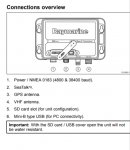
Port number 1 outputs and inputs nmea.

Screenshot_2022-06-02-19-04-18-946.jpeg

I did not realise that this outlet housed a range of output options...


Screenshot_2022-06-02-19-05-52-160.jpeg
It isn't clear to me yet how this will look when I open it up.
Maybe the 'plug' will just have holes in it ready for me to add a wire?

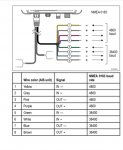
This diagram suggests wires will already be in place.
There is only one AIS enabled device (helm mounted chart plotter).
But the AIS aerial will input data via this route will it not?
Does anyone know which wires are likely to be used for the aerial and plotter( as I really don't want to mess it up)?
 
You'll want the usb software as well. There's a bit of a quirk with that as you don't get all the functionality unless the ais is powered by the usb rather than its power connector.
 
The GPS and VHF connections are separate to the power/data cable. The A75 is getting AIS via the SeaTalk ng network. This may only consist of the AIS and A75. Connecting anything else to the NMEA0183 wires is unlikely to disturb your setup

You need to find the end of the power/data cable to see if anything else is connected apart from power. There will be a bunch of small wires corresponding to your table.

If you have a DSC radio without built-in GPS, it may be connected to the purple and pink wires (NMEA out @ 4800).

You can feed up to 3-4 devices from the brown and blue NMEA 38400 out pair. The Yakker may work just connected to the brown wire. If there is nothing else connected to blue wire, you can connect that to Yakker negative. If there is, then connect Yakker ground to same point as AIS650 negative. This is to avoid a ground voltage difference on the blue wire.

Get some Wago 221 connectors to make life easy.
 
The GPS and VHF connections are separate to the power/data cable. The A75 is getting AIS via the SeaTalk ng network. This may only consist of the AIS and A75. Connecting anything else to the NMEA0183 wires is unlikely to disturb your setup

You need to find the end of the power/data cable to see if anything else is connected apart from power. There will be a bunch of small wires corresponding to your table.

If you have a DSC radio without built-in GPS, it may be connected to the purple and pink wires (NMEA out @ 4800).

You can feed up to 3-4 devices from the brown and blue NMEA 38400 out pair. The Yakker may work just connected to the brown wire. If there is nothing else connected to blue wire, you can connect that to Yakker negative. If there is, then connect Yakker ground to same point as AIS650 negative. This is to avoid a ground voltage difference on the blue wire.

Get some Wago 221 connectors to make life easy.


Thanks Mike, and others. I am attempting this on Monday so will let you know whether I buggered the existing AIS or got it working on the tablet, or something else happened!
 
You'll want the usb software as well. There's a bit of a quirk with that as you don't get all the functionality unless the ais is powered by the usb rather than its power connector.
WIndy... can you clarify this please? I was planning on powering the Yakker using fused 12v wiring to the battery. My AIS transceiver is already wired in by the previous owner in what looks to be a professional setup. Thanks.
 
WIndy... can you clarify this please? I was planning on powering the Yakker using fused 12v wiring to the battery. My AIS transceiver is already wired in by the previous owner in what looks to be a professional setup. Thanks.

In normal use it's fine to power it normally, but if you're using the configuration software over usb the ais should be turned off, it'll get power from the usb while you configure it. Afterwards power it normally.

If you leave the normal power attached while using the software it still works a bit, but you get some odd behaviour when you try this make changes.

For instance, I had to reprogram the mmsi in mine and that wouldn't work with the normal power on, but turned off it was ok.
 
Top