NMEA data on iPad Navionics chart

BelleSerene

Well-Known Member
Joined
19 Sep 2005
Messages
3,423
Visit site
I am not a fan of iPads for navigation: they have too many shortcomings in the glare and rigours of a cockpit.

But they have their place, and a lot of people want to use them. I thought I'd share a discovery.

One of the problems with Navionics for navigation is that it won't repeat wifi instrument data, right?

Since iPad's iOS11 operating system, most iPads can display two apps simultaneously. Trouble is, most third-party apps are not written to support this split-screen feature. But one is. And it happens to be the best one anyway (IMHO; I have no commercial interest).

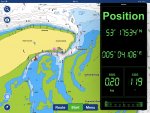
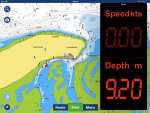
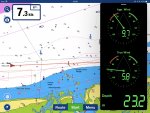
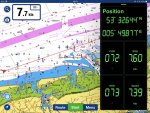
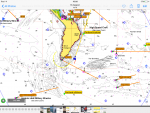
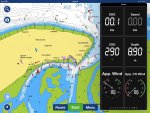
Check your iPad will run iOS11. Install NMEAremote and sync it with your NMEA-wifi convertor (buy one from YakBitz for £28 or £39 if you want to multiplex two data sources). Run Navionics. Load NMEAremote in slide-over mode; that gives it a third of the screen area, hovering over the main app. Bingo: the best charting software (Navionics) and your instrument data visible on the same screen. A finger swipe knocks the instruments out of the view to the right when you need more plotter real estate, and a finger swipe brings them back again.

Here are some screenshots:
IMG_0243.jpg image3.jpg image2.jpg
 
IMG_0298.jpg IMG_0296.jpg

I'm growing quite fond of this, as an aid to navigation.

[Edit:] Sorry, I couldn't upload images to the site from the iPad - anyone know if there's a way? - so had to wait for a Mac.
 
Last edited:
I've been using iSailor and it has similar capabilities, but I'll certainly have a look at NMEAremote. Thanks for the tip!
 
Hello, I have a digital yacht AIS with wifi which talks nicely to my iPad and has been a great success. I have never understood why the boat instrument data has never worked on Navionics. COG,SOG and position come through but nothing else like wind data or depth. I would appreciate any comments about this please.
 
Hello, I have a digital yacht AIS with wifi which talks nicely to my iPad and has been a great success. I have never understood why the boat instrument data has never worked on Navionics. COG,SOG and position come through but nothing else like wind data or depth. I would appreciate any comments about this please.
.... because COG, SOG and position shown on Navionics all come from the internal GPS on the iPad, not NMEA (you also get them sitting on the train, for example).
But the iPad can’t know about wind or depth unless connected to the relevant boat sensors - which is where the topic of this thread came in :)
 
.... because COG, SOG and position shown on Navionics all come from the internal GPS on the iPad, not NMEA (you also get them sitting on the train, for example).
But the iPad can’t know about wind or depth unless connected to the relevant boat sensors - which is where the topic of this thread came in :)
Yes I do understand the thread. My iPad does not have a GPS. It is connected to boat systems via wifi and it's clearly getting some NMEA data but not all instruments are available on iPad which I don't understand.
 
Yes I do understand the thread. My iPad does not have a GPS. It is connected to boat systems via wifi and it's clearly getting some NMEA data but not all instruments are available on iPad which I don't understand.
See screen shot of non GPS iPad connected to boat systems via wifi.
 

Attachments

  • image.png
    image.png
    525.6 KB · Views: 61
Yes I do understand the thread. My iPad does not have a GPS. It is connected to boat systems via wifi and it's clearly getting some NMEA data but not all instruments are available on iPad which I don't understand.

So the obvious question is, are the wind and depth sentences amongst the ones being transmitted by the AIS? Connect to it with a basic TCP client (on Linux or MacOS I'd use netcat; I'll let a Windows user suggest what to use there) and see what comes out. If the AIS isn't sending DPT, MWV, etc, then obviously Navionics can't display them.

Pete
 
So the obvious question is, are the wind and depth sentences amongst the ones being transmitted by the AIS?

That's definitely obvious question #1. Obvious question #2 would be which data does Navionics display (assuming Justin Barber is talking about Navionics displaying them directly rather than via BelleSerene's 2-year-old split screen suggestion)? depth and gps stuff sure but does it even recognise wind data? I couldn't find any documentation on this (quelle surprise)...anyone know before I waste an hour of my life experimenting?
 
anyone know before I waste an hour of my life experimenting?

Well it wasn't an hour but given I'm not on the boat it wasn't just a question of firing up navionics but out of DBT, HDG, MTW, MWV and VHW only DBT did anything. The orientation of the boat icon is apparently only affected by COG, not HDG. This was a dodgy test involving me typing sentences directly (and relying on kplex to add the checksums) so at this point in the evening could be subject to inaccuracy. My conclusion, which I'm happy for anyone to contradict, is that other than GPS (incl, position, sog and cog) and AIS the only data Navionics boating displays is depth (to support their sonar charts thing).

While playing about with the menus I note that the default for navionics is to share your tracks and depth data with Navionics so those concerned with privacy or who don't have unlimited data on their phones might want to think about changing that.
 
That's definitely obvious question #1. Obvious question #2 would be which data does Navionics display (assuming Justin Barber is talking about Navionics displaying them directly rather than via BelleSerene's 2-year-old split screen suggestion)? depth and gps stuff sure but does it even recognise wind data? I couldn't find any documentation on this (quelle surprise)...anyone know before I waste an hour of my life experimenting?
Yes I'm interested in displaying them directly. Not that my old iPad can handle split screen anyway.
 
you don't say where that image is from: I don't appear to have that on my (very recent) navionics on iPad.
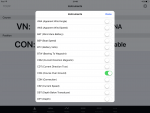
Sorry. That screen is the settings page in the instrument section. Do you receive wind, depth, etc ?
I have yet to find someone who does and the original post in this thread also says Navionics doesn't repeat instrument data over wifi.
 
Sorry. That screen is the settings page in the instrument section. Do you receive wind, depth, etc ?

Can I confirm you mean an "instrument section" in the Navionics Boating app on iOS? I've hunted all round my app's settings, updated to the latest version and can't see that menu anywhere. I'm guessing we're talking at crossed purposes but if we're not, how did you bring up that menu?
 
Can I confirm you mean an "instrument section" in the Navionics Boating app on iOS? I've hunted all round my app's settings, updated to the latest version and can't see that menu anywhere. I'm guessing we're talking at crossed purposes but if we're not, how did you bring up that menu?
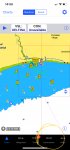
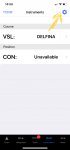
I don’t think we are at cross purposes unless my app is too old. See pics..
 

Attachments

  • B361760D-3BA8-4EDB-885E-E3CF4B5D785C.jpeg
    B361760D-3BA8-4EDB-885E-E3CF4B5D785C.jpeg
    772.2 KB · Views: 31
  • 8998E55A-6C49-4F20-B448-39EAAF77991E.jpeg
    8998E55A-6C49-4F20-B448-39EAAF77991E.jpeg
    285.1 KB · Views: 30
Top