NMEA 0183 linking

cagey

Well-Known Member
Joined
6 May 2004
Messages
2,241
Location
Cornwall
Visit site
I’m about to try and get all my instruments to talk to each other. I’m nearly at the end of a wiring tidy up for fuse/distribution board and all of my instruments. These were added willy nilly grabbing the nearest bit of wire that would work, as you can guess the result was some interesting problems. Everything now is nice and neat with clean supplies but I would like to get them to talk.
Is there a hierarchy and how do I determine master from slave and then when they are holding hands is there a preferred way.
All my instruments are in the 10 ish year old range but I have zero money to replace them in fact I’d rather like to keep them, they are old friends.
Instruments
Northstar Plotter/Radar/Depth 12”
Vision AIS transducer 1year old
Raymarine 6200 Autopilot with course computer and linear ram
Tack-tick wireless Wind/Log/Depth
Northstar VHF
And a Navman plotter at chart table.
I’m looking for a very simple solution because I am very simple.
Thanks for any pointers or nudges re what to read, have looked but can’t find any easy answers.
Thanks
K
 
There are no masters or slaves, as such. Some devices will pass some data to others and receive some back again. Not all devices will pass on all of the information that they know to all of the devices you have. For instance, the VHF won't tell the depth sounder that you just spoke to your mate :)

So, you need to think about what devices you have and how the information that one device has could be beneficial to send to another device. Any device that sends data can send it to as many as 5 devices (typically), but only one data stream can be received per port. Think of talking in a crowd, if you talk and everyone listens, they all understand what you say. If 10 people all speak at the same time it's just a racket that no-one can understand.

Your AIS will therefore send it's data to both of your plotters (assuming they support AIS).

As you have depth on the Northstarr plotter there is no point sending it data from the tack-tick, unless the plotter can make use of the wind data. Is it worth sending any of this to the Navman plotter ? You can of course send all of the Tack-tick data to both plotters.

If the VHF is DSC, then you need to send it GPS data, from one of the plotters.

The autopilot can be used stand alone or it can be sent data from one of the plotters (remember it can only listen to one at a time). It should then be able to steer to a waypoint.

There are limitations in the above, depending on the number of ports that the devices have, but i think you should be OK if you send AIS to both plotters, connect the autopilot to the Northstart plotter and VHF to one plotter for GPS. Then see what's left for the tack-tick, if you can make use of that data anywhere, off the top of my head i suspect that'll just be depth to the Navman plotter below.
 
Last edited:
I found it handy to sketch out a block diagram of the instrument nodes and the message flows I wanted. For the most part you can usually find the manuals online which say which sentences each box will output and which it can read. No point in wiring up something when all it gets is messages it can't understand.

Beware with NMEA0183 there are a few different variants for the same sort of information (I've found HDG, HDM & HDT the hardest to reconcile) before you even get into non-standard formats.
 
You can link up a limited number of "listeners" to a "talker", but you can only have one "talker" on a circuit.

Here's an example schematic:-
View attachment Winter 2010 v3.xlsx copy.pdf

The Echopilot instrument receives the GPS sentences, and it then transmits them, plus the log and depth information.

The TackTick wireless interface does not re-transmit any information it receives.

The manuals are not always too clear on what the instrument will do with sentences they receive, e.g. whether they will re-transmit them.

This may mean that a multiplexer might be required. I took care of that in the data-logger, but Actisense have multiplexers.

Good luck!
 
Mutiplexers are a good way of hard wiring all your instruments and nmea feeds and listeners but not exactly cheap.

However I have just used a simple TV set top box PC with a tablet sized screen with multiple usb inputs and some cheap usb to serial converters. This allowed me to prioritise which bits of kit really needed to be talking to each other, developing the system using the built in software in opencpn that allows multiplexing. I appreciate that this now means that I am depending on software for communication rather than solid copper. I also end up with one of the best chartplotter/AIS displays available on a 24" tv screen if required....

Some might be horrified by this.....However it is now becoming a common practice in industrial automation and control for safety systems. In a number of recent jobs we no longer use hard wires for safety critical operations. It is no longer a legal requirement.

I think this shows how far the reliabilty of modern electronic controls has progressed. This morning I had a call out of the blue from a customer who had PLC automated systems installed in 1997......They assured me that the equipment is still performing the same as the day we commissioned it! However trying to modify their operating software which was contained on a floppy disc has become a challenge as we no longer have a computer with a floppy disc reader!

Our experience is software very rarely is the problem. Sensors, switches and wire connections are always the achilles heel of any system..
Let software do the switching where possible..

Steve
 
.

However I have just used a simple TV set top box PC with a tablet sized screen with multiple usb inputs and some cheap usb to serial converters. This allowed me to prioritise which bits of kit really needed to be talking to each other, developing the system using the built in software in opencpn that allows multiplexing. I appreciate that this now means that I am depending on software for communication rather than solid copper. I also end up with one of the best chartplotter/AIS displays available on a 24" tv screen if required....

Slightly different hardware to your Steve, but similar results. I have a 24" LED TV and a soundbar on the forward bulkhead. The TV is connected to a remote laptop via HDMI and the soundbar to the TV via an optical cable, both are 14v running from the boats domestic batteries via DC-DC converters. The laptop is tucked away, connected to some onboard devices via a USB hub and the NMEA 2K network via wifi. The laptop is tethered to my phone for internet access and controlled by a small wireless keyboard/mouse.

The 24" screen will display OpenCPN with all the boats N2K data (converted to NMEA 0183), including AIS. It will also show the internet and email, all catchup TV, downloaded TV, movies, music etc. I can also monitor solar charging and domestic battery monitoring on the TV. Obviously, all the usual PC functions are available, depending on the software on the laptop.
 
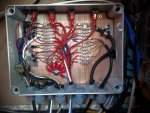
The picture shows how all my NMEA cables come into an electrical box and on the top there are 4 x 2 way switches that allow me to choose where a receiver takes an input from because I have a number of ways to produce position and AIS info. The Raymarine Auto pilot is also useful as you can use it effectively to manage some data sets within the raymarine network. The main benefit of this approach it to make the wiring more obvious and to remove stress on the joints of what tend to be very fine wires.

Yoda


NMEA box.jpg
 
The picture shows how all my NMEA cables come into an electrical box and on the top there are 4 x 2 way switches that allow me to choose where a receiver takes an input from because I have a number of ways to produce position and AIS info. The Raymarine Auto pilot is also useful as you can use it effectively to manage some data sets within the raymarine network. The main benefit of this approach it to make the wiring more obvious and to remove stress on the joints of what tend to be very fine wires.

Yoda

If your system is that complex might be worth looking at the ShipModul MiniPlex. You can configure it with primary and secondary sources of messages and it will do an automatic failover when one goes offline.
 
Forgive me. I forgot that everybody with a boat has 20 years of PLC experience and knows how to use opencpn. Your solution is not really entirely software driven neither:
PC form the junk yard, plus a tablet screen (what for anyway?) plus cheap (Reliable from China?!) USB to serial converters??? Good grief.
Enjoy programming whilst underway. There is tanker just in front of you. Watch out :-))
 
Forgive me. I forgot that everybody with a boat has 20 years of PLC experience and knows how to use opencpn. Your solution is not really entirely software driven neither:
PC form the junk yard, plus a tablet screen (what for anyway?) plus cheap (Reliable from China?!) USB to serial converters??? Good grief.
Enjoy programming whilst underway. There is tanker just in front of you. Watch out :-))

Yet you suggest a MUX, when the OP has next to nothing to interconnect ?
 
Very sorry I just thought this was PBO. Just trying to be helpful and in no way meant to be critical of our choice of I critical of using an MUX

I think I have some affinity with the Op in that I found myself thinking and doing exactly the same as he intends a couple of years ago. For me it was more of a case of how can I connect the various bits of kit without spending big bucks in true PBO style and was more of a project for the projects sake.

In reality by linking all my instruments and nmea feeds what feature or facility have I gained that is done automatically rather than previously requiring a modicum of manual input from skipper?

The ability to sail to a preset route by autopilot.( Hardly ever used it.) Usually just point the boat towards the next way point and engage autopilot on the basis of a roughly calculate course to steer.
The ability to sail to the wind by autopilot (Used twice and not tested in any rough stuff yet.)

The ability to automatically give a position over dsc. (Never required yet and still have to remember to manually input the nature of your distress in any case!)
The ability to instantly display a dsc distress position on a chart plotter.used frequently this year and very quickly lets you see if you are in a position to help.

The ability to continuously monitor and record wind speed and direction , depth and log functions against any position at virtually any time interval. Quite interesting results. Helps with the routine of hourly logging on longer trips . Can be a bit of fun when reviewing your trips and could be of use to help generate better charting for local moving sand bars.

The ability to easily track, monitor and identify and record any other AIS equipped vessels operating in close proximity. The cockpit display isn't half as good as the display on Open cpn.

Oh some other benefits

My "junk yard system" has eliminated the need to carry all the admirables books on board,
We have our entire music collection available without need of a single CD!
We can connect to the internet via wifi when available or by using a tethered phone.
We can play our sound in any cabin or cockpit via Bluetooth Bose portable speaker.


Open CPN is really not a difficult system to set up use and operate and there is loads of help available from the sailing community who support it.
I would think the cost to set this up now would be about the same as basic MUX from Shipmodul
https://www.amazon.co.uk/s/?ie=UTF8...qmt=p&hvbmt=bp&hvdev=c&ref=pd_sl_7ypj1vlyd7_p


Steve
 
Yoda your distribution box looks nice, but in a few year's you will have contact problems. The terminal blocks are calling for trouble. It would have been much better to solder all the cables..... there are also blocks for soldering available.
On a boat it's wet and all the stuff corrodes.
 
Last edited:
Yoda your distribution box looks nice, but in a few year's you will have contact problems. The terminal blocks are calling for trouble. It would have been much better to solder all the cables..... there are also blocks for soldering available.
On a boat it's wet and all the stuff corrodes.

Doesn't his enclosure have a gasketed lid?
 
Doesn't his enclosure have a gasketed lid?

Yes it does have watertight lid and glands, i'll take my chances on the chocolate block! It is 3 years old now and since I can see all the contacts because the lid is clear and not opaque, I know it is still dry in there.

Yoda
 
Top