NKE help

Jaco

New Member
Joined
18 Jul 2011
Messages
13
Visit site
Hi - i have an NKE set up on boat which is going a little haywire. I'm not an electrican but could do with some advice on how to tackle it. I keep losing magnetic heading from my display as well as heel angle.
It flashes on and off and then decides to stay off. Re-setting the system sometimes helps - its very erratic.
Any advice on what could be the issue?
 
Do you have a 9X fluxgate compass if so the problem would seem to be there as it provides a 3D space heading and heel angle information. Best you can do is check the connections disconnect it and reinitialise it. If it persists then you need to get the compass checked by a dealer.
 
Hi have a regatta compass.
The boat wifi can see it and i have checked the connections - seems pretty tidy and in good order.
How do i re-intialise it??
Thanks for your help?
 
I think I would start by recalibrating the compass and obviously checking for any large lumps of metal around it. I have to say I have only sailed on one boat with NKE kit and whilst it was superb it was complicated with a huge range of functions obviously dedicated to racing and with extensive set-up and calibration procedures. I understood that there was an extensive error log and fault finding facility by connection to a PC / lap top.
 
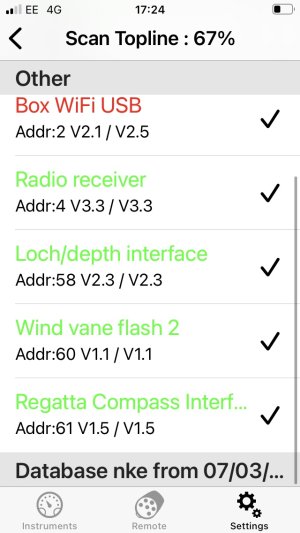
What is odd is that the NKE interface app on my phone can see the compass and its highlighted green meaning its up to date.......
Im trying to down load Topsailor NKE to the boat PC to see if it can diagnose the issue.....
 
This is of absolutely no use to you at all, but I have NKE and the only component I consistently have problems with is the compass. My first one regularly went haywire and I sent it back. The replacement is more consistent, but it's proved impossible to autocompensate for deviation - hence it steers the autopilot perfectly well, but always reads 10-30 degrees off the magnetic compass.
I would check that the screws holding your bracket are definitely brass screws rather than steel; beyond that, remove it from the system, and then from your Multigraphic, run the process of Topline device recognition through the Settings/Maintenance menu - it should pick up everything but obviously not the compass. Then switch off, add the compass, and re-run the Topline device recognition process. Fingers crossed, the compass will be there and will be behaving properly.
I love NKE when it's working, but it's very fickle...
 
Hi Ed - thanks.
The problem only just started happening.
The compass is visible on the App on my phone- see attached.
I have no idea how to access NKE itself- do you need a PC? Or do you do it via the multifunction?
I may just turn it off and unplug it.....
 

Attachments

  • Screenshot 2025-05-04 at 17.24.40.jpg
    Screenshot 2025-05-04 at 17.24.40.jpg
    122.7 KB · Views: 2
Odd question, but does the compass just appear once in the list on the app? sometimes you get multiple appearances of a component, which scrambles things a bit.

You don't need the PC to remove and re-add things - you can do it through the Multigraphic display if you have one of those (or the Multidisplay II too, I suspect). Using TopSailor through a PC is good for fiddling with the configuration settings, and TopLink for dealing with updates etc. However, if you just want to remove some or all items off the Topline network and then progressively add them again, then the Multigraphic is probably easier.

You can download the Multigraphic user guide from the Downloads page of the NKE website - the part where Topline recognises what's connected to it is in s.2.7.6.3 on page 43. Basically, when it's powered off, unplug the compass. Power it up, and then follow the steps shown in the screen grabs (which unhelpfully aren't described in words). The system should recognise everything connected but obviously won't find the compass.
Then power it off, reconnect the compass and power it back up again - re-run the same Topline discovery process and it should now find the compass this time ... and it hopefully should work properly.

I installed a core NKE system last year (wind, Multigraphic, radio/remote and Gyropilot AP), connected to Raymarine depth and speed sensors and RM dials and displays via a NKE/NMEA2000 box, along with a DigitalYacht HF GPS and a Comar AIS, both on NMEA0183. When I set it all up, and had endless problems with conflicts, data clashes (eg multiple boxes trying to provide GPS data), ghost components, erratic readings etc. The only way to solve it was to incrementally add one item at a time using the method above, and then it sorts itself out. I can't guarantee it will work with yours, but I think there's a high chance it will unless the actual compass hardware is damaged. Removing and re-adding is the NKE version of switching it off and on again...
 
Odd question, but does the compass just appear once in the list on the app? sometimes you get multiple appearances of a component, which scrambles things a bit.

You don't need the PC to remove and re-add things - you can do it through the Multigraphic display if you have one of those (or the Multidisplay II too, I suspect). Using TopSailor through a PC is good for fiddling with the configuration settings, and TopLink for dealing with updates etc. However, if you just want to remove some or all items off the Topline network and then progressively add them again, then the Multigraphic is probably easier.

You can download the Multigraphic user guide from the Downloads page of the NKE website - the part where Topline recognises what's connected to it is in s.2.7.6.3 on page 43. Basically, when it's powered off, unplug the compass. Power it up, and then follow the steps shown in the screen grabs (which unhelpfully aren't described in words). The system should recognise everything connected but obviously won't find the compass.
Then power it off, reconnect the compass and power it back up again - re-run the same Topline discovery process and it should now find the compass this time ... and it hopefully should work properly.

I installed a core NKE system last year (wind, Multigraphic, radio/remote and Gyropilot AP), connected to Raymarine depth and speed sensors and RM dials and displays via a NKE/NMEA2000 box, along with a DigitalYacht HF GPS and a Comar AIS, both on NMEA0183. When I set it all up, and had endless problems with conflicts, data clashes (eg multiple boxes trying to provide GPS data), ghost components, erratic readings etc. The only way to solve it was to incrementally add one item at a time using the method above, and then it sorts itself out. I can't guarantee it will work with yours, but I think there's a high chance it will unless the actual compass hardware is damaged. Removing and re-adding is the NKE version of switching it off and on again...
Had a go with this Ed and still no compass so now disconnected it an sent if of to dealer to check if its faulty or not....standby.....
 

Other threads that may be of interest

Top