navionics

Using navionics europe HD software & setting up a route manually where does it show the course to steer?

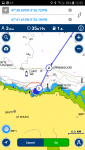
Whilst creating the route click the i at the right end of the blue bar showing leg distance, fuel and time.
Screenshot_20180331-125308.png
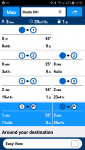
Once route is created place relevant leg in crosshair and click ?
Screenshot_20180331-125235.png
 
Last edited:
I have been looking at various apps, and as far as I can ascertain, the Navionics App gives a COG as I understand the intention is to avoid obstacles if you deviate from that.
I think that Neptune are launching this spring an app which calculates the Course to Steer and the Optimised Departure Time from its built in tidal database. The website screenshots seem to show the actual ground track on a chart.
No connection to Neptune, but intrigued to see what the released product delivers.
 
the problem with all these app is , people with no Nav skills wont bother to lean any and people with Nav skill will end up losing them ,
off couse for them who haven't any Nav skill and rely on app when the day comes when the sh@t hits the fan they will be well ant truly stuff
 
That's not CTS though... That's COG. don't you need to manually do the tidal offset for CTS
Apologies. You are quite right. I assumed that, as no course data at all is displayed on the Navionics primary screen, the OP sought any course data from which to calculate CTS, COG or whatever.
 
On a similar note, I’m currently on the trial and have been playing with the “dock to dock” route planner. Although the app gives indications of currents it doesn’t appear to take this into account for estimated trip times; the time seems to be a simple “distance” / “cruising speed” = “time”.

I’d assume if it isn’t taking this into account for the route calculations it’s possibly not taking CTS into account either?
 
The only way I’ve found is to use nav planner software which uses Navionics charts, do the planning on app, import to nav planner which does the tides etc and modifies the route and allows for time to leave and arrival comparisons etc and then send route back to app and sync with chartplotter. Seems long winded but the tide stuff even takes the pc a while to do all the what ifs, but once route is done syncing back easy.
 
Top