
nasa battery monitor

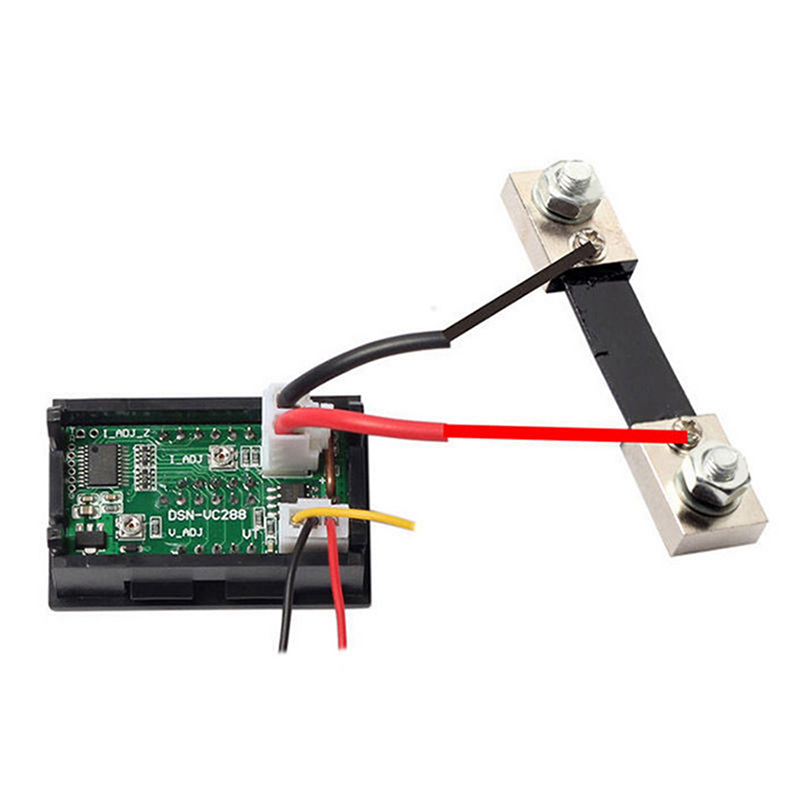
The pictures in the link show two short heavy wires connected to the shunt unlike a proper battery monitor such as a BM1 which is connected by relatively long and thin wires to the shunt.
This implies a farily large current flow, presumably upto the 10 amps which the device can measure without a shunt.
YPG9011g09.jpg

I think the awful cheap pic layout with different levels of zoom all merged and messed together is confusing.
I'm afraid you're wrong Vics, just trigger cables to the gauge as in all shunts.

V.
 
If you are one of those who dismiss all of the features of the better monitors as a waste of time and you ignore the SOC readout (because it's rubbish), (and if that's all you want then that is fine, your choice) then all you really want is a voltmeter and ammeter. Why spend around £100 for a cheap battery monitor, why not buy something like this https://www.ebay.co.uk/itm/DC-10A-5...hash=item1a34bbc866:m:mynnSOklpGr8xey0QE57hOA Serious question.

I don't dismiss anything, if that's what people want that's fine with me. I prefer simple stand alone technology and personally not interested in networking instruments or navigating by tablet. Out of the last 10 years, we've lived on the boat for around 7 years total time, done quite a few thousand miles and I've found the NASA give me the information I'm interested in. I'm sure there are "better" things on the market for those who want them.
 
Surely there is a simple rank order depending on needs.

Are my batteries OK: use a voltmeter
How much current am I using: use an ampmeter
Want to see both but don't care about SOC: use cheap voltmeter and ampmeter
Really want to know how long batteries will last and don't use more than 100A then if not too bothered about accuracy: use BM1

If over 100A drawn then may as well go with the Victron as its about same price as BM2 unless you want the larger display.
 
Last edited:
Surely there is a simple rank order depending on needs.

Are my batteries OK: use a voltmeter
How much current and I using use an ampmeter
Want to see both but don't care about SOC use cheap voltmeter and ampmeter
Really want to know how long batteries will last and don't use more than 100A then if not too bothered about accuracy use BM1

If over 100A drawn then may as well go with the Victron as its about same price as BM2 unless you want the larger display.

I'm afraid that's far too sensible an approach! Except of course the BM-1 won't tell you how long the batteries will last as everyone says the SOC readout is a joke.:rolleyes:
 
Might want to go back and read the description again.

Plenty of cheap ammeters out there.
They dont show cumulative charge/discharge - so a waste of time.

I dont want one which does not show ALL THE TIME both Volts and Amps on the screen. I dont want to see it through another device - I can see it from the cockpit as well.
 
The pictures in the link show two short heavy wires connected to the shunt unlike a proper battery monitor such as a BM1 which is connected by relatively long and thin wires to the shunt...

That's because you haven't selected the 50A or 100A version. Then the picture will change.
 
Might want to go back and read the description again.

Plenty of cheap ammeters out there.

Before buying my NASA BM2 I bought a cheap voltmeter and a cheap ammeter. I fitted the voltmeter, which was fine.

I didnt fit the ammeter because it was going to be a bit fiddly fitting the shunt, and it was never going to tell me cumulative amp hours , which was what I was/am particularly interested in. So I wasted about 10 or 20 quid, or whatever they cost at the time.

I cant remember why I chose the NASA rather than any other monitor, but price would have been a big factor, and readability another. I think, if I couldn't see volts and amps simultaneously from a distance, I would be dissapointed. Equally, if I had to fire up a laptop, phone app, or similar, I would also be dissappointed. If I want to know cumulative Ah, I press a button - it seems I only want to know this from time to time as I I almost always have the display showing Amps and Volts.

I'm not dismissing all the other features I could have had for the same money with a BMV700, but I never find myself thinking, "I wish......".

In fact, I dont actually recall considering a version of the BMV when I bought in 2012... was it available with the same functionality then... and was it similar in price at the time?

I have a Tracer MPPT solar controller which has a cable to connect it to a laptop, or I could get a wifi gizmo which could enable it wirelessly.... but I havent yet bothered to connect it, so it would seem that I dont need/want the facility on the MPPT, and am probably right in thinking I dont need it on the NASA.

So the NASA does exactly what I want, and displays it in exactly the way that I want, (I guess it would be just a little bit better if it could have Volts, Amps and cumulative AmpHours, on the same screen.... but that is all.

So it's horses for courses.

Even knowing what I now know about the BMV, I think the OP will be pleased if he buys a NASA BM2, and I dont think he will be dissappointed with it. In particular, now that we are all better educated on the alternative, those that haven't yet got a monitor, or are considering an upgrade from a simple ammeter and voltmeter, or something else, can include it in their options.... which can only be a good thing :)
 
Well, here’s my experience so far. When I took over the boat it had a NASA BM1 installed after a fashion, that is to say connected to the load side of a 2-1-both switch. Having done away with that, fitted a dedicated engine battery and separate isolators, the next step after reconnecting the BM correctly was to install a new Victron mains charger. That’s done, and the charger does its thing, yesterday it went to float after about 2hours. When the charger was showing float, which should be about 13.8V, the BM Showed in excess of 14V, about 14.2mostly. I’m more inclined to believe the charger knows what it’s doing and on that basis I’m inclining towards the anti NASA side.
 
When the charger was showing float, which should be about 13.8V, the BM Showed in excess of 14V, about 14.2mostly. I’m more inclined to believe the charger knows what it’s doing and on that basis I’m inclining towards the anti NASA side.

Have you checked with an accurate multi-meter? My experience with the 2 x BM! I have are that volts and amps are spot on.
 
Well, here’s my experience so far. When I took over the boat it had a NASA BM1 installed after a fashion, that is to say connected to the load side of a 2-1-both switch. Having done away with that, fitted a dedicated engine battery and separate isolators, the next step after reconnecting the BM correctly was to install a new Victron mains charger. That’s done, and the charger does its thing, yesterday it went to float after about 2hours. When the charger was showing float, which should be about 13.8V, the BM Showed in excess of 14V, about 14.2mostly. I’m more inclined to believe the charger knows what it’s doing and on that basis I’m inclining towards the anti NASA side.
The instructions are quite specific, the ballast should be fitted to the negative post etc. The BM will read the battery voltage directly off the battery so you are getting a true reading off the battery. Anything else will be going through the isolation switches and lengths of wires and they will be affecting any votage reading downwards.
Stu
 
The instructions are quite specific, the ballast should be fitted to the negative post etc. The BM will read the battery voltage directly off the battery so you are getting a true reading off the battery. Anything else will be going through the isolation switches and lengths of wires and they will be affecting any votage reading downwards.
Stu
I understand the instructions and the BM is now installed correctly. Shunt connection to -ve, with about a hand’s span of 35 sq mm cable between, and BM positive to battery +ve. I’m not sure what your point is?
 
I understand the instructions and the BM is now installed correctly. Shunt connection to -ve, with about a hand’s span of 35 sq mm cable between, and BM positive to battery +ve. I’m not sure what your point is?
How far away is the charger from the batteries and how does it charge or sense? If its like mine its several mtrs away and the voltage can and does change with distance
Stu
 
If that were the source of difficulty surely the BM would show less than 13.8V? The charger leads are less than 1m so I doubt that’s an issue.

You are correct. But you need to double check the readings with a known accurate meter. Does the Victron charger have built in Bluetooth ?
 
I have BM1s on both my battery banks on my wee boat. I have regularly checked them against various meters. They are accurate for voltage and current. They have served me well for ten years. I'm never very sure about % charge. That's not the same as saying it's wrong - I just don't really know. I would be keen to know how those who argue about % charge accuracy confirm the accuracy. I don't know any easy way, however, nothing anecdotal has ever made me think mine were wildly out. I don't run power regime so near the edge that I need to look while at the helm, so no need for networking (despite a liking for such gadgetry). It's an ingrained habit to take a look whenever I go below to make coffee, look at the chart table, or use the heads. After reading all the horrors above, I feel extremely fortunate to have managed for years with such modest instruments.
 
Surely there is a simple rank order depending on needs.

Are my batteries OK: use a voltmeter
How much current am I using: use an ampmeter
Want to see both but don't care about SOC: use cheap voltmeter and ampmeter
Really want to know how long batteries will last and don't use more than 100A then if not too bothered about accuracy: use BM1

If over 100A drawn then may as well go with the Victron as its about same price as BM2 unless you want the larger display.

Thanks. I find that a useful summary.
 
I think the awful cheap pic layout with different levels of zoom all merged and messed together is confusing.
I'm afraid you're wrong Vics, just trigger cables to the gauge as in all shunts.

V.
Just bought one of these, but am not sure how to wire up. No wiring diagram supplied! Do I connect the shunt by splitting the -ve or +ive lead to the battery? I presume the small leads connect red to + and - to negative but to what does the yellow wire go to? I am going to give this a whirl but will probably fit a BM2 or Victron BMV 700 if it does not give me at least some info.!
Many thanks. See post 81
 
Just bought one of these, but am not sure how to wire up. No wiring diagram supplied! Do I connect the shunt by splitting the -ve or +ive lead to the battery? I presume the small leads connect red to + and - to negative but to what does the yellow wire go to? I am going to give this a whirl but will probably fit a BM2 or Victron BMV 700 if it does not give me at least some info.!
Many thanks. See post 81

I personally have a BMV700, but I've also installed another shunt for the old analogue Ammeter of the boat so since none has answered I'll try (no responsibility if it works differently though!)

split the -VE (most shunts where on the negative.
the two wires on the shunt go to the ammeter you get them the wrong way round, shows negative amps (on my analogue gauge, swap them over, no big deal!
The black and red go as you say to the battery or generally power.
The yellow, no idea, I can only think it's a trigger current to start the thing when something else is working, or other option is that it affect illumination.
Anyhow, start with the red/black and see if it fires up, I give it 80% it works, if not carefully and momentarily touch the yellow to the red and see if it works.

goodluck!
if someone else has actually got one, obviously listen to him and not me!

cheers

V.
 
Top