McMurdo M10 AIS - transmitting incorrect heading

What on earth does the AIS use the heading data for?

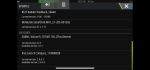
If you look at a variety of vessels on MarineTraffic you'll see that some have blank headings (like this one) and some have a heading in degrees. The latter ones use heading data to transmit it.
IMG_8890.jpeg
 
Another question for Shuggy.

To confirm the heading info from the gyro is good on the backbone, do you see correct 'compass heading' when you view the data from the Navico compass on the MFD? E.g Sources -> view data.

Is it a Precision-9 or something else?
 
The 108 comes with an AIS configuration too with a diagnostics feature. Does the M10 have the same? You could try using that to disable the heading input.
 
This would be so much easier with spare bits wouldn't it! If I were closer, I could call round with a working M10 and see if that exhibits the same symptoms. Then try a different heading sensor whilst connecting up the laptop with some NMEA2000 decoding software.

How about powering up the M10 after the rest of the kit has had a few minutes powered up and had time to settle. That might prove if it's latching onto one heading source that then cancels out.
 
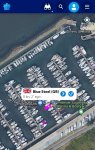
Take this boat, Blue Steel for example.
Berthed stern to in the marina with zero speed.

20220805_185053.jpg

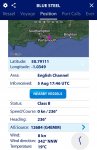
And the Marinetraffic received details...

20220805_185111.jpg

It's only a guess, but it seems like after a certain time of no movement, the Marintraffic map view seems to revert to just a small square icon for each vessel. But it does seem to show heading for some time at first power on and then for a short while after movement stops.
 
The 108 comes with an AIS configuration too with a diagnostics feature. Does the M10 have the same? You could try using that to disable the heading input.
The M10 I purchased did indeed have a configuration program supplied which was rather dated.
The Camino configuration utility worked just fine on my McMurdo M10 unit if you no longer have the McMurdo supplied software and seemed to have more options on the settings.
 
Shuggy... In the absence of any easy way of monitoring the actual NMEA PGNs (packet data) are you able to check the NMEA health via the MFD... there should be a menu that will show bus voltage, load, collisions etc..

Are both 120 ohm terminators plugged in correctly? If you could plug in an extra 'T' and drop cable, with bare wires it should measure 60 ohms across blue and white (powered off bus). That's two 120 ohm resistors in parallel.
Thanks Martin - that's great info. I'm not on the boat but will check when I am.
 
Another question for Shuggy.

To confirm the heading info from the gyro is good on the backbone, do you see correct 'compass heading' when you view the data from the Navico compass on the MFD? E.g Sources -> view data.

Is it a Precision-9 or something else?
Sorry - my replies are now all out of sync! Yes, the heading data is correct when viewed from the MFD or the Autopilot control head.

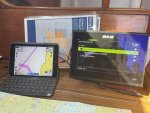
IMG_8496.jpeg

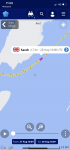
That's an iPad running Navionics independently showing our COG track (thin pink) vs the heading on the compass showing 225 on the MFD.
 
Last edited:
This would be so much easier with spare bits wouldn't it! If I were closer, I could call round with a working M10 and see if that exhibits the same symptoms. Then try a different heading sensor whilst connecting up the laptop with some NMEA2000 decoding software.

How about powering up the M10 after the rest of the kit has had a few minutes powered up and had time to settle. That might prove if it's latching onto one heading source that then cancels out.
If only! That would have been great. I might see if someone in the marina has one they could lend me. Our sister boat has one but she has sneaked off to Portugal for the summer...
 
If anyone's interested, I think we've cracked it.

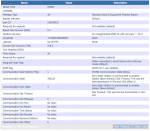
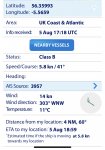
I have been logging our AIS data on the NMEA 2000 network and this is a decoded packet from yesterday, which has no heading data available. As a result the AIS has been doing its usual thing and transmitting a heading of 0deg. This means that we end up pointing due north on everyone else's plotters regardless of our COG.

Screenshot 2022-08-28 at 18.07.31.png
With a quiet weekend on the boat I've been working through various software updates, and I installed the latest update for the Precision-9 compass, which was on a much earlier firmware version:

IMG_9021.PNG
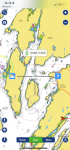
Having run the update while away, we came back this morning and it looks like we've managed to resolve the issue. I'm not 100% confident but it's looking better. Below you can see our track and heading on the way out (heading always showing 0deg regardless of actual heading and COG) while on the way back you can see that that heading readings now correspond with the COG:

IMG_9023.PNG

We'll keep an eye on it next weekend and see if it continues to behave, but it would be great if this was the problem. I'm not sure why the B&G plotter could previously read the Heading data without issue while the AIS unit could not, but if this has fixed it I will be delighted - no dodgy NMEA 0183 converter required as a bodge!
 
I have the same problem on a Camino, and have had for a long time. I have to ensure the autopilot which provides heading sentence is switched on first and stabilises, before Ais is switched on. Default camino is North heading, marine traffic will show that heading while computing cog from GPS.
 
I have the same problem on a Camino, and have had for a long time. I have to ensure the autopilot which provides heading sentence is switched on first and stabilises, before Ais is switched on. Default camino is North heading, marine traffic will show that heading while computing cog from GPS.
That is very interesting - I wonder if mine is doing the same and the update success was a coincidence.
 
Another weekend on the boat. I fired up the instruments and the VHF at the same time and headed north. It appeared that we were on a permanent heading of 0deg whenever I looked at MarineTraffic. However when I headed south all looked good - until the last mile. I tried firing up the autopilot first, tried resetting the AIS unit a few times. Nothing worked. I've decided that I've spent so long mucking about with it that I just need to make the AIS unit's comms unidirectional. I bought a conversion device today which will take the AIS output, convert it to NMEA 2000, and then send it to the NMEA 2000 backbone. The beauty is that it will not feed heading data back into the AIS device. I know it's a fudge but I've bought a conversion unit that will transmit all data on wifi, so my iPad can see the AIS output too.
 
This is similar to the problem that I used to have until I set the system's definitive COG data source rather than letting it choose automatically.

I don't really understand what you're saying. What's a Course Over Ground data source? I can understand a heading data source, but the COG device is surely the GPS? The McMurdo (like most Class B transponders, I think) relies on its own GPS signal rather than picking up one from the network. Can you be more specific about what you mean by 'the system' and the 'COG data source'? Thanks.
 
Quick thread update - Quark Electronics converter fitted and the AIS unit now transmits unidirectional AIS data to the converter and can't see the NMEA 2k network any more. It seems to have done the trick and I now get the bonus of having WiFi enabled AIS data available to my phone and iPad through WiFi... see screenshot below from my phone. Hopefully a good result for little outlay on the Quark kit.

IMG_9623.PNG
 
Top