Lowrance 5200c - new GPS module wiring

Robin Somes

New Member
Joined
21 Sep 2025
Messages
7
Visit site
Hello all,
I've got an old Lowrance GlobalMap 5200c chart plotter, which a couple of years back started giving the "GPS module not responding" error. I'm keen to get it going again, or find an excuse to get rid, so I've just got a replacement GPS antenna (QUESCAN GPS receiver, model R70L-12V).

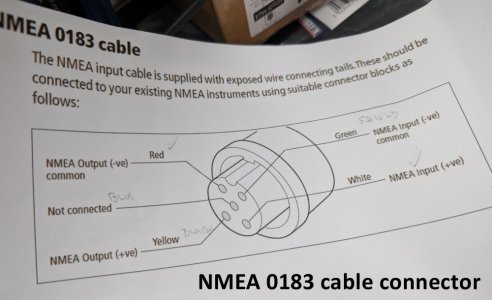
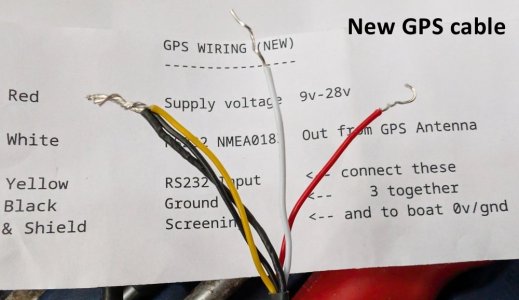
And there my problems begin. The new GPS module's cable has red, white, yellow and 2x black wires (1 = shield), and it comes with a useful slip of paper saying that red = supply voltage, white = RS232/NMEA0183 signal out, and yellow black & shield should be connected together to ground (1st image below). Maybe that's true, maybe not.

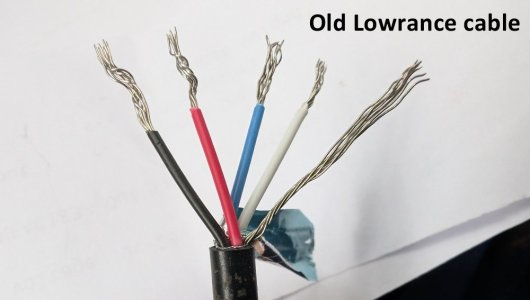
The old Lowrance GPS module's cable has red, black, blue and white strands, plus a bare (presumably) shield (2nd image below).

There is a myriad of diagrams on the web showing how to wire up an NMEA 0183 connector - not one of which has anything like this combination of wire colours.

So, for a relative electronics novice, can anyone kindly point out which colour wires from the new GPS should be connected to which colour in the old Lowrance cable?

Many thanks
 

Attachments

  • 001.jpg
    001.jpg
    78.9 KB · Views: 6
  • 002.jpg
    002.jpg
    54.6 KB · Views: 6
  • 003.jpg
    003.jpg
    73.6 KB · Views: 6
Many thanks, yes that makes sense, and I have the manual. However, there's still no indication of which wire colours at the remote end are the right ones to connect to; I'm connecting to the extension cable between the T-connector and the GPS receiver, and at that point there's neither an orange or yellow wire to be seen. Obviously I'm reluctant to just connect wires randomly until I find a combination that works :LOL:
Good point about telling the 5200c to use the new GPS; will bear that in mind when I get to it.
Thanks again,
Robin
 
Are you trying to connect your new GPS receiver to the Com port on the Lowrance or it's dedicated GPS receiver port?

If you are trying to connect it to the COM port you will have to tell the setup that is where you are expecting the GPS data from. It is probably currently set to the dedicated GPS socket.

I don't think the wiring colours of the dedicated GPS port are documented because they expect that to be used with a pre made extension cable and pre made cable attached to the original GPS module.

Clarify what you are trying to attach the GPS receiver to and I can help further.

I did a hack to mine and used the original GPS socket, in fact what I did was cut open the original Lowrance receiver module, discard the failed PCB and fit the replacement inside that housing. That had the advantage that the GPS receiver port has a 5V power output to feed the GPS receiver. It was not straightforward because I ordered the wrong GPS module and ended up with a level shift issue.

If you use the Com port it only has 3 pins, ground, data tx and data rx, so you will need to provide power to the new GPS receiver externally and it gets a little clumsy.

Here is a link to my modification, but don't buy the same GPS module that I did or you will have the same level shift issue.

 
Last edited:
Are you trying to connect your new GPS receiver to the Com port on the Lowrance or it's dedicated GPS receiver port?

If you are trying to connect it to the COM port you will have to tell the setup that is where you are expecting the GPS data from. It is probably currently set to the dedicated GPS socket.

I don't think the wiring colours of the dedicated GPS port are documented because they expect that to be used with a pre made extension cable and pre made cable attached to the original GPS module.

Clarify what you are trying to attach the GPS receiver to and I can help further.

I did a hack to mine and used the original GPS socket, in fact what I did was cut open the original Lowrance receiver module, discard the failed PCB and fit the replacement inside that housing. That had the advantage that the GPS receiver port has a 5V power output to feed the GPS receiver. It was not straightforward because I ordered the wrong GPS module and ended up with a level shift issue.

If you use the Com port it only has 3 pins, ground, data tx and data rx, so you will need to provide power to the new GPS receiver externally and it gets a little clumsy.
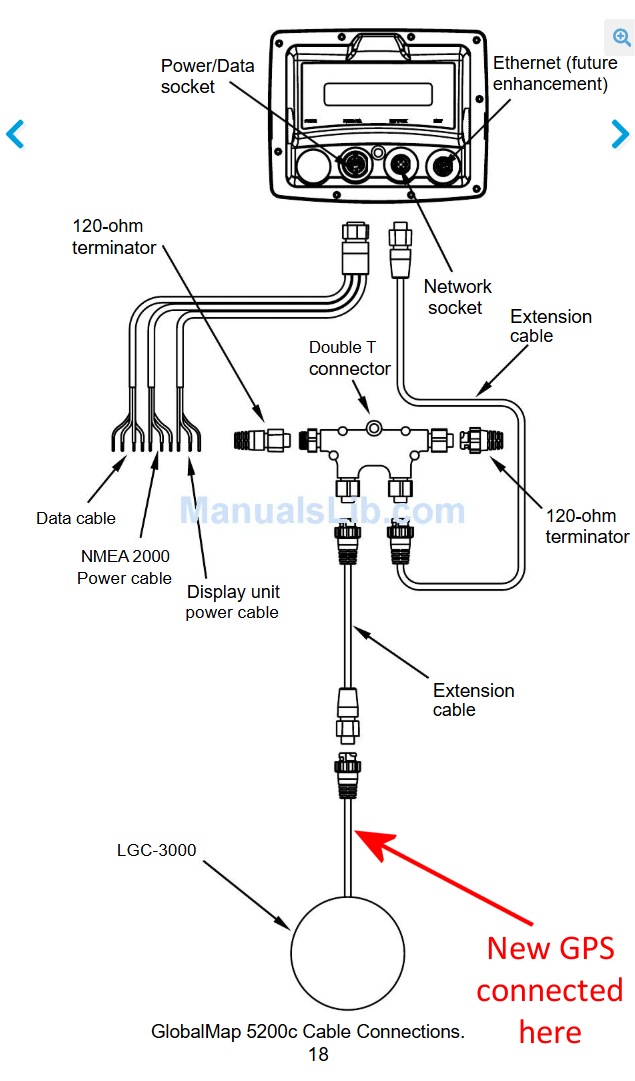
Many thanks. It's my intention to use the existing cabling - as in the attached image from the manual, so everything from the T-connector to the chartplotter itself is exactly as originally installed and working. The only difference is what's attached to the far end of the cable.
Mainly because the whole thing could turn out to be worthless anyway, so I'd rather not spend more time or cash than necessary to try it out.
Since the only connection from the 5200c to the GPS receiver was through the Network socket I must assume that also carries its power supply.
Thanks again

Image1.jpg
 
Many thanks, yes that makes sense, and I have the manual. However, there's still no indication of which wire colours at the remote end are the right ones to connect to; I'm connecting to the extension cable between the T-connector and the GPS receiver, and at that point there's neither an orange or yellow wire to be seen. Obviously I'm reluctant to just connect wires randomly until I find a combination that works :LOL:
Good point about telling the 5200c to use the new GPS; will bear that in mind when I get to it.
Thanks again,
Robin

The NMEA you should be using is in the power cable - not the 2K cable ...
 
As I've replied to ProDave above; I'm trying to replicate the existing setup - which worked for years - and as far as I can tell is identical to the setup shown in the diagram in my reply to him. As far as I know, that is the NMEA 0183 cable, yes? (assuming, of course, that it was all wired up correctly in the first place - I guess so, as it did work).
 
So your original Lowrance GPS moduleLGC3000 is dead?

That's an NMEA2000 module. You have bought an NMEA0183 module. You can'rt directly connect one to another, different protocols and signals.

And the one on the power / data socket also says NMEA2000

Sorry but my old Lowrance in the post I linked to was a different model that was NMEA0183

Is there an option for an NMEA0183 connection via that power / data cable?
 
The Power / data cable HAS NMEA 0183 as well as 2K ....

Trying to connect to the T connector setup will never work unless you use a 2K compatible unit.

Please use the DATA cables that are with the power cable ....I know that works as I have used mine to send 0183 out to other items ............
 
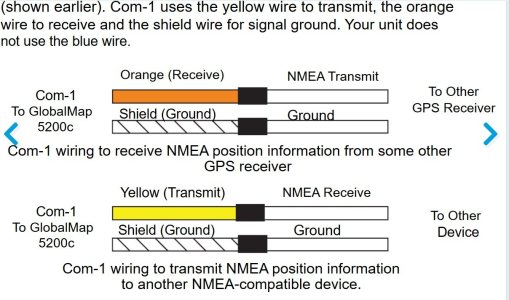
Yes. Reading the Globalmap 5200c manual page you need the 4 core com port cable that comes from the shared data / power connector.

you are only interested in the ground and Orange / receive wires of that cable. The ground will connect to the yellow black and shield of your new GPS receiver and the Orange . RX will connect to white from your new GPS. You will also need to connect the red of your GPS to a fused 12V supply.

The old GPS cable used by the old GPS will not be used at all and you will no doubt need to alter some settings to tell it that it is to receive it's GPS position from the com port.
 
Yes. Reading the Globalmap 5200c manual page you need the 4 core com port cable that comes from the shared data / power connector.

you are only interested in the ground and Orange / receive wires of that cable. The ground will connect to the yellow black and shield of your new GPS receiver and the Orange . RX will connect to white from your new GPS. You will also need to connect the red of your GPS to a fused 12V supply.

The old GPS cable used by the old GPS will not be used at all and you will no doubt need to alter some settings to tell it that it is to receive it's GPS position from the com port.

My post #2 ... which is a direct cut and paste from the manual.
 
So your original Lowrance GPS moduleLGC3000 is dead?

That's an NMEA2000 module. You have bought an NMEA0183 module. You can'rt directly connect one to another, different protocols and signals.

And the one on the power / data socket also says NMEA2000

Sorry but my old Lowrance in the post I linked to was a different model that was NMEA0183

Is there an option for an NMEA0183 connection via that power / data cable?
Yes the original GPS module is dead - or at least the 5200c throws an error message saying "GPS module not responding", and the most likely explanation for that is that it's dead. I don't know the precise model number of the module, since it's not marked as such; it could equally be the LGC2000, I suppose. I know that underneath is a serial number, so given time I can no doubt find out.

It is, however, wired up exactly as shown in the diagram I posted from the manual, and mea culpa I've assumed that as it was under the "NMEA 0183 cable connections" section, it was indeed NMEA 0183. The GPS module's only connection was through the Network socket; the blue power/data lead plugs into the 5200c, and I can only guess that power then supplies the GPS module from the Network socket.
The wiring was a tangle when I bought the boat, and I've deliberately not tried to untangle it, under the "if it ain't broke" principle.
The Power / data cable HAS NMEA 0183 as well as 2K ....

Trying to connect to the T connector setup will never work unless you use a 2K compatible unit.

Please use the DATA cables that are with the power cable ....I know that works as I have used mine to send 0183 out to other items ............
Got it, got it, got it now. Thank you. That point, that the power/data cable also handles NMEA 0183 isn't clear from that section of the manual. It's a bit late now and getting dark, but I'll take a look at it tomorrow when I get in from work. Thanks again, much appreciated.
 
Yes. Reading the Globalmap 5200c manual page you need the 4 core com port cable that comes from the shared data / power connector.

you are only interested in the ground and Orange / receive wires of that cable. The ground will connect to the yellow black and shield of your new GPS receiver and the Orange . RX will connect to white from your new GPS. You will also need to connect the red of your GPS to a fused 12V supply.

The old GPS cable used by the old GPS will not be used at all and you will no doubt need to alter some settings to tell it that it is to receive it's GPS position from the com port.
Yep, thank you - and Refueler. I'd missed the crucial point that NMEA 0183 comes in/out via the power/data connector. I'll give that a try tomorrow.
 
I have the 3500c .... same machine - just smaller display.

The Standard GPS module suppliede with these - is the N2K format : LGC-2000

A very good receiver in fact ... yes its not just an antenna ... mine picks up inside cabin and never needed to be externally mounted. I basically hung my via the curtain rail in main cabin ... actually my ONWA GPS antenna is hung same way !
But the LGC-2000 has one big factor I really dislike .. along with the rest of the N2K cabling of these units ... the cables are so stiff and hard to route ... why they never used decent softer cables ??
Its why at times I considered swapping to an 0183 GPS and utilise the easier to work with cable.
 
When i am figuring stuff our like this, i draw a big diagram having all manuals in front of me.

Much easier and less complicated when you can see all the in and outs on one page and work from fthere
 
Top