LiFePo4 monitor : LLBMSMonitor app

Refueler

Well-Known Member
Joined
13 Sep 2008
Messages
24,037
Location
Far away from hooray henrys
Visit site
The Iron-V LifePo4 battery I have ... with BMS / Bluetooth / Heater ...

Previously I could monitor and get relevant data via BT on my Samsung A34 smartphone ... but now all I get when I start the app :

Cannot take a photo because the required permissions are not all granted

This is crazy as camera is ALLOW ..... the LLBMSMonitor app has ALLOW when using app (it does not have a ALLOW all time option) ...

I've restarted phone ... uninstalled and re-installed ... tried everything - but still same result.

This us annoying as I want to use the battery as a field charging station and I really need that app to show data so I don't over-discharge even with the BMS ...

I even installed another LiFePo4 monitor app to see if that could do the job ... screen opens but doesn't try to find any device ..

Is there a generic or universal monitor app out there I can download and get it to work ??

I really do not want to start adding items .. the whole point is the prtability and that the battery has Bluetooth and DID work to the app before.
 
Have been searching all over internet for answers to this and one item has come up that I was not aware of :

It appears that some LiFePo4 with BMS and BT have an automatic Sleep Mode ... that inactivity can default activate Sleep Mode .. to protect the battery in long term storage etc.
I have a feeling that App fails to connect to the battery because of this.

I have tried discharging the battery which is I know near full charged .... but my discharger cannot get BMS to allow greater rate than 0.3A ... which further makes me consider Sleep Mode.

Checking various brands ... most talk about Sleep Mode is cancelled by charging at over 1A ... but because my battery is near full - the charger does not kick in long enough.

I will pick a day when I have time - to run a pump or similar to get the battery charge value down ....
 
OK ... received word from supplier :

"For 99% of the cases with Bluetooth missing connection it is just due to the bms has to be restarted.
So he need to fully discharge and then charge again and Bluetooth should work again."

Therefore it appears that this particular brand may have a sleep function ... that needs resetting.

Now I have to find a way of discharging a 100AH battery ..... my bench gear is too slow ..
 
WOW ... no suggestions or help ??
I would assume that not many people have that particular model of battery or BMS. I'd never heard of it.

Therefore it appears that this particular brand may have a sleep function ... that needs resetting.

Now I have to find a way of discharging a 100AH battery ..... my bench gear is too slow ..
Can you not just disconnect then reconnect the BMS rather than discharge and recharge the battery, or is the case sealed? It would seem to be something of an oversight to require the entire battery to be completely discharged just to reset a bluetooth device.
 
The BMS is internal ... when you look at the battery - apart from the terminals - it looks just the same as a normal LA ...

I have a Li discharger based on 3 Headlamp bulbs that I used for model cells .... I replaced it with a shop bought discharger some years ago because it has no cut-off mechanism ..
Because the battery has its own BMS .... I shall connect up and let the BMS do its job ... checking on it regularly of course ! Its goind to take a while .. so maybe connect for a few hours - then disconnect ... let discharger cool off .... then connect again ...

Everything online seems to concentrate on SLEEP mode - but show that there is no voltage shown - battery basically disconnects. But my battery shows 13.32V on my DVM .. and powers anything I connect .. which says to me - BMS is OK - but the Blue Tooth is not.

I have the discharger on it now - but its only 2A rate .. so I'm hoping that I can leave it for the day ... so its takes the 'top' of the charge and see what happens then ...
 
Battery supplier has advised dealer who sold to me :

|"Hi Yury,


Has your customer charged the batteries before taking it into use?

  • Lithium is not allowed to be send fully charged.


Before being taken into use a lithium battery need to be fully charged to balance all cells and calibrate BMS – which will ensure the Bluetooth works.


If this has not been the case we see issue with the BT.


This can be sovled by screwing of the lit and loosen the plus terminal – and then re-screw.

Afterwards restart BMS by discharge and recharge.

I hope this helps."


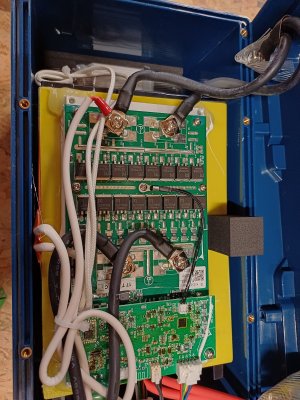
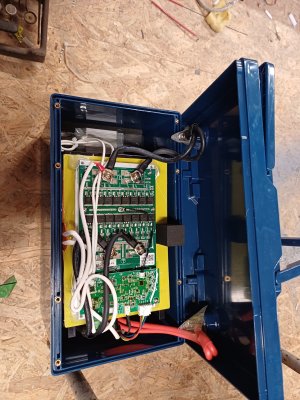
I popped the little blue plugs over top of the screws and opened up the lid .... mmmm now I have sent picture to them asking wich terminal to unscrew and then rescrew ... as nothing has any voltage there .. I am reluctant to lift the board / go further without info ...

LiFePo4 BMS b.jpg


LiFePo4 BMS a.jpg
 
OK .. success ...

I asked via another forum - in the Lithium section about this .. and a guy I know on there answered and its now working.

He reckoned dealer / supplier was wrong .. that their advice would have no effect at all.

Guy advised that the smaller board on top was the BT board and that the way to reset was to actually disconnect ALL leads / plugs from it ... wait and then reconnect. There would not be any need to discharge / recharge ... in fact he reckoned I could induce battery to SLEEP mode as seen in many videos.

Yesterday - I did as he said and saw a couple of LED's flash on the board on reconnection. My Samsung A34 phone still refused to connect. My Nexus tablet still refused ..

Today I thought - lets try again ... battey has been on slow discharge all night ... and now should be about 50% ...

Disconnected all plugs on BT board ... waited - then reconnected ... LED's flashed same .... Samsung A34 still not connecting ... but the Nexus fired up and showed battery at 47% .... discharge current 2.3A .. which agrees with the Wattmeter connected in the discharge circuit.
I then dug out my old S8 phone ... installed the app on that ... BINGO ... connected and showing battery status.

Strange though that Samsung A34 says no permissions - despite full access granted. But I have solution .. BT is now working ... I have stopped the discharge as battery is in good charge level for storage ...

I have passed the info to Dealer ... will be interesting to read what reply is !!
 
Top