Is there an alternative to a second Garmin MFD?

salar

Well-Known Member
Joined
5 May 2009
Messages
990
Location
Hampshire, UK
harley25refit.blogspot.co.uk
I have a Garmin GPSMap4008 that I am very happy with. However I would like the option of displaying sonar, charts and/or radar on a second screen. Is there an alternative approach to using a second Garmin unit (GPSMap4008 now no longer manufactured anyway)? I am using NMEA2000 as well as Garmin Network. Thanks for any advice.
 
If you are wanting to use the data already being fed to and used by your 4008 then as far as I am aware you can only do it by adding another Garmin particularly the radar data. I have a 3006 and a 5012 networked together. They share everything but the chart data. Obviously a separate non-Garmin standalone plotter would come with its own GPS aerial, chart and it could take the depth data from the N2K network but not radar.
 
I think you'll have to stick with Garmin, and check the compatibility of whichever plotter you choose with them before buying! Although discontinued, you can still buy 4008s.
 
Last edited:
Does the 4008 allow a wifi connection, which would then allow you to use an iPad.

Just checked and it does

https://buy.garmin.com/en-US/US/on-the-water/discontinued/gpsmap-4008/prod8111.html

bottom of the page.

Wifi dongle about £170 I think then connect to your iPad.

I am just considering doing just this as by far the cheapest way to create second networked plotter into my Garmin network. My plotter is at the helm and I tend to plan routes on the Laptop using Homeport and then manually transfer them to the plotter via an SD card. I thought there must be a better way. Assume you have to also buy the relevant chart for the IOS software and cannot use the MFD chart for the ipad?
 
I am just considering doing just this as by far the cheapest way to create second networked plotter into my Garmin network. My plotter is at the helm and I tend to plan routes on the Laptop using Homeport and then manually transfer them to the plotter via an SD card. I thought there must be a better way. Assume you have to also buy the relevant chart for the IOS software and cannot use the MFD chart for the ipad?

As far as I know you don't need another card. You are on the same network as your plotter. It should share just like another plotter.
 
That is an Ubiquiti Bullet M2 preconfigured to work with the Garmin network. I have achieved the same using a household router by following the guide on Pat McQueens website. I'll track it down later and post a link.
 
That is an Ubiquiti Bullet M2 preconfigured to work with the Garmin network. I have achieved the same using a household router by following the guide on Pat McQueens website. I'll track it down later and post a link.

Thanks. Be interested to see that as I have some old draytek routers lying about at work.
 
I have a Garmin GPSMap4008 that I am very happy with. However I would like the option of displaying sonar, charts and/or radar on a second screen. Is there an alternative approach to using a second Garmin unit (GPSMap4008 now no longer manufactured anyway)? I am using NMEA2000 as well as Garmin Network. Thanks for any advice.

One option would be wifi and a tablet. Am on dodgy ground here because I'm not familiar with Garmin but I assume they have a wifi capability like my B&G or Raymarine. This squirts a signal to my android tablet which uses a free app to display the master screen and to give control of the system
 
So, just to clarify, if you hook an iPad up to a Garmin plotter, does the chart data get transmitted to the iPad? And can you then use the iPad just as you'd use a second compatible Garmin plotter?
 
Nope, it won't share the chart. You need to use Garmin's Bluechart iOS app and purchase a chart.

So, at the end of the day, it's probably not much cheaper, and probably has inferior functionality. Why not just buy another Garmin plotter? That will share the chart, it will operate in the same way as the main plotter (familiarity is good), and it will do it all seamlessly via NMEA2000.
 
So, at the end of the day, it's probably not much cheaper, and probably has inferior functionality. Why not just buy another Garmin plotter? That will share the chart, it will operate in the same way as the main plotter (familiarity is good), and it will do it all seamlessly via NMEA2000.

That is what I am concluding. Pity, that is quite a wedge of money.
 
There are two Garmin apps for smartphones / tablets that have different functionality:

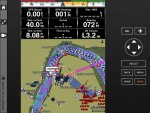
1. "Helm" is a new app (only found out about it after reading Garmin's software upgrade notes) that "ports" your MFD to the tablet. It puts a facsimile of your plotter, screen, buttons, black plastic case and all, on your tablet. Whatever appears on your chart plotter screen appears on the tablet, including in my case AIS info, and the "buttons" on the tablet have the same functionality as on the chart plotter (including cancelling the dreaded AIS alarms). For me it's exactly what I want, as I have a 557 unit at the chart table downstairs, and an iPad in the cockpit, with exactly the same functionality, positioned wherever I like. There are no Bluecharts to buy, but you must have Wi-Fi functionality (or Bluetooth, but you would need to check).

2. The older app is Blue Chart Mobile, which is a self-standing plotter app, needs Bluechart maps (oh so expensive!) but does allow you to plan a trip off-line and upload/download routes and waypoints. It does also allow you to activate routes on the chart plotter, via either Bluetooth or wifi but that is about it. It will also take the GPS feed from the chart plotter instead of relying on your tablet / smartphone.

Helm has been a long time coming, but it's the app that delivers a second MFD at close to zero cost (love it).
 
There are two Garmin apps for smartphones / tablets that have different functionality:

1. "Helm" is a new app (only found out about it after reading Garmin's software upgrade notes) that "ports" your MFD to the tablet. It puts a facsimile of your plotter, screen, buttons, black plastic case and all, on your tablet. Whatever appears on your chart plotter screen appears on the tablet, including in my case AIS info, and the "buttons" on the tablet have the same functionality as on the chart plotter (including cancelling the dreaded AIS alarms). For me it's exactly what I want, as I have a 557 unit at the chart table downstairs, and an iPad in the cockpit, with exactly the same functionality, positioned wherever I like. There are no Bluecharts to buy, but you must have Wi-Fi functionality (or Bluetooth, but you would need to check).

2. The older app is Blue Chart Mobile, which is a self-standing plotter app, needs Bluechart maps (oh so expensive!) but does allow you to plan a trip off-line and upload/download routes and waypoints. It does also allow you to activate routes on the chart plotter, via either Bluetooth or wifi but that is about it. It will also take the GPS feed from the chart plotter instead of relying on your tablet / smartphone.

Helm has been a long time coming, but it's the app that delivers a second MFD at close to zero cost (love it).

Thanks for the explanation and good news. Are you using the Garmin WIFI unit OR have you used a different method? I have an old Draytek 2850 lying about that will run on 12v, so am going to connect this up and try and get a feed into the ADSL socket from MFD or Garmin network and then run the router in bridge mode. Then I shall log the Ipad onto the Draytek WIFI network and using the "helm" app see what I can get. If anyone else has success with similar to this do share it :)
 
Last edited:
so am going to connect this up and try and get a feed into the ADSL socket from MFD or Garmin network and then run the router in bridge mode. Then I shall log the Ipad onto the Draytek WIFI network and using the "helm" app see what I can get. If anyone else has success with similar to this do share it :)

I don't think you need to feed it into the ADSL. Just connect your Garmin into one of the ethernet ports on the back of the router and set up the IP and subnet to suit those on Pat McQueens website. If your router hands out IP via DHCP to your iPad there should be no problem getting it all to talk just make sure the DHCP pool doesn't clash with any Garmin IP's which seem to all be fixed.
 
Top