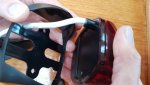
installing osculati nav lights

chubby

Well-Known Member
Joined
28 Mar 2005
Messages
1,108
Location
hampshire, uk
www.flickr.com
These look to be a sealed LED unit and supplied with two self tapping screws but no instructions! Tried to screw in the screws but the hole in the plastic is blank not pre drilled, so do you just push hard so the screw bites or pre drill a pilot hole? Tried that and it doesn`t work, so have I knackered the wiring inside with the drill, also breached the sealed unit and got bits of swarf inside? They look a good idea but some instructions might help!
 
I purchase an Osculati combined red/green bow light. Like you, I could find no fitting instructions anywhere. There are none in the box when you buy the thing, and Mr Google didn't seem to be able to help.

So, I simply screwed the supplied screws into the unit. Within a month, there was moisture inside the lens! A second unit was then fixed to the boat - this time I used shorter screws..........and this time, all was well. Don't forget to apply your choice of sealant to the screw holes! I do wish it had come with a longer cable - I had to join mine in the middle of the pulpit tubing! :(

FWIW, I though the light from the unit was way brighter than the 25W bulb fitting it replaced.
 
Same issue. This is absolutely crazy. How can they even sell these lights as sealed units when there are no instructions on how to fix other than using the two obvious routes throught the gasket and into the fitting. I've just pre-drilled pilot hole for the bottom hole and think I've gone through into the fitting. The top hole though is producing metal swarf so I stopped. Nothing at all on Osculati website. Ridiculous.

These are a widely distributed light so I can't believe more others aren't finding the same issue. What am I doing wrong?
 
If it's the Sphera range of Osculati lights, I fitted one and definitely did not have to drill or screw into the unit. As best I can recall, the stainless silver (or polycarbonate black) outer shell comes off and there's a plate at the back that can be screwed or bolted to the boat, the sealed LED unit is then held in place by the outer shell which clips back onto the back plate.
 
I fitted three. Remove bracket, screw bracket to boat, clip light unit into bracket. Before screwing, check the bracket is the right way up - the cable exit is not the same on all versions of the lights. (Now how did I come to realise that :rolleyes: )
 
Correction, I fitted two. The masthead was a Hella.

I am talking about the Osculati Sphera II. Mine are the black ones. I said nothing about a metal bracket. The black plastic housing and the sealed light unit clip apart. The black housing is the bracket and screws to the boat - in my case the bicolour is bolted to a plate and the stern light is screwed onto a wooden block. The wire threads through a hole in the housing and then through the hole which you have, hopefully, drilled in the right place. The light unit then clips into the plastic housing.
 
Thanks very much Andy. I dared to prise it harder and now see how the plastic comes off! Did yours come with instructions? Even our electrician couldn't figure it out. Now I have one unit with holes - aagghh.
 
good Afternoon, I am the tech support of Osculati,

we have discovered that for an understanding problem with the sub-contractor that makes the packaging, this instructions sheet was not included in the package. Now thanks to this chat them we have noticed, we are providing, in the meantime the instructions are available on our site since tomorrow ( PDF online)

https://www.osculati.com/en/11366-m...era-ii-a-led-fino-20-m-corpo-in-policarbonato
 
Credit where credit is due. Osculati dropped off a replacement unit to me yesterday. The lack of instructions may have caused me some aggravation and delay but their response has been textbook customer service.

For anyone else in the same situation they will no doubt find this tread or the link that is contained where Osculati are going to upload installation instructions.Sphera II sealed unit.jpg

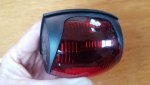
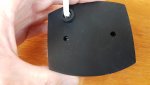
The unit looks fully sealed and the back suggests 2 positions for the self tapping screws provided.

Spera II back gasket.jpg
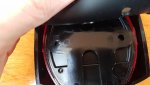
Spera II back under gasket.jpg

However the black part comes away from the unit.

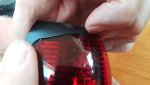
Sphera II removing bracket from lens.jpg

So that the bracket can be screwed ( preferred to through bolt to your frame or mount.

Sphera II bracket and lens separated.jpg

The units look well made and are much brighter than the previous filament type.
 
I found this thread while looking for a good quality replacement for our failed Osculati bicolour nav light. It lasted 3 years and appears to have failed due to water ingress with one green led working and all reds failed.
Any recommendations?
And no I didn't drill into it!!
 
good Afternoon, I am the tech support of Osculati,

we have discovered that for an understanding problem with the sub-contractor that makes the packaging, this instructions sheet was not included in the package. Now thanks to this chat them we have noticed, we are providing, in the meantime the instructions are available on our site since tomorrow ( PDF online)

https://www.osculati.com/en/11366-m...era-ii-a-led-fino-20-m-corpo-in-policarbonato


I could not find any instructions on that page (10 days after the post).
 
I've discovered the link Osculti provided above is the wrong one:rolleyes:.

The instructions are here: https://www.osculati.com/supplyimag...uction.pdf?itemno=11.060.05&contentrefno=FILE

You can get to the instructions from the link they previously provided, but probably only with luck and/or a lot of searching.

I PM'd Osculati Tech Support, and they sent me a different link, but still the wrong one!

The page Osculati previously posted a link to [ https://www.osculati.com/en/11366-m...vigation-lights-up-to-20-m-polycarbonate-body ] shows the whole range of Sphera II lights. The instructions are not on this page. On this page you have to go to the list of different models below the main pic and click on the number, e.g. 11.060.05 (not the picture) in the 'Item' column.

That takes you to the page for that particular model (e.g. , for 11.060.05, the bi-colour, black body model) https://www.osculati.com/en/11366-11.060.05/sphera-ii-navigation-light-bicolor-black-abs-body

The link to the instructions is on that page about half way down on the right hand side, and also accessible via the "Related Files' tab at the bottom of the page. (Note it is not in the 'Related Files' tab on the page for the whole range, linked above. :rolleyes: )
 
Top