HF Weather Fax interface to Ipad/tablet - Advice!

Slowboat35

Well-Known Member
Joined
4 Apr 2020
Messages
2,655
Visit site
There are scores of sites describing how to obtain fax via HFand just as many describing how to read the result on an ipad.
My HF receiver (Target HF3P) is excellent, my ipad with the Blackcat app hears the data via the HF3 speaker and it's audio microphone but unsurprisingly produces fuzzy results due to noise. There are many references online to delivering the data direct via cable into the 3.5mm socket which has a mic input circuit (thus avoiding the 'noisy' speaker to audio mic route) but next to no detail as to specifically what components are required.

OK, it is plain to eny fule that one connects the radio's fixed-level (3.5mm) output to the mic input of the ipad, but only with much further research does one find that that a special cable(TRS/TRSS) is needed to ratify the connections so the audio output from the radio gets to the mic input of the ipad.

But this doesn't work...the ipad still doesn't 'see' it.

I gather (from yet more hours of semi-fruitless research) that the ipad won't recognise an input as coming from a 'microphone' unless the impedance of the input is correct - ("ensuring the impedance of the output is around XXXOhms" is pretty useless advice to me unless I can find out where to solder what value of resistor - I can hack that!)
But what is totally missing on every site I've yet found is what specific components do you use to physically connect the two?

Can anyone explain specifically what components are needed to make an ipad read the audio output of a Nasa/Target HF3 P?

Anyone managed this and care to share?
 
I am not familiar with the Target but for a clear fax you need to be exactly on frequency and some receivers do not tune in small enough steps..

This is what can be achieved

 
pandos, that sounds like a hopeful lead, but I can't find the reference to an "I rig" cable in that thread - which post is it in - am I being dull?
 
pandos, that sounds like a hopeful lead, but I can't find the reference to an "I rig" cable in that thread - which post is it in - am I being dull?
I can't see it now, it may be the wrong post...? But this might be the correct trail. ADS TRADE MARKET iRig Guitar Interface for iPhone iPad & Android For Live Streaming : Amazon.co.uk: Musical Instruments & DJ
If you look in the questions below the item it is described as a cable to turn the earphone jack into a microphone input...

This accords with the Amazon link in the post I linked to which feature d a two headed adapter lead which allowed a mic and ear phones to fit into a single head phone socket.
 
There are scores of sites describing how to obtain fax via HFand just as many describing how to read the result on an ipad.
My HF receiver (Target HF3P) is excellent, my ipad with the Blackcat app hears the data via the HF3 speaker and it's audio microphone but unsurprisingly produces fuzzy results due to noise.

I found on a laptop that the mains charger must not be plugged in otherwise noise prevails.
 
Finally! Got there, with thanks to Pandos in particular.

For feeding from the HF3P or W's fixed-level output into a Mac or Ipad's mic socket the Ipad/Mac (in my case) needs to see a certain resistance across the input to 'recognise' that a mic is plugged in - otherwise it simpy doesn't 'see' the signal.
I was duped by various inaccurate reports on t'internet about TRS/TRRS converter cables and suchlike - I spent hours (and ££ on Amazon) trying this - nada.
TS/TRS/TRRS/TRRRS: Combating the misconnection epidemic by Allan Tépper - ProVideo Coalition

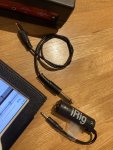
Pandos' revelation was a device called Irig, a simple and cheap inline converter that is designed to allow you to play a guitar into a computer (this allows mixing while listening on headphones) - the point is that a guitar output is electrically similar to a mic's - and the circuitry in the Irig adapts this to something the ipad/Mac can recognise as a mic input through the 3.5mm headphone/mic port.
The HF3 output is a simple mono 3,5mm plug. The Irig input is a 1/4in mono socket and the output a TRRS 3.5mm that connects to/corresponds with the mic input into the computer. What's required in between I reasoned, is a mono 3.5mm male to a 1/4in male to mimic a guitar input into the Irig.

So after all that cussing and puzzling and a total dearth of accurate info on the internet it turns out all you need is;

HF3P/W - 3,5mm mono-mono male-male (ie TS/TS) to 1/4in jack patch cable - Irig - Mac/Ipad.

Why was it so darn had to find that out?

If your gadget uses a lightning port instead of a 3.5mm mic plug then a simple 3.5mm TRRS to lightning converter goes between the Irig and the iphone/ipad.

All in all barely more than a tenner's worth of kit.

Hope this saves someone some sweat!
I can't speak for PCs or Android but I gather the inputs are easier - something to do with the way Windoze soundcards work.IMG_3978.jpg

The reciever of the HF3 is extremely sensitive and tends to bog itself down with RF noise. At home fridges, washing machines, computers, mobile devieces, mains converters, battery chargers, some LED arrays, dimmer switches all tend to create RF noise..

The next trick is to find an antenna that produces an acceptable signal:noise ratio. The 30ft wire provided is far too good at grabbing noise! I'll shift the rig to the boat now it works and develop it from there. At sea the RF environment tends to be much less noisy especially if you are willing to temporarily switch off any noisemakers on board which might be engine alternator, autopilot, instruments, charge controller, USB output etc while you need to recieve your faxes.
Fingers crossed the (insulated) backstay will do the job.

I'll refresh this page as and when I make more progress.
 
Last edited:
Finally! Got there, with thanks to Pandos in particular.

For feeding from the HF3P or W's fixed-level output into a Mac or Ipad's mic socket the Ipad/Mac (in my case) needs to see a certain resistance across the input to 'recognise' that a mic is plugged in - otherwise it simpy doesn't 'see' the signal.
I was duped by various inaccurate reports on t'internet about TRS/TRRS converter cables and suchlike - I spent hours (and ££ on Amazon) trying this - nada.
TS/TRS/TRRS/TRRRS: Combating the misconnection epidemic by Allan Tépper - ProVideo Coalition

Pandos' revelation was a device called Irig, a simple and cheap inline converter that is designed to allow you to play a guitar into a computer (this allows mixing while listening on headphones) - the point is that a guitar output is electrically similar to a mic's - and the circuitry in the Irig adapts this to something the ipad/Mac can recognise as a mic input through the 3.5mm headphone/mic port.
The HF3 output is a simple mono 3,5mm plug. The Irig input is a 1/4in mono socket and the output a TRRS 3.5mm that connects to/corresponds with the mic input into the computer. What's required in between I reasoned, is a mono 3.5mm male to a 1/4in male to mimic a guitar input into the Irig.

So after all that cussing and puzzling and a total dearth of accurate info on the internet it turns out all you need is;

HF3P/W - 3,5mm mono-mono male-male (ie TS/TS) to 1/4in jack patch cable - Irig - Mac/Ipad.

Why was it so darn had to find that out?

If your gadget uses a lightning port instead of a 3.5mm mic plug then a simple 3.5mm TRSS to lightning converter goes between the Irig and the iphone/ipad.

All in all barely more than a tenner's worth of kit.

Hope this saves someone some sweat!
I can't speak for PCs or Android but I gather the inputs are easier - something to do with the way Windoze soundcards work.View attachment 125933

The reciever of the HF3 is extremely sensitive and tends to bog itself down with RF noise. At home fridges, washing machines, computers, mobile devieces, mains converters, battery chargers, some LED arrays, dimmer switches all tend to create RF noise..

The next trick is to find an antenna that produces an acceptable signal:noise ratio. The 30ft wire provided is far too good at grabbing noise! I'll shift the rig to the boat now it works and develop it from there. At sea the RF environment tends to be much less noisy especially if you are willing to temporarily switch off any noisemakers on board which might be engine alternator, autopilot, instruments, charge controller, USB output etc while you need to recieve your faxes.
Fingers crossed the (insulated) backstay will do the job.

I'll refresh this page as and when I make more progress.
Good to hear that worked...I'll get one myself now??

My next trick is to wire up an active antenna I bought on Amazon to my unused nasa unit.

I will try this over weekend and will update on its abilities.

The pinnacle in this weather. Trickery for me is to build a QFH antenna and capture live satellite images....

How To Build a Quadrifilar Helix Antenna for Weather Satellites
 
I'll be most interested to hear how the active antenna works, although I'm getting a hefty signal the quality of the fax is still dire due, I'm sure, to poor signal/noise ratio.
 
two questions - have you earthed the Aerial? Secondly, how are you powering the radio?

I had terrible interference, but mainly on my desk at home. I was using a 230v AC to 12vDC converter but that introduced too much noise. Once I used a 12v battery it was much better. Earthing the aerial made big improvements once more.

I have it now set up on the boat and chugging away the whole time I'm aboard being recorded by SeaTTY and have perfect reception from Germany using the long wire aerial. This aerial is jubilee clipped to a bolt holding on the alloy toe rail (and by extension the stantions and guard wires)
 
Car battery and yes/no. Only earth available in the living room is on the ringmain which seems to make little diference, if anything it makes the interference worse.

So far I have only found Hamburg transmitting. Have Northwood stopped?
 
Car battery and yes/no. Only earth available in the living room is on the ring main which seems to make little difference, if anything it makes the interference worse.

So far I have only found Hamburg transmitting. Have Northwood stopped?

Do not use the ring main earth as an R.F. earth. Much better to use a copper earth rod outside. Or radiating wires buried in the lawn each tuned to an operating frequency.

Northwood are transmitting on the usual frequencies but reception may depend on your locality I use 4610 however note that with domestic receivers you need to tune to 4608 . Signal strength can vary a lot day to day as we are a bit close.
 
Northwood are transmitting on the usual frequencies but reception may depend on your locality I use 4610 however note that with domestic receivers you need to tune to 4608 . Signal strength can vary a lot day to day as we are a bit close.
Thx. I'm probably in the skip zone near Norwich.
 
Thx. I'm probably in the skip zone near Norwich.
We used to use a close frequency to 4610 in Egypt for telex and it was good at about 350 miles for much of the day. You are possibly too far for ground wave and too close for sky wave.
The 4610 is not as good as it used to be in Edinburgh.
 
I'll be most interested to hear how the active antenna works, although I'm getting a hefty signal the quality of the fax is still dire due, I'm sure, to poor signal/noise ratio.
The active antenna was a damp squib....luckily I left the power connection at home, when I opened it up to have a look I found the polarity reversed internally, but even when rewired it made no improvement over the non powered version.

I saw reference to a virtual audio cable which seems to be a piece of software that allows the audio from an sdr to be used by a program on the same tablet/PC. This might be a tidier solution
 
The active antenna was a damp squib....luckily I left the power connection at home, when I opened it up to have a look I found the polarity reversed internally, but even when rewired it made no improvement over the non powered version.

I saw reference to a virtual audio cable which seems to be a piece of software that allows the audio from an sdr to be used by a program on the same tablet/PC. This might be a tidier solution
Another option if you’ve internet is to se one of the remote access hf radio station, you can tune as needed and then use the virtual link as needed to your decoder
 
Thought it might be an option to test if you cannot get a decent signal direct, the route hf stations in many different locations world wide,
 
Top