OAF
Well-Known Member
Nick I will try my best, the update procedure for mine isn't that complicated compared to other versions of the tracvision, mine is the M2 version. there is a great website here which explains how to do it, it can be found here https://caclase.wordpress.com/ but it doesn't give you all of the information needed! so here is what I know.
You have to go in to the set up programme on the receiver and change frequency settings on the hi band and low band, and the fec code and the other code the name of which escapes me, this is for the Astra 2 satellites. I would have to go through the process on my receiver to remember the exact details, I can do this but it would be easier done over the telephone!
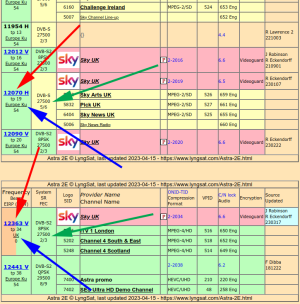
once in the set up programme you need to select the VL high band frequecy and change it to 12207 and the next one to 27500, the new FEC code is 5/6 and the next code is 0x0020
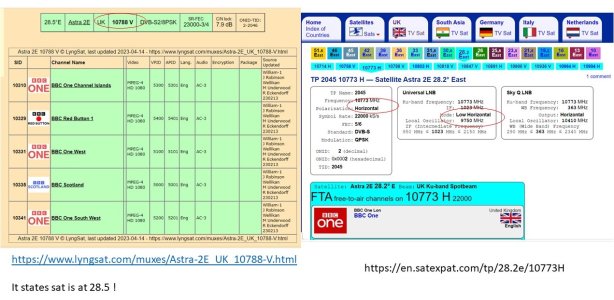
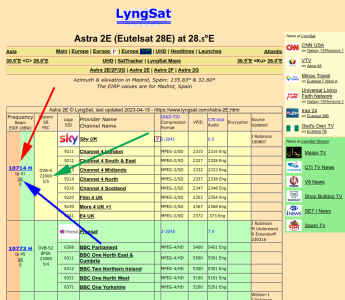
next change the VL low frequency to 10788 and the next one 22000, FEC code 5/6 and 0x0020
next change the HL high frequency to 12110, then 27500, FEC code 5/6 and 0x0020
next change the HL low frequency to 10964, then 22000, FEC code 5/6 and 0x0020
once done you should be able to receive all of the Sky and Freesat channels, to test to make sure the codes have all been inputted correctly a quick test is to see if you are receiving channel 501, this is the VL high setting, then check channel 118, this is the VL low setting, then check on channel 650 this is the HL high setting and finally channel 102 this is the HL low setting, if the receiver picks them all up then the rest of the channels should be fine.
I hope that helps, if not and you want to call me so I can talk you through it, I am on the boat tonight and most of next week.
Regards
Simon
You have to go in to the set up programme on the receiver and change frequency settings on the hi band and low band, and the fec code and the other code the name of which escapes me, this is for the Astra 2 satellites. I would have to go through the process on my receiver to remember the exact details, I can do this but it would be easier done over the telephone!
once in the set up programme you need to select the VL high band frequecy and change it to 12207 and the next one to 27500, the new FEC code is 5/6 and the next code is 0x0020
next change the VL low frequency to 10788 and the next one 22000, FEC code 5/6 and 0x0020
next change the HL high frequency to 12110, then 27500, FEC code 5/6 and 0x0020
next change the HL low frequency to 10964, then 22000, FEC code 5/6 and 0x0020
once done you should be able to receive all of the Sky and Freesat channels, to test to make sure the codes have all been inputted correctly a quick test is to see if you are receiving channel 501, this is the VL high setting, then check channel 118, this is the VL low setting, then check on channel 650 this is the HL high setting and finally channel 102 this is the HL low setting, if the receiver picks them all up then the rest of the channels should be fine.
I hope that helps, if not and you want to call me so I can talk you through it, I am on the boat tonight and most of next week.
Regards
Simon