Help needed with Tracvision issue

  • Thread starter Thread starter OAF
  • Start date Start date
Nick I will try my best, the update procedure for mine isn't that complicated compared to other versions of the tracvision, mine is the M2 version. there is a great website here which explains how to do it, it can be found here https://caclase.wordpress.com/ but it doesn't give you all of the information needed! so here is what I know.

You have to go in to the set up programme on the receiver and change frequency settings on the hi band and low band, and the fec code and the other code the name of which escapes me, this is for the Astra 2 satellites. I would have to go through the process on my receiver to remember the exact details, I can do this but it would be easier done over the telephone!
once in the set up programme you need to select the VL high band frequecy and change it to 12207 and the next one to 27500, the new FEC code is 5/6 and the next code is 0x0020
next change the VL low frequency to 10788 and the next one 22000, FEC code 5/6 and 0x0020
next change the HL high frequency to 12110, then 27500, FEC code 5/6 and 0x0020
next change the HL low frequency to 10964, then 22000, FEC code 5/6 and 0x0020

once done you should be able to receive all of the Sky and Freesat channels, to test to make sure the codes have all been inputted correctly a quick test is to see if you are receiving channel 501, this is the VL high setting, then check channel 118, this is the VL low setting, then check on channel 650 this is the HL high setting and finally channel 102 this is the HL low setting, if the receiver picks them all up then the rest of the channels should be fine.

I hope that helps, if not and you want to call me so I can talk you through it, I am on the boat tonight and most of next week.

Regards
Simon
 
Nick

Be warned.
OAF's settings for the low frequencies (10788 and 10964) are transponders that only transmit over the UK beam.
You won't receive them in the SoF.
OTOH, the High Band frequencies (12207 and 12110) are transmitted over the European Wide Beams.
See this page http://www.lyngsat.com/Astra-2E-2F-2G.html - Just below the freq in the 1st column there is a link to the footprint for that transponder.

IIRC, 12110 transponder has some special extra uses - Sky use it as an alternative "Default Transponder" (They have 4 in total) - in the past I have used 12110 to get my Sky system started - it is set in one of the Sky hidden menus.

However, I think that the procedure that OAF outlines will be useful to others setting up Trackvision systems.
It seems that Trackvision's tracking process is decoding the signal (hence the need to enter FECs and Symbol Rates)
 
Following on from my post above - regarding the Sky Default Transponder, I found that changes were made in Feb 2015.

Sky Boxes have a setting where you can select which transponder is used to carry the EPG (Electronic Program Guide).
Sky call this setting the "Default Transponder" and the "factory setting" is - freq 11778 - polarity Vertical - Symbol Rate 27500 - FEC of 2/3
Unfortunately, the Sky box has a bit of an idiosyncrasy in that it always tries to reset its Default Transponder to its factory setting.
Before Feb 2015, the Astra 2 constellation only transmitted a on a freq of 11778 over the UK beams - not over the Europe wide beams.
So it was necessary to select a different frequency for the Sky Box's Default Transponder - I successfully used 12110

In February 2015, SES Astra moved the 11778 frequency the European wide beam so Sky Boxes throughout Europe now pick up the EPG wherever they are in Europe so it now doesn't matter if the Sky Box resets its Default Transponder to the factory default.

I think I've got that correct.

Even though I use and like the Sky Box, it has been challenging to keep it working!!

Anyone saying that satellite TV on a boat is easy needs their head examined.
 
Nick I will try my best, the update procedure for mine isn't that complicated compared to other versions of the tracvision, mine is the M2 version. there is a great website here which explains how to do it, it can be found here https://caclase.wordpress.com/ but it doesn't give you all of the information needed! so here is what I know.

You have to go in to the set up programme on the receiver and change frequency settings on the hi band and low band, and the fec code and the other code the name of which escapes me, this is for the Astra 2 satellites. I would have to go through the process on my receiver to remember the exact details, I can do this but it would be easier done over the telephone!
once in the set up programme you need to select the VL high band frequecy and change it to 12207 and the next one to 27500, the new FEC code is 5/6 and the next code is 0x0020
next change the VL low frequency to 10788 and the next one 22000, FEC code 5/6 and 0x0020
next change the HL high frequency to 12110, then 27500, FEC code 5/6 and 0x0020
next change the HL low frequency to 10964, then 22000, FEC code 5/6 and 0x0020

once done you should be able to receive all of the Sky and Freesat channels, to test to make sure the codes have all been inputted correctly a quick test is to see if you are receiving channel 501, this is the VL high setting, then check channel 118, this is the VL low setting, then check on channel 650 this is the HL high setting and finally channel 102 this is the HL low setting, if the receiver picks them all up then the rest of the channels should be fine.

I hope that helps, if not and you want to call me so I can talk you through it, I am on the boat tonight and most of next week.

Regards
Simon

Thanks Simon

I'm on my boat at the end of this month so will try and use a mix of your info, the KVH manual, and the lyngsat website to see if I can get the TV working. Thanks for the offer to talk through it by phone, but without the controller in front of me I'm not sure how useful that would be. I'll see how I get on later in the month.
 
Just an update on our Tracvision problem. Whilst all the chat about transponder settings is absolutely relevant, our underlying problem was a faulty LNB. Given it's a G4 and probably 12 years old, the fault is not too surprising. The problem was slightly compounded by incorrect marking of two domes. The satellite dish was hidden under a dome marked "Tracphone" whilst the G4 dome was, in fact a dummy! I suspect they were installed in Taiwan so perhaps it was a language problem!
 
Only adding for future reference given my post today and bit of searching whilst watching MoTD. Some great info here
 
Following on from my post above - regarding the Sky Default Transponder, I found that changes were made in Feb 2015.

Sky Boxes have a setting where you can select which transponder is used to carry the EPG (Electronic Program Guide).
Sky call this setting the "Default Transponder" and the "factory setting" is - freq 11778 - polarity Vertical - Symbol Rate 27500 - FEC of 2/3
Unfortunately, the Sky box has a bit of an idiosyncrasy in that it always tries to reset its Default Transponder to its factory setting.
Before Feb 2015, the Astra 2 constellation only transmitted a on a freq of 11778 over the UK beams - not over the Europe wide beams.
So it was necessary to select a different frequency for the Sky Box's Default Transponder - I successfully used 12110

In February 2015, SES Astra moved the 11778 frequency the European wide beam so Sky Boxes throughout Europe now pick up the EPG wherever they are in Europe so it now doesn't matter if the Sky Box resets its Default Transponder to the factory default.

I think I've got that correct.

Even though I use and like the Sky Box, it has been challenging to keep it working!!

Anyone saying that satellite TV on a boat is easy needs their head examined.

Wondered if there was any further advice based on info in this thread (last post in 2015) and the retirement of Astra 2d and 3a in January 2023. Given i have had problems since February '23 (thinking i was tracking 2d) and have checked my GPS link is now on but doesn't appear to affect the reception so will aim to reset the satellite tracking. I can track 3 satellites altogether but i'll start with one!

Ive found this info out but as im new to this area, wondered if ive misunderstood or should still try the data in this thread ? Plan is to go to boat at weekend armed with necessary info

Astra 2E 28.2E
Ku band (Spotbeam)
TP name: 2045
TP Frequency 10773
TP parameters (H) 22000 IF Universal LNB 1023MHz Low 9.75GHz High 10.6GHz
? 230317

Freesat - Frequency and channel list - Astra 2 UK Spotbeam and Astra 2 European Beam

TIA simon
 
Intellian i2 Tracking issue

So ive opened the instruction manual and had a go at changing things as I cant make them any worse !!

Intellian.jpg
Intellian i1.jpg
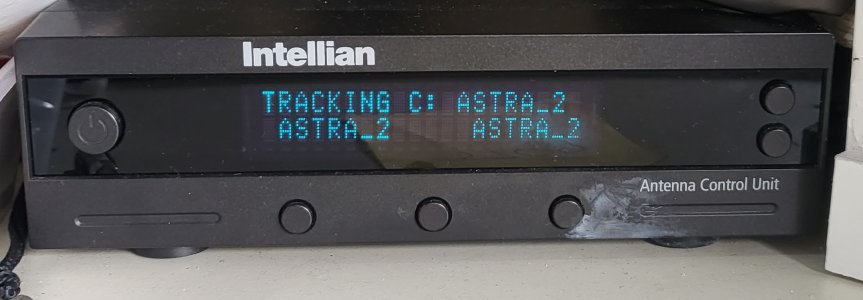
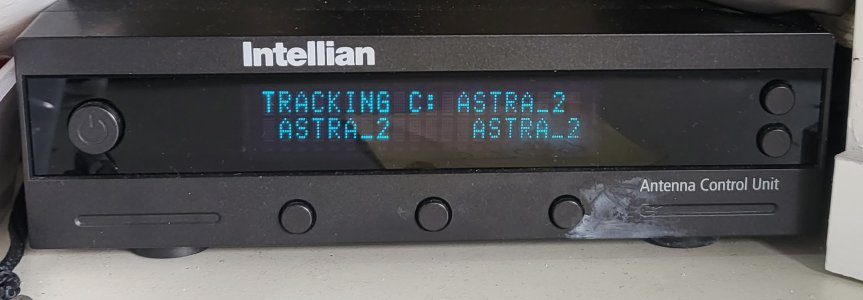
The photo shows how it was before I started and it was logged on to Astra 2 on the 3 satellite choices of A, B, C. Quickly learnt how to programme A- Astra 2E, B-Astra 1 and C-Astra 3. In England I know the main sat is Astra 2E at 28.2E.

Appears Astra-2 was 28.2 was programmed on all A,B,C options just not named on the LED display properly.

The GPS coordinates is updated by the boats GPS so I don’t have to input this.

The problem I appear to have is knowing these data (in brackets is what I used from this thread above):

  • Vertical low frequency band and symbol rate and Network ID 10788, 2200, 0x0020
  • Horizontal Low & SR & NID (10964, 2200, 0x0020)
  • Vert High & SR & NID (12207, 27500, 0x0020)
  • Hor High & SR & NID (12110, 27500, 0x0020)
I don’t seem to have a FEC code input.

Defaults for Verification Method is DVB Decode (options – SIGNAL, DVB Lock, DVB Decode, DSS Decode and AGC After Decode)

And for DISEQC method is Auto (options- Auto, Only 0 KHz to LNB, Only 22 KHz to LNB)

Ive looked on some of the sites such as Lyngsat and Satexpat where the NID has been mentioned of being 2, and SR as 23000 as well as, what I think is the Hor Low at 10714 an the High 12382. FEC codes have been cited as 5/6 or 3/4.

I entered the above parameters and made no difference to the on/ off track/search but did affect the channel picked up esp with no BBC. I saw BBC1 is Hor Low of 10773 and SR 22000 but not sure what to alter the other sections to.

Any advice on what values I should use for the above would be really appreciated.

Many thanks
 

Attachments

  • Intellian i1.jpg
    Intellian i1.jpg
    361.6 KB · Views: 2
  • Intellian.jpg
    Intellian.jpg
    326.7 KB · Views: 2
I'm no expert but this is how I understand it.

The first thing to realise is that it isn't (per se) the name of the satellite so much as where it is in the sky.
Then you need to look at the beam that the satellites transmit - for the UK, you would use the UK Beam
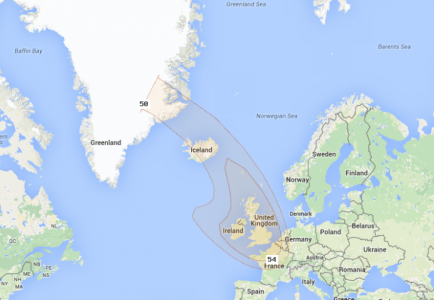
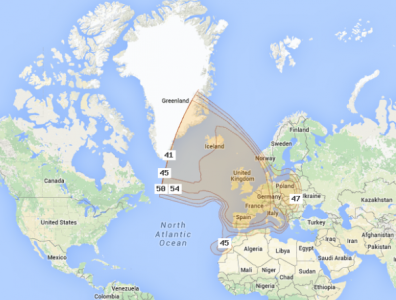
Here is a graphical image of the UK Spot Beam.

Screenshot_2023-04-16_15-48-10.png

For me, in the Med, a beam like that is totally useless - so I now use 3G/4G
But back to the point.

The Intellian system stores a number of satellite parameters but only uses two satellites on its front menu.
You then select one of those two satellites as the one you are working with - in this case you would have a set of settings that you call Astra 2.

I suggest that you manually enter your current long/lat.

I suggest that you switch off DISEQC - this is used by a satellite TV set top box to tell the satellite dish to move to a particular satellite constellation.
On the Intellian, I thought that there is an off parameter for DISEQC.

The next thing to realise is that Satellite signals from the Astra constellation send over frequencies that are either vertically or horizontally polarised.
Which means that a frequency of x can be either horizontally or vertically polarised.
On Astra, they interleave the frequencies so that every other one is horizontally polarised interleaved with every other one being vertically polarised.
Additionally, on the Astra Constellation, there are two bands of frequencies - a Sat TV Box (Sky Box) outputs a signal to switch from the lower band to the higher band.
Each frequency can carry a number of TV channels - typically 6 but many more if just audio is required.
The "symbol rate" mentioned above is used to decode the digital signals.
To decode, you also need to know the FEC rates and whether the signal is transmitted 2/3, 3/4 or 5/6
All this information is available here:
Astra 2E at 28.5°E - LyngSat
Once decoded, the Network ID is available - in the case of Astra, the network ID is 0020 so once set, you won't have to change this.

Now to the Intellian system itself.
For a particular satellite, the controller needs to be set up with all 4 of the parameters:-
That is, a frequency for Horizontal Low Band - a frequency for Vertical Low Band - a frequency for Horizontal High Band and finally a frequency for Vertical High Band.
To do this, you choose 4 frequencies from the above (and this) link Astra 2E at 28.5°E - LyngSat
Choose frequencies that are being transmitted over your footprint (in your case the UK Spot Beam) - see above.
I will take a stab at some frequencies to enter - but these are just a starting point - you may have to play around a bit.
Horizontal Low - 10714 use 22000 5/6
Vertical Low - 10818 use 2300 3/4
Horizontal High - 12070 use 27500 5/6
Vertical High - 12363 use 27500 2/3

The idea is that the Intellian system will now use those frequencies to obtain a signal.
But you also need to tell it how to receive the signals.
This is done by setting the verification method to either "Signal Strength" or various modes of actually decoding the signal.
In other words, if it can decode the signal, it can lock onto it.
Signal strength isn't much good because it could lock onto a completely wrong satellite.
This is where the Network ID comes in - if it can actually decode a signal and find that the ID is 00200, then it has found the Astra 2 constellation.

It should be easy to set this up for the UK because the satellite signals are strong.
In my area, we have a strong Eurobeam footprint but the channels that are broadcast over Eqrobeam aren't anything that we want to watch.
So, my system (a 60cm dish) is now redundant - 4G is the way to go for me.
But I hope the above helps you.

Please let us know if you have been successful - and maybe correct some of my post for others with similar problems.
Good luck.
 
I'm no expert but this is how I understand it.

The first thing to realise is that it isn't (per se) the name of the satellite so much as where it is in the sky.
Then you need to look at the beam that the satellites transmit - for the UK, you would use the UK Beam
Here is a graphical image of the UK Spot Beam.

View attachment 155005

For me, in the Med, a beam like that is totally useless - so I now use 3G/4G
But back to the point.

The Intellian system stores a number of satellite parameters but only uses two satellites on its front menu.
You then select one of those two satellites as the one you are working with - in this case you would have a set of settings that you call Astra 2.

I suggest that you manually enter your current long/lat.

I suggest that you switch off DISEQC - this is used by a satellite TV set top box to tell the satellite dish to move to a particular satellite constellation.
On the Intellian, I thought that there is an off parameter for DISEQC.

The next thing to realise is that Satellite signals from the Astra constellation send over frequencies that are either vertically or horizontally polarised.
Which means that a frequency of x can be either horizontally or vertically polarised.
On Astra, they interleave the frequencies so that every other one is horizontally polarised interleaved with every other one being vertically polarised.
Additionally, on the Astra Constellation, there are two bands of frequencies - a Sat TV Box (Sky Box) outputs a signal to switch from the lower band to the higher band.
Each frequency can carry a number of TV channels - typically 6 but many more if just audio is required.
The "symbol rate" mentioned above is used to decode the digital signals.
To decode, you also need to know the FEC rates and whether the signal is transmitted 2/3, 3/4 or 5/6
All this information is available here:
Astra 2E at 28.5°E - LyngSat
Once decoded, the Network ID is available - in the case of Astra, the network ID is 0020 so once set, you won't have to change this.

Now to the Intellian system itself.
For a particular satellite, the controller needs to be set up with all 4 of the parameters:-
That is, a frequency for Horizontal Low Band - a frequency for Vertical Low Band - a frequency for Horizontal High Band and finally a frequency for Vertical High Band.
To do this, you choose 4 frequencies from the above (and this) link Astra 2E at 28.5°E - LyngSat
Choose frequencies that are being transmitted over your footprint (in your case the UK Spot Beam) - see above.
I will take a stab at some frequencies to enter - but these are just a starting point - you may have to play around a bit.
Horizontal Low - 10714 use 22000 5/6
Vertical Low - 10818 use 2300 3/4
Horizontal High - 12070 use 27500 5/6
Vertical High - 12363 use 27500 2/3

The idea is that the Intellian system will now use those frequencies to obtain a signal.
But you also need to tell it how to receive the signals.
This is done by setting the verification method to either "Signal Strength" or various modes of actually decoding the signal.
In other words, if it can decode the signal, it can lock onto it.
Signal strength isn't much good because it could lock onto a completely wrong satellite.
This is where the Network ID comes in - if it can actually decode a signal and find that the ID is 00200, then it has found the Astra 2 constellation.

It should be easy to set this up for the UK because the satellite signals are strong.
In my area, we have a strong Eurobeam footprint but the channels that are broadcast over Eqrobeam aren't anything that we want to watch.
So, my system (a 60cm dish) is now redundant - 4G is the way to go for me.
But I hope the above helps you.

Please let us know if you have been successful - and maybe correct some of my post for others with similar problems.
Good luck.

Hurricane
Thx again for answering.

I had noted from some googling this morning that the hexadecimal is wrong; should be 0x0002 rather than 0x0020; no idea whether this is important

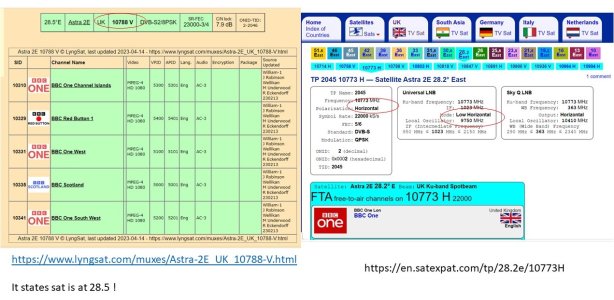
Now im guessing from the right pic below that the frequency of 10773 is Horiz Low ?! But where do you get the other frequencies?
There is a 9750 circled, what is this one?

The left pic was your link. Interestingly it states Astra2E is at 28.5 deg. How do you know the band for Horiz/Vertical detail for frequency 10788?

Above you took a stab at the 4 frequencies; how were you guided in this ?

Astra2e.JPG


Google of Universal LNB tells me it stands for Low-Noise Block converter and is a dish head which converts microwave signals from satellites into a signal that is understandable to the digital box. A universal LNB head receives both polarisations (horizontal and vertical) and the full range of frequencies in the satellite's Ku band.
Not sure how LNB relates to me, guess it does, whereas Sky Q LNB doesnt as im not using sky box.
Ill check DISEQC again manual im checking with now does state no OFF option.

I do sincerely appreciate being educated on this

Many thanks
simon
 
Forget your research on the LNB - that is just the hardware (part of the system) - nothing to set up on the LNB (except maybe skew but I don't think that is your problem)

Yes, you are correct - the Astra 2 constellation's network ID is 0002 (same as 0x0002) - sorry for the confusion, I was working from memory.

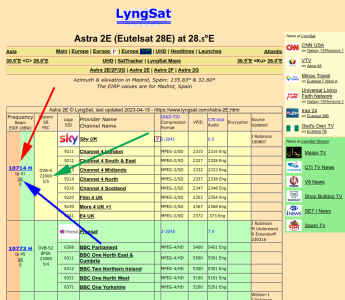
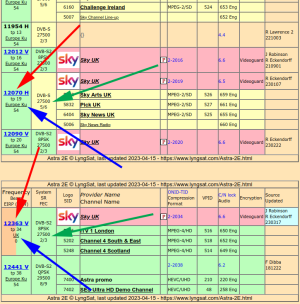
This is where I got the frequencies from - Horizontal Low
This page Astra 2E at 28.5°E - LyngSat )

1.png

The red arrow is the Frequency (H for horizontal)
The green arrow is the FEC and 5/6 etc
Note if you click the little UK (link) that the blue arrow is pointing to, you will go to the display of that transponder's footprint.

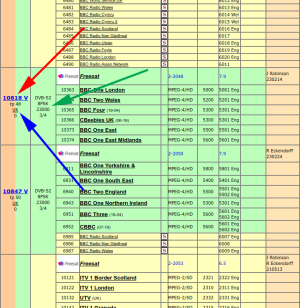
Likewise for Vertical Low

2.png

I can't remember where Low Band Frequencies become High Band Frequencies.
This is where a signal is output to the LNB to make it receive higher frequencies. I believe that, internally, the receiver uses the same IF frequencies when receiving Low and High bands but by outputting a signal to switch from Low to High, it gets a whole new band of frequencies. But you don't need to worry about that - just think of it as Low and High bands.
So, when writing my previous post, I chose some frequencies at the other end of that Lingsat link.

These are the ones that I chose

3.png

Note that I made a small mistake for the 12070 H settings.
That transponder's footprint is actually the big Eurobeam but it shouldn't make a difference.
Here is the Eurobeam footprint:-

4.png

Now to an interesting point.
We are only trying to get the Intellian system to run which only needs to receive a signal for Horizontal and Vertical.
You COULD make the High band frequencies the same as the Low band ones and "fool" the Intellian receiver into thinking that they are actually High band frequencies.
I believe that it only needs a signal so it shouldn't matter if you just give it the Low band ones again.
So your setup could end up like this:-

Horizontal Low - 10714 use 22000 5/6
Vertical Low - 10818 use 2300 3/4
Horizontal High - 10714 use 22000 5/6
Vertical High - 10818 use 2300 3/4

If you understand me correctly.

In the past, I have I played with Verification Method.
I tried using just "Signal" but it sometimes found Eutalsat at 13 degrees
I think you will need to set it to DVB Decode so that it searches for (and tracks) a Network ID of 0x0002

As I say, I am no expert - this is just stuff that I've picked up over the years and some of it might be wrong.
Please keep posting so that others can learn from this conversation.
 
UPDATE

Been playing around with things


So NID needs to be 0020 (as was stated by Hurricane in thread) and not 0002 (on satellite websites!)

Astra-2E 28.2 E (this transmits 10.7 – 12.7 GHz so ive entered these for low/high)

The SR needs low at 22000 and high at 27500

GPS coordinates updated by the boats GPS
  • Vertical low frequency band and symbol rate and Network ID (10700, 22000, 0x0020)
  • Horizontal Low & SR & NID (10700, 22000, 0x0020)
  • Vert High & SR & NID (12700, 27500, 0x0020)
  • Horiz High & SR & NID (12700, 27500, 0x0020)
  • Verification Method is DVB Decode
  • DISEQC method needs to be 22KHz (if Auto or 0 loses Tracking) (advised to set to 22KHz)
It now searches and locks on to Astra2 and tracks without dropping out.

When it tracks it doesn’t find the normal free channels; just limited to these specific ones: Ch4 HD, ITV HD, Dave, Drama, W, Yesterday, Challenge, Sky Intro

It tracks loads of Sky channels, Virgin and MTV but all scrambled for obvious reasons but it still finds them.

So; cant quite figure out why it cant track the Free channels such as BBC and ITV.

The Tracking is now sorted (this was my initial concern so when planning and hitting waves it wont damage the dish (gimble) and clearly the unit works fine but why is it struggling with the missing channels?

Is it a Decoder box issue as is about 2014 although it clearly works; are there some new parameters - i see the FEC5/6 mentioned but mine doesnt mention this

Any thoughts appreciated. Cheers
 
Ok so I might be getting somewhere. Despite numerous retunes with no success I've been advised I might now need a freesat box for the free channels such as bbc1.
Any suggestions ?
Many thx
 
Ok so I might be getting somewhere. Despite numerous retunes with no success I've been advised I might now need a freesat box for the free channels such as bbc1.
Any suggestions ?
Many thx
We use a Freesat box at home - worth having anyway.

I've just read your #33 post.
I must have missed it when I was last out on the boat.

Yep - that is the great thing about the Intellien system.
You don't need a set top box for the system to track the satellites.
So, if your your Intellian Satellite system its indicating that it is "Tracking", then it is working fine.
It is just the receiver (Sky box) that isn't working.
I guess you don't have a Sky subscription which is why you aren't getting some of the channels.
Years ago, Sky insisted that you had to have a card inserted to receive some of the free to air transmissions - even if you didn't have a subscription.
This may be your problem - you used to be able to buy a card (IIRC, it was a one off fee) to get the free to air channels.

But a Freesat box would be a better option - as I say, we use our Freesat box at home all the time.
Just buy it (no subscription) and it should work - fingers crossed - very often things aren't that simple - but thats probably what I would do in your situation.

Good luck.
 
My update and further question
This links into this post from 2023 but this thread appears more technical to continue on - Intellian sat receiver

So i had Sat experts in Swanwick fix (general overhaul) my Intellian i2 system at some cost (!) and not to the pre2023 transmission coverage (satellite transmissions changed) and found some issues with cabling of my installation (fitted before i bought the boat). The result was great and continued last year but stopped working again this summer have lost sat tracking. Appears satellite companies have changed things again around March 2025.

Im aware there was a recent thread here on removing sat TVs and have considered that for end of season but it must be able to still receive some channels (i actually like for BBC news etc or brief viewing AND yes i do have Firestick for streaming). Anyway been playing around with the system today myself and found some changes when going through the various ACU (antenna control unit) pages to modify sat info.

-Astra E sat at 28.2 E (remains)
-LAT/LONG (remains linked to chart plotter)

-However, the 4 vertical low, horizontal low, vertical high and horizontal high frequency bands have changed to just 2 bands - VER/RHCP (vertical) and HOR/LHCP (horizontal).
Googling these didnt find a definitive answer but a variety of frequencies but where to start, and go with the various combinations needed!!

I tried various "numbers" and had success with:
VER - 12,168 S/R 27,500 and NID 0020
HOR - 11,778 S/R 23,000 and NID 0020

-DVB decode (remains)
-Voltage - AUTO (remains)
-DISEQC - AUTO (changed)

This achieved about 100 TV channels many being foreign but had about 20 English languages and some of value to me some ITV and ITV (HD) - didnt have chance to write them all down.

It also achieved a SIGNAL strength of 228 with the magic BLACK BALL icon next to it. Whilst occasionally the TRACKING dropped to SEARCHING this was minimal.

Just thought i'd post for others (as i forgot in 2023!) and will work on other frequencies but wondered if anyone has had better success or whose ACU TRACKs well and maybe you can check what settings are working for you.

TIA
Bluetooth
 
Top