Garmin transducer

Mccraci

Active Member
Joined
7 Aug 2022
Messages
46
Visit site
Hi
I have a Garmin GPS with a Gt50M transducer, I have tried to calibrate the compass, but following the instructions it only goes as far as selecting the transducer and there is no further options. Does this mean that there is no compass. The big issue is that when the boat stop's it looses its orintation.
Thanks any help much appreciated.
 
Garmin GPS (plotter screen, I presume you mean) has no compass so it doesn't know heading. It can calculate your heading by GPS interpolation as you move along, but not when you're stopped.

GT50 is a depth sounder transducer. It won't help you with heading.

If you want heading when stopped, it's easiest to look at your magnetic compass. but if you want it displayed on your chartplotter screen then you need a heading sensor. These come as part of the kit with an autopilot, but if you don't have an autopilot then you need a heading sensor. Assuming you have NMEA2000 (you don't say...) then you need this SteadyCast Heading Sensor | Garmin which will give you magnetic, or if you want to go to town then this rather expensive beast will give you true heading (from GPS)
Garmin MSC™ 10 | Marine Satellite Compass

If you have nmea0183 rather than nmea2000 then google the equivalents for nmea0183
 
Last edited:
Thanks
That is the issue, when fishing a mark as soon as the boat stops the position of the mark is lost to the orintation of the boat on the the GPS screen.
Can you expand on the autopilot option, as I have an autopilot which gives a heading on its display but nothing on the Garmin screen??
 
There's an autohelm function on the Garmin Echomap but is hidden unless the autopilot is plugged in. You can see it on the simulator setting which I guess is so it can't be activated and expected to function if it's not fitted. It does have a seperate compass page, but can't remember if this is heading or orientation. Must admit the orientation of the boat has never been an issue for me.
 
Thanks
That is the issue, when fishing a mark as soon as the boat stops the position of the mark is lost to the orintation of the boat on the the GPS screen.
Can you expand on the autopilot option, as I have an autopilot which gives a heading on its display but nothing on the Garmin screen??
What autopilot do you have ?
 
Thanks
That is the issue, when fishing a mark as soon as the boat stops the position of the mark is lost to the orintation of the boat on the the GPS screen.
Can you expand on the autopilot option, as I have an autopilot which gives a heading on its display but nothing on the Garmin screen??
Can I expand? Howsabout you expanding? It's really hard to help you when you provide such little info. Tell us the exact model number of everything then we can tell you how to connect it.

Your autopilot knows the boat's heading even when stopped, so all you need to do is connect the autopilot to the Garmin screen (if nmea0183) or to the N2k backbone (if you're using n2k), and it will work. You might need to adjust a few settings on the nmea0183-in port using the settings menu on the Garmin screen, if you're even using nmea0183, which no-one knows from the sparse information you are drip feeding out.. With n2k, it will plug and play.
 
Hi
The autopilot is a Raymarine ST6001 Plus.
The Garmin echomap is 93sv and it has a Nmea 2000 plug in the back panel.
 
ST6001 is a control head, not an autopilot computer. If you look under the dash, you will find the actual autopilot brains in a grey box, and I'm going to assume its a 150/400 unit like this, because that's a popular one of the same generation, and I can't do anything but guess.

Unscrew the terminal cover of the grey box and find "NMEA Output #1" pair of terminals. That transmits Heading, I think at 10Hz (which is good). Connect a pair of light weight wires to the two terminals, ideally black for the negative or ground, and brown for the positive or data (so that you use the colouring that Garmin use).

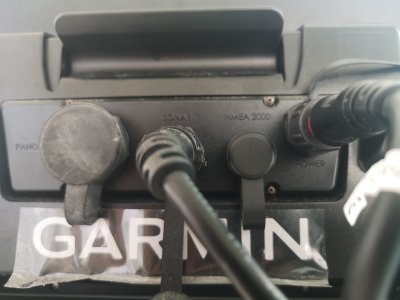
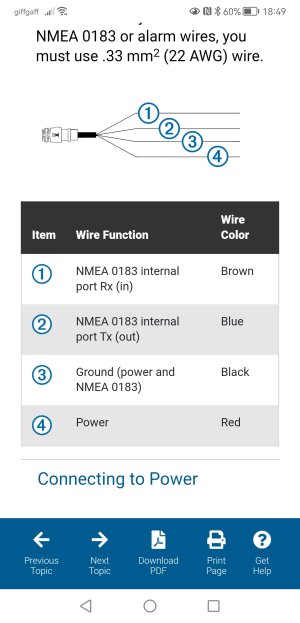
Other end of this pair of wires should be connected to NMEA0183 input on your Garmin 93SV. This means connecting to the brown and black cores in the multicore 12v power cable at the back of the Garmin 93SV. This page from Garmin manual shows these cables that you must connect to.

It's that simple: a pair of lightweight wires connecting your Raymarine grey box autopilot computer to your Garmin 93.

I think you then need to go into settings/communications in the Garmin menu, to tell the Garmin to receive nmea0183 data. I hope this will be obvious, but you might need to tell it (a) to receive nmea0183 (b) to receive at 10Hz baud rate, and (c) that it should be receiving Heading (which might be abbreviated to HDM, HDT or HDG. I'm guessing here - you will have to hope it is obvious, or google it, or screenshot it and ask here. The Garmin manual page is here.

Then heading will show on the Garmin screen.

You won't be using the NMEA2000 socket on the back of the Garmin in any of this.
 
Last edited:
Thanks
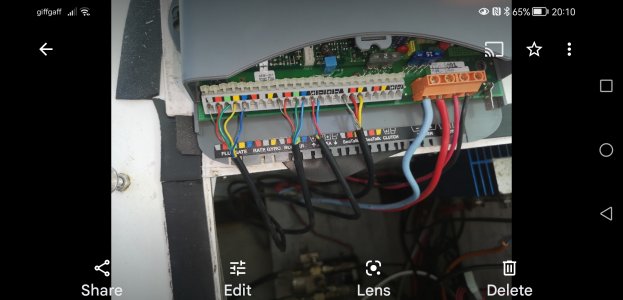
I took these today
One the the rear of the Garmin and the the outer is the controller.
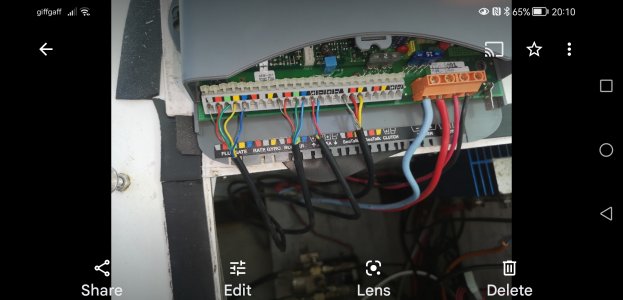
The NMEA wires are attached to the data in terminals ( red and blue) do the new wires go to the other to terminal points marked with the arrow out.
If so where do they attach at.


IMG_20230504_130110.jpgScreenshot_20230504_201018_com.google.android.apps.photos.jpg
 
Two wires connect from NMEA out on the autopilot to the NMEA in on the plotter. The plotter power cable has the NMEA wires in it.

Connect the NMEA out + on the autopilot to the brown wire on the plotter.
Connect the NMEA - on the autopilot to the black wire on the plotter power cable (this will also be connected to 12v negative).
 
Two wires connect from NMEA out on the autopilot to the NMEA in on the plotter. The plotter power cable has the NMEA wires in it.

Connect the NMEA out + on the autopilot to the brown wire on the plotter.
Connect the NMEA - on the autopilot to the black wire on the plotter power cable (this will also be connected to 12v negative).
100% .

Ignore and don't touch the red/blue NMEA in. Concentrate only on the unused pair of NMEA output (arrow outwards) terminals in your Raymarine picture. Run a pair of wires from those 2 terminals, and connect to the Garmin brown+black

The brown and black inputs to the Garmin are located within the fat black lead that is at the far right of your photo of the Garmin. Follow that lead till you get to the end of the black sheath and you will find an unused brown that you connect the Raymarine "output +" to, and a used black that you additionally connect/splice the Raymarine "output -" to.

This is what the Garmin 12v power cable looks like. You're connecting to the black (that is already in use. so you're adding an additional connection to it) and to the brown (its brown/white in the picture). Ignore all the others.
Garmin NMEA 0183 Power Cable
 
Last edited:
He has no N2k network so he would need to build a small network. 3 Tees, 2 terminators, some short cables, and a power supply, plus the heading sensor. >£100. All doable, but surely easier to spend 20p and just connect two wires as described above.
 
Jfm
If you buy this steadycast does just into the Nmea2000 port or do you need a separate power supply.
Looking on line the info appears to suggest you need to set up a backbone with a separate power supply.
 
Jfm
If you buy this steadycast does just into the Nmea2000 port or do you need a separate power supply.
Looking on line the info appears to suggest you need to set up a backbone with a separate power supply.
All you need to do is follow posts #10 or #11, nothing extra to buy except a bit of wire.
 
100% agree with Paul R. There is no sense in buying the Steadycast I only mentioned it at a point in this thread where you had provided almost no useful info and expected us all to be mind readers, which you are still doing now to some extent.

But if you do crazily buy the steadycast then yes you will need to build a mini backbone in order to feed power to it; you cannot just plug it into the N2K socket on your Garmin plotter because the Garmin won't provide power to the Steadycast.

You have a zero cost solution in posts 10+11, which fixes your problem in less time than making a post on here.
 
Last edited:
Ok I wired in today and it all worked fine at a cost of a 5 foot piece of wire.
Thanks to you all for the help. It's not that held back on the info, I am new to all of this and have only a limited knowledge.
👍
 
Hi
I was tidying up the wires today and got a bit unsure.
Am I right to say that :-
The Blue wire coming from the GPS chart plotter, " as shown in wiring picture" connects to red wire going to the NMEA input terminal, as seen in photo of the computer.
Screenshot_20230511_184937_com.android.chrome.jpg
Screenshot_20230504_201018_com.google.android.apps.photos.jpg
 
Top