Free chart-plotting/AIS programmes for Toughbook

Tim O

Well-Known Member
Joined
3 Jan 2010
Messages
582
Visit site
I was running an old version of OpenCPN on my Panasonic Toughbook touchscreen CF28 connecting to a wireless GPS dongle via Bluetooth. Im never quite sure how reliable this connection is and would prefer a wired connection in some ways

When I upgraded to latest OpenCPN version it now won't initialise the programme...have tried uninstalling and re-installing twice and no luck.

So, what I am wondering is if there is another...better?...free plotting programme which might work (or I suppose any suggestions to try to get OpenCPN working again!)

The laptop is quite old and running on Windows XP.

I'd also like to add a "plug and play" AIS USB antenna if possible...oe even better is there such a thing as a combined GPS/AIS antenna (or engine or whatever it should be called!)?

Basically Id like a simple to set up and cheap system that would be independent of my main chartplotter (Lowrance). There is no AIS currently on board.

Suggestions gratefully received
 
Are you saying that OpenCPN won't initialise after the upgrade?

Are you using the Toughbook for anything else? If it were me, I'd follow the lead of corporate IT departments everywhere and just re-install Windows XP and re-load the applications I want. Of course, you have to make sure you can re-load all the programs you'll want before starting the re-install.
 
Yes. When i try to open OpenCPN it says in a pop-up .
",the application failed to initialise"

The only other programme have put on is MS Office.

I wouldn't have a clue (or a disc) how to install Windows XP!!!
 
I'm not sure that the current version of OCPN is backward compatible to XP.
You might have to use an older version or buy a more modern laptop!

ps
No, looks like it is ok
Stable Release 4.4.0:

The latest stable release of OpenCPN (as of 13 June, 2016) is 4.4.0
OpenCPN 4.4.0 for Windows® XP SP3/Vista/7/8/8.1/10

Have you got XP ServicePack 3 installed?
 
Last edited:
I was running an old version of OpenCPN on my Panasonic Toughbook touchscreen CF28 connecting to a wireless GPS dongle via Bluetooth. Im never quite sure how reliable this connection is and would prefer a wired connection in some ways

When I upgraded to latest OpenCPN version it now won't initialise the programme...have tried uninstalling and re-installing twice and no luck.

So, what I am wondering is if there is another...better?...free plotting programme which might work (or I suppose any suggestions to try to get OpenCPN working again!)

The laptop is quite old and running on Windows XP.

I'd also like to add a "plug and play" AIS USB antenna if possible...oe even better is there such a thing as a combined GPS/AIS antenna (or engine or whatever it should be called!)?

Basically Id like a simple to set up and cheap system that would be independent of my main chartplotter (Lowrance). There is no AIS currently on board.

Suggestions gratefully received

Use Opening it will work on your laptop. Sounds like a memory issue. Try removing (unistall) opencpn, delete the xp paging file and reinstall. If this sounds like Chinese to you then perhaps you need to invest is a more modern laptop.

Also most up to date AIs units can be made to work on XP but most likely they will not be plug and play
 
Last edited:
Wired GPS and AIS would, IMO, be a backwards step. I'd be looking at a wireless AIS/GPS solution.

Might be time for a laptop update too, or even a new tablet (which you can get for around £100).
 
I'm not sure that the current version of OCPN is backward compatible to XP.
You might have to use an older version or buy a more modern laptop!

ps
No, looks like it is ok
Stable Release 4.4.0:

The latest stable release of OpenCPN (as of 13 June, 2016) is 4.4.0
OpenCPN 4.4.0 for Windows® XP SP3/Vista/7/8/8.1/10

Have you got XP ServicePack 3 installed?

Ah...... I'm not sure, will check this evening!

If I used an older version, wouldn't it be out of date with regard to chart updates?
 
Wired GPS and AIS would, IMO, be a backwards step. I'd be looking at a wireless AIS/GPS solution.

Might be time for a laptop update too, or even a new tablet (which you can get for around £100).

You may be right I actually do have both a more modern laptop (lenovo Idea pad z585 running Windows 7) and a Hudl 2 tablet

But the idea of the Tough book was the robustness and the fact it can sit up in the cockpit much of the time....but yrs it is becoming outdated I guess
 
I'm confused now! I bought the Tough book with OpenCPN preinstalled with loads of charts....I assumed they were all part of the programme!!!

No, they are not part of OpenCPN Tim, most likely CN93 charts, which will be several years old. So, whichever version of OpenCPN you use, you will be using the same charts. I'd be wary of using them for navigation though, depending on where you are of course.
 
The most likely cause of OCPNs failure to initialise on the Toughbook you have is the graphics capability of the hardware. OCPN now (from about v4 on) has a dependency on accelerated graphics (OpenGL) which isnt supported by the display hardware on older Toughbooks. The chart package you bought is most unlikely to be CM93 based, much more likely to be a raster based set similar to those sold by VisitMyHarbour - there was (is?) a London based company selling Toughbooks packaged with OCPN and that sort of chart set.

For those based outside the US, where NOAA makes electronic charts free, the achilles heel of OCPN is charts. In the UK, VisitMyHarbour were providing a Windows only set of charts based on the Admiralty raster set with a scope restricted to UK waters (and some Channel/North Sea ?).

There are solutions to what youre trying to do but not with your current hardware. OCPN is still a very good plotter package, partly because it is actively updated. I'm not aware of a simple AIS solution packaged as a USB 'puck' but there are a number of AIS devices with a USB NMEA output that OCPN can use - & OCPNs AIS handling is really very good.
 
Last edited:
The most likely cause of OCPNs failure to initialise on the Toughbook you have is the graphics capability of the hardware. OCPN now (from about v4 on) has a dependency on accelerated graphics (OpenGL) which isnt supported by the display hardware on older Toughbooks. .
Not actually dependent, you can turn OpenGL off in the display /advanced menu. Or if you can't get it to boot up then edit the line in Opencpn.conf to "openGL=0" , can't remember where that file is on Windows, in .appdocuments maybe? Or the About menu button should tell you.
 
Not actually dependent, you can turn OpenGL off in the display /advanced menu. Or if you can't get it to boot up then edit the line in Opencpn.conf to "openGL=0" , can't remember where that file is on Windows, in .appdocuments maybe? Or the About menu button should tell you.

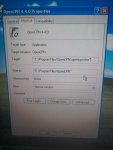
Or just right click on the OpenCPN shortcut icon on the desktop or start menu and click "Properties" then look at the command line and check it says

C:\OpenCPN\opencpn.exe /no_opengl

If it does not have no_opengl at the end then just type it and apply/save the new config.

Richard
 
Not actually dependent, you can turn OpenGL off in the display /advanced menu. Or if you can't get it to boot up then edit the line in Opencpn.conf to "openGL=0" , can't remember where that file is on Windows, in .appdocuments maybe? Or the About menu button should tell you.

Thanks - had forgotten that, I use O with the Navico radar plugin which does depend on OpenGL now.

So, RichardS' solution above should get the OP going to the point where he can use the OCPN menus. I think the conf file is usually in the root directory, ie C:\, in XP (or maybe thats just older versions of O) but the easiest way is to follow the pointer in About (thats the book with ? symbol in the menu bar).
 
VisitMyHarbour were providing a Windows only set of charts based on the Admiralty raster set with a scope restricted to UK waters (and some Channel/North Sea ?)

VMH charts cover the UK and the channel, from about Zebrugge to Brest. The version i have runs on Windows and Android (only with the Marine navigator app). AIS works fine with Windows, as you say, doesn't work with the Android app.

My laptop and tablet can both receive GPS, AIS and all onboard N2K data wirelessly via a vYacht router/multiplexor. Although i tend to use the tablet stand alone with it's inbuilt GPS, shame i can't see the AIS on it.
 
Or just right click on the OpenCPN shortcut icon on the desktop or start menu and click "Properties" then look at the command line and check it says

C:\OpenCPN\opencpn.exe /no_opengl

If it does not have no_opengl at the end then just type it and apply/save the new config.

Richard

Ok, this is what I get if I right click on the shortcut and go to properties
1481833131467-690177860.jpg

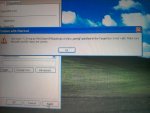
I've tried changing the Target....is that what you mean by command line? It just says invalid file path......

1481833238467-1799377197.jpg

I have searched and can't find the OpenCPN.conf file anywhere
 
Top