Em-Trak B100 tranceiver, cannot see my boat on other AIS apps and has red error light

UK-WOOZY

Well-Known Member
Joined
7 Feb 2015
Messages
1,152
Location
medway river
Visit site
Cannot get it to work, has a red error light on after a few minutes. I can see other vessels on my B&G Vulcan 7. I assume the VHF is for receiving other AIS targets and the GPS antenna is for transmitting my vessel info?

My info was loaded onto the B100 with a .cfg file Em-Trak support created for me and put onto an SD card. my boat has two antennas, one metz for the fixed VHF and one Hawk for spare/AIS, I do also have the B100 splitter and tried other antenna configurations (antenna plugged direct into the tranceiver and using the metz int the splitter then tranceiver)

I had my boat AIS arrow on my vulcans arrow, but wasnt visible on other devices.


Pics taken while red light was on, on the em-trak

LXDmWyB.jpg


s8GVehl.jpg


u1DosPo.jpg


4DrTh2C.jpg


phone app (tried other AIS apps to)

tQQf9Bz.png
 
If Red light on check that a valid Mmsi number has been configured

The VHF aerial is also a reason for this fault light. The unit may will receive (poorly) with a faulty aerial but will not transmit. It does not use the GPS aerial for transmitting your ais signal.

I would suggest you obtain a SWR meter and have your aerial checked out. If you can't get hold of a an SWR meter try the unit on a known good vhf antenna. Double check that you dont have a short between the coax and centre conductor of your vhf . This will allow RX of signals but not efficient tx.

If neither of these solve your problem then you need to send unit back to emtrak.

My transponder received local boats as in your screenshot without any VHF aerial connected!
 
Not 100% sure what the question is here.
Firstly, the VHF antenna both receives and transmits AIS data. The GPS antenna is there to provide position data to your AIS unit.
Check the VHF antenna connection and see if tha5 gets rid of the error light. Also recheck that the MMSI has been correctly entered.
Finally, don’t rely on Marine Traffic or other internet apps for showing that you’re transmitting properly. They often fail to pickup signals, even when you can see a vessel showing just a short distance away. Find someone else with a working AIS and get them to see if your signal is showing up.
 
If the unit operates anything line the Camino transponders, it will receive AIS data OK but if there is any issue with the GPS antenna, then there is a red light. The units cannot transmit without their own, valid GPS fix.
 
its possible i didnt wire the deck vhf sockets from the mast antenna properly, instead of spending money on a SWR meter im thinking shall i just get anther vhf antenna and mount if on my solar panel NOA mount on the stern?

would this be ok for the AIS, i know its advertised for AIS.

Glomex RA111 AIS antenna | Force 4 Chandlery
I have been using a similar dedicated ais antenna attached to my radar pole with excellent results .If your mast goes over the side or you have a faulty MH vhf antenna then you can connect your main vhf and ditch the ais. It will give you a much greater range than a hand held in an emergency. I prefer the Metz unit as offered by Salty John of this Parish.
Metz Manta VHF antenna, for radio and AIS | Salty John

I have also helped a friend mount one of these as high up as possible clamped to a backstay with very good results.
 
You don't by any chance have another AIS receiver connected (VHF-AIS perhaps)?

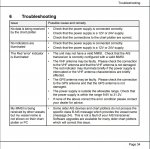
Here are the reasons for the Red light from the manual.
The Red 'error' indicator is illuminated :

• The unit may not have a valid MMSI. Check that the AIS transceiver is correctly configured with a valid MMSI.
• The VHF antenna may be faulty. Please check the connection to the VHF antenna and that the VHF antenna is not damaged. The red indicator may illuminate briefly if the power supply is interrupted or the VHF antenna characteristics are briefly affected.
• The GPS antenna may be faulty. Please check the connection to the GPS antenna and that the GPS antenna is not damaged.
• The power supply is outside the allowable range. Check that the power supply is within the range 9.6V to 31.2V.
• If none of the above correct the error condition please contact your dealer for advice. My MMSI is being received by other vessels but my vessel name is not shown on their chart plotter or PC
• Some older AIS devices and chart plotters do not process
 
i fiddled with the connecter on the end of the wire from the hawk antenna which connects to my deck socket by the mast and hey presto, green light.

but i can only see my boat on marine traffic none of the other websites or apps

MarineTraffic: Global Ship Tracking Intelligence | AIS Marine Traffic
All websites and apps are relying on receiver placed along the coast to get position data. They have different set of receivers and different coverage. Best way to verify your AIS is to check what other boats can see.
 
Don't trust Marinetraffic it is notorious for old and spurious data. Vesselfinder is much more reliable for real time indications although you should still assume some lag.

Connecting laptop and running the supplied ProAIS2 will give you a diagnostics page which includes SWR, GPS status along with received targets list to confirm decent range.
 
Top