Docking & engine room cameras

Yes, We've got an IR camera in the engine room, it gives a pretty good view of both engines up the centre line and you'd spot if there was any smoke or fire (if you were watching it of course).

It works well with engine room lights either on or off. If you are putting an engine room camera in you might want to think about how you actually monitor it when motoring. Ok if you've got enough plotter space, we've got 2 on each helm so if I want to I can have 1/4, 1/2 or a whole of 1 screen devoted to cameras but if I was working on 1 plotter I don't think a camera view would be priority info for me. Maybe if you have smoke detectors and one goes off then an instant camera view would then be a 1st good check.

+1 I have a cheap IR camera and works well, but have found the IR slowly fails overtime (years) and now on my second one, I suspect this is due to long term vibration etc. Mine is connected to a cheap wifi and viewed on my tablet or smartphone, I found it works well with or without engine room light on.

Wifi device, something like this: http://www.ebay.co.uk/itm/Car-Wifi-...3743a4bf92c60611652e1e&pid=100507&rk=1&rkt=1&
 
I can see the logic for IP cameras over a wide network but on a closed small thing like a boat I prefer analogue "old fashioned" cameras, and that's what I have. I find them completely reliable and the lack of buffering delay is reasonably critical when docking or using an AnCam. If you want more cameras than you have inputs for on your MFD, you can buy splitters etc on eBay. The components are cheap and when they fail you can chuck them away and pull another off your spares shelf. And you don't spend your life faffing with IP addresses and other settings just to get them working.

I'm going to install 3 or 4 cameras on new Magnum, but haven't decided whether to go analogue or IP. Having said that this one looks pretty good - http://www.raymarine.co.uk/view/?id=16388

I hadn't considered lag. Is it significant? Are we talking fractions of a second or more?
 
I'm going to install 3 or 4 cameras on new Magnum, but haven't decided whether to go analogue or IP. Having said that this one looks pretty good - http://www.raymarine.co.uk/view/?id=16388

I hadn't considered lag. Is it significant? Are we talking fractions of a second or more?

I can't speak for that camera but my cheap IP anchor camera has a lag of about half a second whereas my RGB docking cameras are instantaneous.
 
Regarding the OP about IP cameras I too had planned to install some as my winter project.
However the issue is that every IP camera I have found (that is not Raymarine) requires a username and password authentication. So whilst you can buy cameras that are fully ONVIF S compliant, and meet all the technical requirements for the Raymarine MFD the current software on the MFD does not provide for you to enter the username and password.

So I resorted to the old fashioned BNC connection.
I bought 2 of these for less than £50 each.
https://www.tlc-direct.co.uk/Products/TSHDVC36FD.html
They are IP66 (ingress protection) and highly configurable (mirror, flip,HD, SD etc)
I particularly wanted grey because of the location on the boat but they make them in white also.
Attached photo - sorry it's a crop from a bigger shot.View attachment 61440
Port and Starboard sides both in and working perfectly with the MFD, IR works nicely too.
Going to ask a stupid question, that link you gave to the camera on tlc direct, do you need to run a cable from those cameras to your screen or are wireless?
 
If I can suggest? Look at RG59"shotgun" cable, available from same supplier. It's co-ax plus power so a single run per camera. Getting 100m shipped to France for £30 from Setik.biz, an Italian electrical supplier, paid in £ too!
 
Hi this time I ran cables (the combined power and coax mentioned by gentleman racer) bought on eBay for about £10.
Last time however I connected an analogue bnc camera into a wireless AV transmitter in the roof space and connected the wireless AV receiver into the MFD behind the dash.
The unit had been permanently on for 3 years when we sold the boat, and never failed; so easily doable if running cables looks like a headache.
 
Thanks, the more cameras the easier to helm short handed. I have a rear view camera raymarine setup also a starboard door all I need for perfect visibility is a port camera
 
Hi this time I ran cables (the combined power and coax mentioned by gentleman racer) bought on eBay for about £10.
Last time however I connected an analogue bnc camera into a wireless AV transmitter in the roof space and connected the wireless AV receiver into the MFD behind the dash.
The unit had been permanently on for 3 years when we sold the boat, and never failed; so easily doable if running cables looks like a headache.

Didn't think to broadcast camera feed to the chart plotter! What has my attention today is that I can buy a 7" monitor for £90 less than the price of a Raymarine "video in" cable...
 
Didn't think to broadcast camera feed to the chart plotter! What has my attention today is that I can buy a 7" monitor for £90 less than the price of a Raymarine "video in" cable...
Yep, the Raymarine cables certainly carry the "luxury tax".
I believe many of the MFD's have a BNC input as part of the integrated power cable connector. But if you want more than one camera then you have to splash the cash on another dedicated cable (which cost me more than the two cameras!)
I guess the alternative is some form of BNC switch that can take 2 inputs and then you toggle between them with a switch on the dash; connecting the output to the single BNC feeding the MFD.
 
I went ahead and bought this (as worth a gamble) - https://www.amazon.co.uk/Upgrade-Se...coding=UTF8&psc=1&refRID=XVY1NPQHYEWD1E7QK2DS

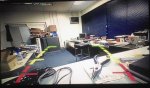
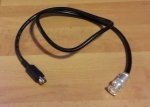
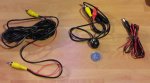
Chris Ellery from Greenham Regis, Poole kindly made me up the lead (see pic) to link to Raymarine E series and appears to be great cheap solution. Only issue is that the image is reversed (ie flipped horizontally). Now I am used to reversing camera in car but pretty sure this isn't how it should be, image wise, though haven't installed in boat yet as need to get some extra yellow RCA cable. Have I missed something or is there a way of flipping the image ? I think the "monitor reverse signal trigger cable" from instructions is meant to attach to car reversing lamp to power unit up rather than reverse the image.
Reverse pic.jpgcustom lead.jpgkit.jpgInstru 1.jpgInstru 2.jpg

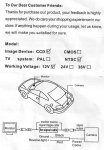
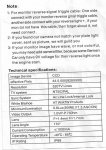
Kit insrructions included -
 
I went ahead and bought this (as worth a gamble) - https://www.amazon.co.uk/Upgrade-Se...coding=UTF8&psc=1&refRID=XVY1NPQHYEWD1E7QK2DS

Chris Ellery from Greenham Regis, Poole kindly made me up the lead (see pic) to link to Raymarine E series and appears to be great cheap solution. Only issue is that the image is reversed (ie flipped horizontally). Now I am used to reversing camera in car but pretty sure this isn't how it should be, image wise, though haven't installed in boat yet as need to get some extra yellow RCA cable. Have I missed something or is there a way of flipping the image ? I think the "monitor reverse signal trigger cable" from instructions is meant to attach to car reversing lamp to power unit up rather than reverse the image.
View attachment 61577View attachment 61578View attachment 61579View attachment 61580View attachment 61581

Kit insrructions included -
I was going to start a thread on this 'cos I also have a raymarine with a reversing camera that reverses the image. While at the boat show I went to the raymarine stand and they had the same setup as on my boat. So I asked them and the guy said it was easy and proceeded to show me, only he couldn't do it so he called his mates and they tried and couldn't do it. I suggested they turn the camera upside down, something I always wanted to try, but when they did this the whole image was upside down i.e. the floor was the ceiling. So if anyone has an idea I'm all ears
 
I was going to start a thread on this 'cos I also have a raymarine with a reversing camera that reverses the image. While at the boat show I went to the raymarine stand and they had the same setup as on my boat. So I asked them and the guy said it was easy and proceeded to show me, only he couldn't do it so he called his mates and they tried and couldn't do it. I suggested they turn the camera upside down, something I always wanted to try, but when they did this the whole image was upside down i.e. the floor was the ceiling. So if anyone has an idea I'm all ears

What reversing camera have you got installed ? Raymarine or 3rd party ?
 
What reversing camera have you got installed ? Raymarine or 3rd party ?
I'm sure it's raymarine, it cost enough on the options list and it looks the same as on raymarine stand. But I'm not on my boat and I might not be there for a couple of days 'cos the weather is turning wet and windy so can't be 100%
 
I went ahead and bought this (as worth a gamble) - https://www.amazon.co.uk/Upgrade-Se...coding=UTF8&psc=1&refRID=XVY1NPQHYEWD1E7QK2DS
[...]
is there a way of flipping the image ?

The Amazon description says "The white line control front view or rear view", and shows a picture of the white core in the camera's cable being cut with scissors. I assume if you cut that core then the image will change to non-mirrored.

(It also says "The green line control the parking line", so you could remove the red and yellow overlays shown in your first image if you want to.)

Pete
 
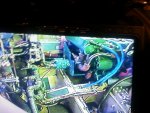
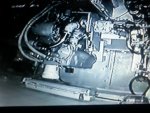
I use a pair of infra red reversing cameras in my engine room.
Both work in black & white in the dark.
with engine room lights on , the picture is in colour.

One is focused on the bilge collection point, the other on the front of the main engines.

20141220_123033.jpg


20141220_122035.jpg
 
The Amazon description says "The white line control front view or rear view", and shows a picture of the white core in the camera's cable being cut with scissors. I assume if you cut that core then the image will change to non-mirrored.

(It also says "The green line control the parking line", so you could remove the red and yellow overlays shown in your first image if you want to.)

Pete

Ah - sadly mines doesn't have these extra wires although think mine was a different product as only £12. Doing bit of googling reveals that some have hidden/minute switches to allow mirror image switching. Mine doesnt. Good review here : http://www.ebay.co.uk/gds/EVERYTHIN...T-REAR-VIEW-CAMERAS-/10000000000708736/g.html

Looks like £12 was too much of bargain but then again for me I only want to point a port stern quarter to see "jumping distance" to pontoon so shouldn't really matter. Will install and take it from there.
 
I was going to start a thread on this 'cos I also have a raymarine with a reversing camera that reverses the image. While at the boat show I went to the raymarine stand and they had the same setup as on my boat. So I asked them and the guy said it was easy and proceeded to show me, only he couldn't do it so he called his mates and they tried and couldn't do it. I suggested they turn the camera upside down, something I always wanted to try, but when they did this the whole image was upside down i.e. the floor was the ceiling. So if anyone has an idea I'm all ears


When we were at the boat show this year we asked Raymarine the same question - the guy was very helpful and said they are two different part numbers ; one has a "reversed" image and the other a standard image. Apparently there was no way of altering them, you just have to buy the right one.
 
When we were at the boat show this year we asked Raymarine the same question - the guy was very helpful and said they are two different part numbers ; one has a "reversed" image and the other a standard image. Apparently there was no way of altering them, you just have to buy the right one.

Thank you for that, its the only definitive answer I've had. Its the kind of thing you don't know till you know then it's too late:encouragement:
 
Top