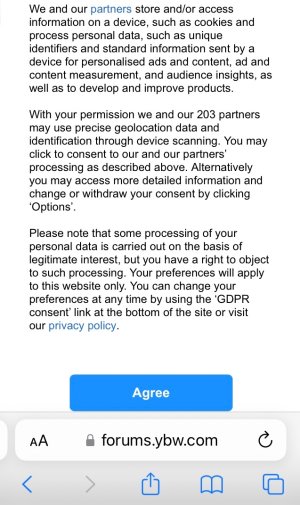
Cookie request at every click?

Cerebus

Well-Known Member
Joined
4 May 2025
Messages
1,182
Visit site
My introduction message said there was a forum feedback section but I have since been told by the forum admin that it no longer exists, so I can find no place except here to ask:

Why do I keep being bombarded with a cookie request EVERY time I click a single thing? I mean EVERY click…

I have asked admin some hours ago and they must be busy and may get back to me but in the meantime may I ask here?

I click “reject” every time because I thought that was the safest method.

Yachting Monthly's Scuttlebutt
 
An ongoing problem. I'm now starting to get it once every 3 or 4 days.
Thank you.

Clicking on your link sends me to an “Oops, you cannot access this”, or words to that affect.

That is because I am a newbie I think.

I have asked admin.

I get the cookie request at every click and sometimes it pops up whilst I am typing !

Not to worry. I have been clicking “Reject” for two weeks or so.

It may resolve itself and Admin may reply when they get a chance.
 

Attachments

  • 8543D09C-C7DC-4BFE-AC09-F2E3485A7ACD.jpeg
    8543D09C-C7DC-4BFE-AC09-F2E3485A7ACD.jpeg
    220 KB · Views: 2
It will go away and come back again erratically, without any reason or logic. It has been happening for the last three years or so. Admin has never reacted to complaints.
I had it for nearly 2 weeks until it stopped yesterday, we’ll see when it comes back. When, not if.
 
Thank you.

Clicking on your link sends me to an “Oops, you cannot access this”, or words to that affect.

That is because I am a newbie I think.

I have asked admin.

I get the cookie request at every click and sometimes it pops up whilst I am typing !

Not to worry. I have been clicking “Reject” for two weeks or so.

It may resolve itself and Admin may reply when they get a chance.
It stays away longer if you accept the cookies. I'm presently using my tablet with Samsung Web browser and the remove adverts add on so don't see adverts. Brave web browser is also good at blocking adverts and pop ups.
 
It stays away longer if you accept the cookies. I'm presently using my tablet with Samsung Web browser and the remove adverts add on so don't see adverts. Brave web browser is also good at blocking adverts and pop ups.
I use Brave on Android and Windows 10 and haven't ever seen this problem. I use all Brave options to stop adverts, pop-ups, tracking, etc.

Seems to work well and I can't remember seeing an advert on any site. I do sometimes lower shields for a couple of sites with issues but they don't show adverts anyway.
 
We have a bit of difference there. I do NOT uncritically accept all cookies.

Far too anal about privacy
I don't uncritically, but I use a service this site offers (as well as making it more attractive to others of course), so I consider accepting cookies and seeing the occasional advert a reasonable quid pro quo, and they do have some functionality.

On other sites I reject them.
 
As soon as it starts with the request I immediately delete all browsing/history/ cookies.....re log in...and it's fine for a while....
 
Thank you.

Clicking on your link sends me to an “Oops, you cannot access this”, or words to that affect.

That is because I am a newbie I think.

I have asked admin.

I get the cookie request at every click and sometimes it pops up whilst I am typing !

Not to worry. I have been clicking “Reject” for two weeks or so.

It may resolve itself and Admin may reply when they get a chance.
Several months on the forum and over 400 posts. You should have full access to all sections by now. I'd email the admin to ask why not. Does the PM system work for you?
 
Several months on the forum and over 400 posts. You should have full access to all sections by now. I'd email the admin to ask why not. Does the PM system work for you?
Thank you.

Have sent a message to Admin.

For sale section has opened up, no Feedback section or general chat section yet.
 
Top