boat electrical diagrams and symbols.

sarabande

Well-Known Member
Joined
6 May 2005
Messages
36,182
Visit site
a re-visit to an old problem.


I want to make "as installed" and "wiring layout" (theoretical) diagrams of the boat's cabling, instrumentation, switches, lighting, etc, prior to doing a re-wire. The objective is to calculate loads, cabling thicknesses and lengths, and to optimise the control panel layout for electrical services and the boat's electronics.

I have looked at various boat wiring diagrams and am struck by the lack of standardisation of symbols.

A quick search on the web reveals the IEC and BS symbols as standards for land-based domestic electrical diagrams, but I cannot find any 'proper' automotive or boating symbols.

The preferred application is Visio, which has some electrical stencils, but they are not 'boaty' enough. I do have an early copy of AutoCAD, but I'd prefer to keep it simple !

Before I spend a few days designing a new set of stencils (probably by shape development of existing ones), does anyone know of an existing set of stencils which might be suitable please ? From time to time excellent diagrams appear on the forum, so fingers definitely crossed for a result !


thanks !
 
Since it is a diagram for your own consumption using symbols with which you are happy would probably make sense.

I'd refer to http://www.tlc-direct.co.uk/Technical/Symbols/Index.htm but it's something you have already found probably.

You make find it worth while doing a theoretical diagram and also a cabling diagram to show the layout of the cabling within the boat.

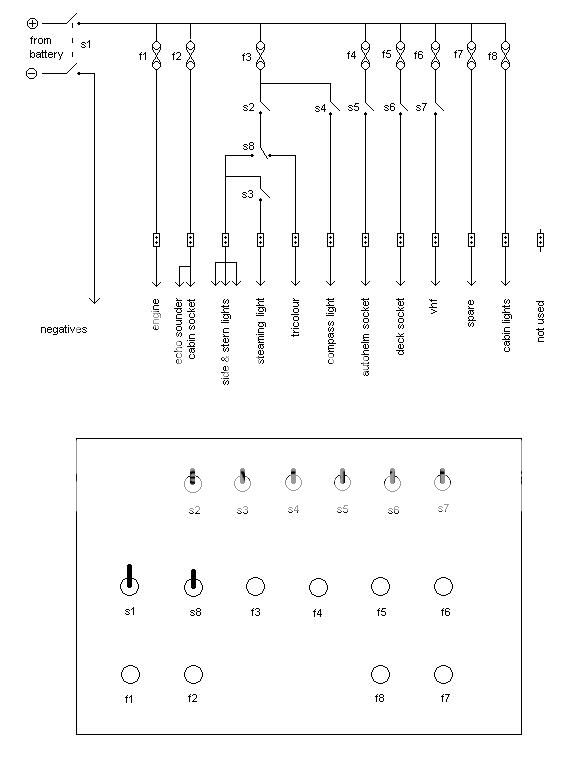
All I have is a theoretical diagram of my switch panel, and it uses symbols that I recognise , not necessarily the latest BS, ISO, IEE or whatever symbols

It was drawn using MS paint but if I did another I would do it by hand and scan it!

97a15036.jpg
 
thanks vm Vic. Just the sort of target at which I am aiming.

I'd come across the link in my websearch, but had studiously avoided the symbols as they are .gif images and I was looking for something which would run under Visio directly, as I want to move diagrams around the plot and keep the connections 'live'.

However, I've found a translator and will play with that later to see if I can bring the .gif into .vss symbols.

You are right about the need for two different diagrams; one the neat theoretical 'location of kit and flow of electrons' type, and the other one for keeping on board to show the relative position of all the cables, switches and instruments.

I must say that your Paint diagram is quite astonishing - it must have taken hours !

thanks again.
 
lecky stuff

I take it if you have an early version of AutoCAD its LT2000, I still use that now over the newer solidworks, cant get away with the 3D, prefer the older standards that it has. It also has the base electrical symbols that could be used for your system. The reson I would prefer to use it is that it will be easy to change anything that wants to be shuffled round, plus if you change things later on its easy done........at least thats my preferance anyway.
 
oh Nimbus ! I wish I hadn't clicked on your link to SmartDraw.....


It does everything I want, and seems to do it so much quicker than Visio ! AND it has the dreaded symbols (automotive, elec engineering, server room layout.....)


With a special offer of $197 if I buy before 24 Dec !


Decisions, decisions......:mad:
 
I must say that your Paint diagram is quite astonishing - it must have taken hours !
It was not a 5 minute job I must admit but when each symbol has been drawn once it can be copied and pasted over and over.

For a one off I could easily come to a decision on whether or not to spend $197 :eek:
 
Personally I use OmniGraffle for this kind of thing. Originally came free with my Powerbook; I've paid for the odd upgrade over the years.

Pete
 
oh Nimbus ! I wish I hadn't clicked on your link to SmartDraw.....


It does everything I want, and seems to do it so much quicker than Visio ! AND it has the dreaded symbols (automotive, elec engineering, server room layout.....)


With a special offer of $197 if I buy before 24 Dec !


Decisions, decisions......:mad:

Sorry about that :)

got a uni student to hand? http://www.smartdraw.com/buyinfo/education.htm
 
Last edited:
Some have used word documents to create drawings. Once the symbols are created and possibly stored on a seperate document you then just copy and paste and join them up using lines either from word or use a pencil. For my boat I hand drew the wiring diagram but the problem arises when extra wiring is added.
 
Top