
Baggywrinkle
Well-Known Member
Dont have save or exit , press the X ?
Go for it ....

Dont have save or exit , press the X ?
Done ! Thank you but still “ no fix “ , will now try to work out the wire change , might take a little while ,Go for it ....
There has been no request for baud number
Done ! Thank you but still “ no fix “ , will now try to work out the wire change , might take a little while ,
I think it is in Pauls replyGive me a second ... I've just got hold of the installation manuals .... will give a definitive answer in a few mins.
I think it is in Pauls reply
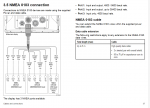
Orange / white to what ,,,, Orange / green to whatNo such thing.
Connect the red and black to power, connect the Cobra NMEA OUT to the Raymarine NMEA IN (+ to + and - to -), set the baud rate on the plotter to 4800.
Might help to post links to the Cobra and Raymarine manuals so people can verify your quoted colours are correct.
Edit, Just checked in my Raymarine installation manual and you are using the wrong wires, you are using the NMEA OUT wires. You should be using:
Orange/White +
Orange/Green -
You still need to check the baud rate.
You could also change the thread title to "Bloody amatuers"
That is the diagram which i havePauls reply is correct .... and there are 2 other NMEA 0183 input ports on the raymarine.
View attachment 120885
Orange / white to what ,,,, Orange / green to what
That is the diagram which i have
Thank you mate , going to try that now , prob take a little while ?Yellow on Cobra to Orange/White on Raymarine
Green on Cobra to Orange/Green on Raymarine

assuming you get the gps antenna working, remember that if you decide to fit an AIS receiver, the port you're going to use must set to 38400 so gonna be port 2. So you may have to move mushroom to another port for that.Nmea port setting ports 1. 2 and 3 are now showing 4800
Thank you , that is nxt jobassuming you get the gps antenna working, remember that if you decide to fit an AIS receiver, the port you're going to use must set to 38400 so gonna be port 2. So you may have to move mushroom to another port for that.
If you're going to get a VHF as well in the mix that's probably going to be in port1, hence the suggestion to get the mushroom on port 3 to start with and not having to move things about at a later date
Wires done as suggested , just giving it abfew minutes as suggested ?