B&G Vulcan minor problem

jwilson

Well-Known Member
Joined
22 Jul 2006
Messages
6,241
Visit site
A quick test to see whether B&G "support" or a forumite answers first. Just sent the following message to B&G/Navico Support:

Vulcan 7R - plotter works OK except for one VERY annoying problem: it will not "scroll" screen to follow boat movement on chart. I have it set to North Up with 'Look Ahead' selected. The boat icon just sails off the screen and I have to zoom out, find, it and zoom in again constantly. ( I have read the ******* manual! )

Anyone else had this, and how to fix?
 
I'm not on board to try out the Vulcan but I do remember that on the Zeus, if you had touched the chart elsewhere (i.e. not on your boat icon) then the screen would stay centred on where you had last touched it.

By pressing escape or back or whatever it was, your own boat would become selected again and would stay centre screen (or just behind centre in lookahead mode).

Perhaps your own vessel is not 'selected'.
 
Does it not say "clear cursor" in the bottom right corner of the screen?

Note that the display will twitch and rotate when the boat is stationary as the GPS is accurate to a meter or two, so the boat thinks it's moving a meter or two and hence its heading is constantly changing. There may be a settling to damp this, but it doesn't matter because actual movement exceeds the tiny GPS inaccuracy.

EDIT: last paragraph, page 29 of the manual "B&G Vulcan Series Operator Manual English" [Vulcan_OM_EN_988-10859-001_w2]
 
Last edited:
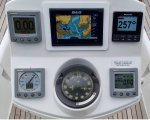
Thank you KompetentKrew. I took a photo of the screen yesterday, and it does indeed say 'clear cursor' at the bottom right. And I thought I had fully read the manual, but clearly missed that sentence!
 
B&G have responded, they said:-
"....ensure that a cursor hasn't been activated on the chart. In the top right corner, you can bring out a menu and at the top, it will say clear courser. "

Not quite correct, but it would have pointed me in the right direction. The "Clear cursor" option is showing on screen at bottom right, but I had foolishly not realised that "Clear cursor" actually meant "get back to normal working". Not all instruments connected at time of photo!

About evens in response time from forum and Navico Support. Quite impressed.
 

Attachments

  • instruments.jpg
    instruments.jpg
    333.6 KB · Views: 9
Just like I described in post 2.

You had activated the chart cursor by touching the chart at a point away from your vessel.

That needed deselecting by either clicking the back button, or the 'x' or the 'clear' soft key.

I realise you say you have a Vulcan 7R, but the underlying cursor feature is the same on many of the B&G/Simrad range.
 
Just like I described in post 2.

You had activated the chart cursor by touching the chart at a point away from your vessel.

That needed deselecting by either clicking the back button, or the 'x' or the 'clear' soft key.

I realise you say you have a Vulcan 7R, but the underlying cursor feature is the same on many of the B&G/Simrad range.
In principle you are right, but Vulcans don't have any buttons or softkeys to press. I still think "Clear cursor" is a silly name for "Back" or "get back to normal working". In general the Vulcan is good but the menu structure is quite complex. I chose it after two previous Garmin plotters at the helm died from water ingress.
 
Top