B&G Vulcan interfacing limited?

syfuga

Well-Known Member
Joined
21 Mar 2005
Messages
310
Location
Back in UK waters
www.syfuga.co.uk
Hi,

I bought a Vulcan 7 recently as it seemed to be more versatile with wifi, smart phone interfaces etc. and assumed that it would do what I wanted.

I like to use OpenCPN for chartwork at the chart table, setting up routes and adjusting them easily with a mouse. I have been familiarising myself with the Vulcan on the desk at home, and the wifi links work well.

However, while I am receiving GPS position, COG, SOG from the Vulcan on the PC, I cannot set a route on the PC and get the Vulcan to recognise this, or display distance, bearing to waypoint and cross track error. You can set up a waypoint, route on the Vulcan, but there appears no way that it will passively display waypoint on the chart.

And I haven't even started to test AIS, and there seems to be no support?

Am I missing something? I hope I am wrong! Anyone want a new Vulcan 7, boxed?
 
If you have AIS going into the Vulcan then it will provide it to the OpenCPN laptop. I assume you have OpenCPN setup something like this.

Looks like you go to Tools > Route & Mark Manager > Export selected… in OpenCPN to obtain a .gpx file. You then transfer this to your Vulcan via SDF card or FTP. @stevead on CruisersForum posted 2 weeks ago that he has developed a plugin to make transfer simpler, but has not yet published it; in the meantime you might find his PDF useful.
 
Hi, it may be that AIS is not a problem, but I have been unable to check as only desk testing without a VHF aerilal to hand.

However, the solution based on downloading routes is not practicable at sea in a dynamic situation. For example, when headed down a 2M wide channel against a headwind, with a reef or similar on one side. In such circumstances, I am used to seeing the direction I am headed, and inserting a new waypoint dead ahead with the necessary clearance from the obstruction ahead. This to be immediately reflected on the chart plotter and instruments up in the cockpit. Try doing that in a F6, doing 6 knots. Equally, things change on most voyages, due to a change of wind, being later on the tide, and you need to easily adjust your route accordingly.

The sales bumf makes much of integrating with existing instruments, etc. Sadly not, apparently.
 
I think their reference to interrogation with other devices would assume other marine kit and not a PC
 
when headed down a 2M wide channel against a headwind, with a reef or similar on one side. In such circumstances, I am used to seeing the direction I am headed, and inserting a new waypoint dead ahead with the necessary clearance from the obstruction ahead. … Equally, things change on most voyages, due to a change of wind, being later on the tide, and you need to easily adjust your route accordingly.
This is what the chart plotter is for IMO.

This to be immediately reflected on the chart plotter and instruments up in the cockpit.
Well, @stevead's plugin should probably fix that, or make it an operation of one or two clicks. You should message him.

The sales bumf makes much of integrating with existing instruments, etc. Sadly not, apparently.
I have B&G Vulcan in the cockpit too - if I added a Raymarine chartplotter at the chart table, I wouldn't be surprised if they were unable to share routes between them. I'm pretty sure each of these manufacturers can send routes to their own autopilots, but not to the other's. It's the sort of detail you need to check before buying, if it's important to you.

OpenCPN is written by hobbyists for hobbyists - it's just some guy who decided to write a chartplotter app, then posted his work online. You've got the source code - you can download it and make the changes you want. The problem with this is obviously that most people aren't skilled programmers and wouldn't know where to start - yeah, it's super hard a computer program of this complexity, which is why it's unreasonable to moan that you got it for free and it doesn't meet your standards.
 
There is an iPad app to remote control the Vulcan. I have the iPad at the chart table and do it this way.

You can also use the navionics app to setup routes and transfer them to the vulcan.

You can even use the free online navionics chart viewer to create a route, and that will sync to the iPad app and transfer to the plotter that way.

As kompkrew said above, open cpn is made by hobbyists for free. The b&g is a serious bit of kit.
 
I meant to mention this. Unfortunately the Android version of the software is terrible though - it was fine when I first used it, but I now suffer from the green bar bug (see the right hand side of the image).

B&G have known about this bug for literally years and have failed to fix it. This bug is well known and also quite weird - I bought quite an expensive Samsung tablet to use as a remote viewer and it was fine at first; I read of the bug in the app's reviews on Google's Play Store, but I was unaffected.

Then, one day, I connected my tablet to the B&G and there was the nasty green bar - I say that it seems a weird bug because I was unable to resolve it even by rolling back to previous versions of the software (that I knew to be unaffected) on both tablet and plotter. I suppose it might be related to the Android o/s, as I was unable to downgrade to the previous major o/s version (from Android 10 to Android 9, I think).

B&G have two apps on Android - one is called "Link: Connect Your Boat" which is just the screen viewer, and the other (I think it's called "B&G: Sailing & Navigation") has a tonne more features, allowing you to create routes on the tablet app and then transfer them to the plotter. On my tablet both suffer from the green bar bug, but if you use iOS and it is unaffected then this might suit you.

It feels like B&G support are hamstrung by their own management - when I asked for help downgrading the plotter's software they replied immediately with a link but with curiosity why I needed it, along the lines of "is there anything more we can do to help?" When I explained I was trying to fix the green bars bug they were apologetic and said they were aware of it; at one point they said management had told them this was now a priority, but this must be at least a year ago now. I find I have correspondence with the since October 2021, and I've just checked for updates now - it's still not fixed.

I was reflecting on this this week, in fact, contrasting B&G's support with Victron's. Victron can be superficially unhelpful - you email them and they refuse to help, telling you "please contact your dealer, or use the Victron Community Forums", yet a few months ago they added some significant features to the SmartShunt as part of a firmware upgrade. When you open the Victron app in your phone, the voltage and state of charge are now shown next to the SmartShunt in the app's list of devices, saving you the necessity of connecting to the SmartShunt to view these details. History data is now stored on the device instead of being transient - I was surprised it wasn't stored in the first place, as it seemed useless having a history view if the history was not available, but in any case they fixed this. More recently another update has added options for how the Smart Shunt should behave if it's de-powered, and the default is now much safer (it no longer assumes the battery is fully charged when the power comes back on). B&G's support are incredibly helpful and apologetic, but have not solved the problem in 2 years now. As I wrote before, I suspect management are not prioritising it, for some reason.
 
I must admit that I wasn't aware of the green bar issue as I only have ios devices. The B&G: Sailing & Navigation app sounds very much like the Navionics app but with less features. I notice you have to have a subscription to it as well. As it's cMap, and Navico who own B&G own cMap, I can only guess that they are trying to tempt people away from Navionics as it's owned by Garmin.

The new, cheaper Zeus S only runs cMap charts, and works with the " Sailing & Navigation " app. Incidentally, the Navionics app only works with the plotter if you have Navionics on it, and you do need a subscription for it. This has always annoyed me as having to pay for the charts and then the app on top seems a bit like profiteering.

Another thing that annoys me is that you have to pay considerable sums to the NMEA to register and test a NMEA 2000 device so that you can bring it to market. I have some product ideas, but I can not afford the outlay required. You can't even view the full NMEA spec without spending a considerable amount of money (* considerable to an individual, not to a corporation )

Back to the original question, yes it's rather inconvenient that very few things talk to each other on this level, and it is a PITA to move waypoints, routes etc between devices. This is why I have settled on the Navionics and B&G setup as it allows me to synchronise across my devices. Don't expect this to change anytime soon as apart from a standard message for the current waypoint I don't believe that there are standard messages to relay route information.
 
I have come back to this full circle.

Firstly, I have used OpenCPN (and indeed Linux as opposed to Windows) for well nigh on 20 years. OpenCPN is a great navigational tool, designed by sailors, for sailors, and has been continuously improved over the years. Just because you pay a lot of money for your kit does not mean it is the best ever. Sailors have been using navigational systems on computers for a long time - MaxSea was the best for a while, originating in 1985, and took Ellen McArthur around the world?

I installed a Raymarine C9 MFD in the cockpit of my Dehler in 2011, and had no difficulty talking to it through the Seatalk interface with serial inputs/outputs from a laptop at the chart table. The small HP Stream computer was installed under the chart table, and all interaction was via a 12v TV screen and mouse at the chart rable. There was a software switch that configured the chart plotter not to drive the autopilot itself, but to act on external waypoint data, and all the current waypoint data was displayed on the chart and screen, as well as on the autopilot.

I have just sold the Quark kit that I bought initially, and replaced it with their recommended solution for interfacing my legacy NMEA0183 instruments.. it is working well, but the B&G Vulcan is still not picking up waypoints externally generated, but broadcast on the NMEA2000 network. This, I was assured by Navico support, it would do.

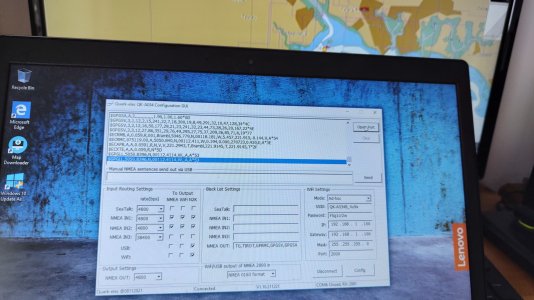
On the attached photo, the boat is here on my desk (the GPS in the Vulcan), and the active waypoint on OpenCPN is the yellow circle on the PC: waypoint data is being broadcast on NMEA2000.

The display options on the Vulcan for sailors are first class, but I think it will shortly be for sale on eBay, unless I can overcome this problem.
 

Attachments

  • IMG_20230727_085410925_HDR.jpg
    IMG_20230727_085410925_HDR.jpg
    1.4 MB · Views: 8
In there B&G menu there is the facility to specify what source device to use for data. There is also a diagnostic tool that will show you what data each device is providing.

I'm wondering if you need to specify that it should accept waypoints from an external device.
 
Can anyone refer me to someone who really understands the set up and configuration of this B&G kit, and its limitations? Please PM me!

If you are interested in the Vulcan, with a an SD card containing current CMAP charts, bought end May and never left my desk, PM me!
 
In there B&G menu there is the facility to specify what source device to use for data. There is also a diagnostic tool that will show you what data each device is providing.

I'm wondering if you need to specify that it should accept waypoints from an external device.

If there is, point me to it! I cannot find anything and Navico support have not offered.. it picks up stuff of the NMEA2K (for example the heading) no problem!
 
If there is, point me to it! I cannot find anything and Navico support have not offered.. it picks up stuff of the NMEA2K (for example the heading) no problem!

From memory as I'm not near the boat at the moment!

Settings-> Network -> Devices : This will show you what it can see on the NMEA2000 Network, and if you select a device it will show you what data it's providing.

Settings -> Network -> Sources? : This allows you to choose what source to use for what data.

The manual is pretty useless for anything beyond basic operation unfortunately:
"A device connected to the NMEA 2000 network should automatically be identified by the system. If not, enable the feature from the advanced option in the System settings dialog."
 
From memory as I'm not near the boat at the moment!

Settings-> Network -> Devices : This will show you what it can see on the NMEA2000 Network, and if you select a device it will show you what data it's providing.

Settings -> Network -> Sources? : This allows you to choose what source to use for what data.

The manual is pretty useless for anything beyond basic operation unfortunately:
"A device connected to the NMEA 2000 network should automatically be identified by the system. If not, enable the feature from the advanced option in the System settings dialog."
Good man! Well remembered! I hadn't found my way there recently (I've been at this on and off for a month or more). It recognises the Quark compass on the NMEA2K bus, and displays the data for that. It also sees the Quark A034B multiplexer, but offers no data whatsoever for that. Configure just has instance 000 which I cannot change. Data is just blank! Where there is NMEA2000 'Receive Waypoint' is ticked, but send waypoint is not. Other inputs, like True Wind (as I am not on the boat, there is no data feeding this), there are 'No devices'.
 
Good man! Well remembered! I hadn't found my way there recently (I've been at this on and off for a month or more). It recognises the Quark compass on the NMEA2K bus, and displays the data for that. It also sees the Quark A034B multiplexer, but offers no data whatsoever for that. Configure just has instance 000 which I cannot change. Data is just blank! Where there is NMEA2000 'Receive Waypoint' is ticked, but send waypoint is not. Other inputs, like True Wind (as I am not on the boat, there is no data feeding this), there are 'No devices'.

Do you have anything else you can use to check that the waypoints are being sent to the network? If it's not showing any data from the multiplexer could it be that it's not sending the data out?
 
On the attached photo, the boat is here on my desk (the GPS in the Vulcan), and the active waypoint on OpenCPN is the yellow circle on the PC: waypoint data is being broadcast on NMEA2000.

I don't see anything in the photo you attached showing proof that the Waypoint location NNEA0183 sentence is making it into your NMEA2000 network and the NMEA0183 you highlighted looks to be your actual location.


The Quark A034B manual also fails to list conversions (NMEA0183->NMEA2000) for either of the waypoint or active route sentences.

How exactly are you expecting these (e.g. $GPWPL, $GPRTE and $GPR00) sentences to be converted and sent to the NMEA2000 backbone?
 
Last edited:
I don't see anything in the photo you attached showing proof that the Waypoint location NNEA0183 sentence is making it into your NMEA2000 network and the NMEA0183 you highlighted looks to be your actual location.


The Quark A034B manual also fails to list conversions (NMEA0183->NMEA2000) for either of the waypoint or active route sentences.

How exactly are you expecting these (e.g. $GPWPL and $GPR00) sentences to be converted and sent to the NMEA2000 backbone?

That might be why then !
 
At the moment, I'm assuming the original transfer of information from your PC to the older Raymarine C90 MFD was likely to be via NMEA0183 (unless you had an NMEA0183<-> Seatalk convertor on your PC that did the conversions).
 
I don't see anything in the photo you attached showing proof that the Waypoint location NNEA0183 sentence is making it into your NMEA2000 network and the NMEA0183 you highlighted looks to be your actual location.


The Quark A034B manual also fails to list conversions (NMEA0183->NMEA2000) for either of the waypoint or active route sentences.

How exactly are you expecting these (e.g. $GPWPL and $GPR00) sentences to be converted and sent to the NMEA2000 backbone?
I am not. Those are route sentences (waypoint location). All I am asking is to move bearing, distance and cross track error from the computer to the chartplotter. These are ECAPB, ECRMC, XTE?
 
I have just sold the Quark kit that I bought initially, and replaced it with their recommended solution for interfacing my legacy NMEA0183 instruments.. it is working well, but the B&G Vulcan is still not picking up waypoints externally generated, but broadcast on the NMEA2000 network. This, I was assured by Navico support, it would do.

I was replying to what you had said above..

I read that message as implying the B&G Vulcan was not receiving waypoints that you had externally generated on the computer and you were somehow believing they were being transmitted onto the NMEA2000.
 
Top