B&G H5000 configuration/ethernet

MikeBz

Well-Known Member
Joined
22 Aug 2005
Messages
1,804
Location
East Anglia
Visit site
Does anyone have a B&G H5000 system? I want to configure the depth offset. According to the manual this is done by connecting a laptop with an Ethernet cable and using the unit’s built-in web server.

This is how the installation manual shows the Ethernet port:
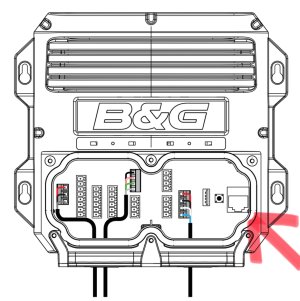
IMG_1926.jpeg


And this is what I have - no Ethernet port!
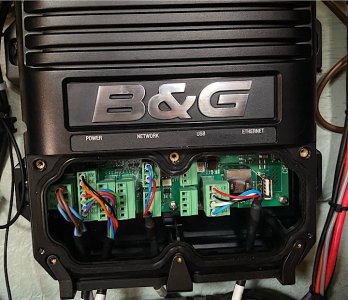
IMG_2024-06-19-150548.jpeg

Is there any other way to configure the depth offset? I’ve tried B&G’s website for support but you have to select a product type, and there is no category for CPUs.
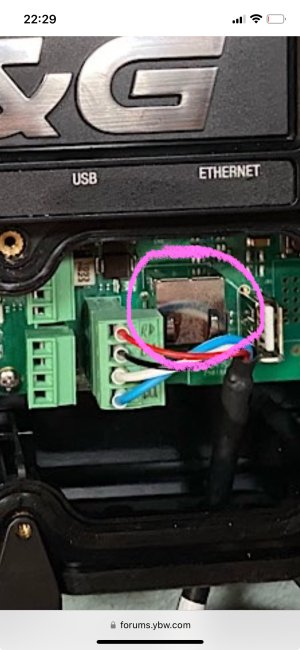
 
This is your Ethernet connector, should be able to plug an RJ45 straight in.

If you have B&G instruments or plotter you can set the depth offset via the calibration menu.
 

Attachments

  • IMG_0275.jpeg
    IMG_0275.jpeg
    1.4 MB · Views: 9
Doh! It wasn’t obvious to me that it’s an “up-and-under” into that silver box. In the manual it’s a front entry socket to the right of the USB socket, on my PCB there are holes there for a connector of some sort so it looked as though it was missing.

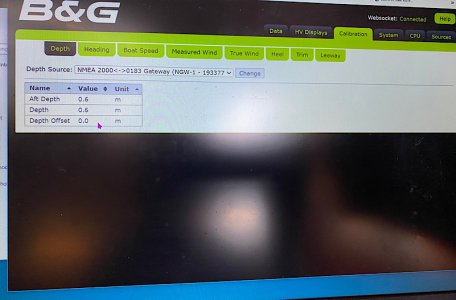
So I thought now I’d be home and dry… Conmected laptop, browser connects to web server, go to Calibration->Depth, select depth source (there is only one), click Change but the offset is not editable. Other calibration items have a spin box to change the number but not this one, can’t put the cursor in it to edit it either :mad:

IMG_2024-06-20-174126.jpeg
 
I remembered that someone I knew well through dinghy racing some years ago worked for B&G. He suggested I try setting the depth offset in the calibration section on one of the displays - tried that and it reported that it failed to save the new offset. He thinks it may be due to the fact that it’s an 0183 sensor (albeit through a converter to 2000). He then suggested I try setting a depth offset in the Advanced settings on a display and that worked and propagated the offset to the other displays. So now only the plotter (Zeus3) doesn’t have the offset - I’ve tried setting every depth offset I can find in its settings but nothing works. Hey ho, I can live without a depth display on the plotter.
 
Top