Axiom 9 Ais problem šŸ˜ž

Jasonbbo

New Member
Joined
19 Feb 2023
Messages
14
Visit site
Hi guys , I’m hopeful maybe someone who has a bit more technical knowledge about raymarine axioms than I have and could figure out what my problem is, I’ve decided to put a new navigation system, on to my boat
To hand I’ve bought the following brand new.

- Raymarine Axiom 9 touch screen (not pro) nmea2000
- Navionics large map
- Raymarine EV-100 auto pilot (STNG)
- Lowrange link 9 vhf with Ais (receiver only) nmea2000

as my boat is about 200 miles away I’ve decided to set everything up at home on a 12v battery and get everything connected together so I only need to worry about fitting everything when I next go to see the boat.

I have managed to connect the EV-100 to the axiom 9 by linking the backbones of Nmea2000 & STNG and I’ve full control of the auto pilot on the Axiom 9

I have connected the Lowrange link 9 to the Nmea 2000 backbone and you can see it in the network of the axiom 9

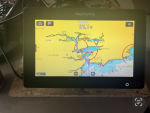
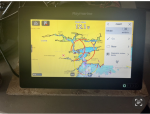
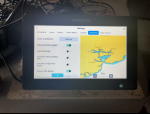
my problem is Navionics or light house maps are not giving me any ā€œtargets menuā€ to layer Ais on the charts I’ve spent hours reading up on lots of forms and flicking thro every menu on both the Axiom & Lowrange I can’t find an answer hopefully someone can answer my question.

All the equipment is brand new , and up to date
The Axiom 9 is capable of receiving Ais I’ve found an ā€œenhance AISā€ option and as far as I know the Lowrange is capable of sending Ais via the Nmea 2000 network

Any help is much appreciated guys !!

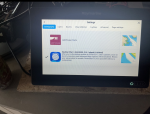
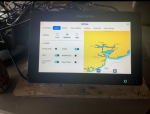
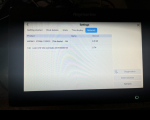
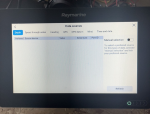
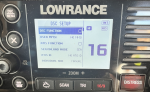
there’s a few pictures attached of what I’m seeing maybe this can help
 

Attachments

  • View recent photos 2.png
    View recent photos 2.png
    1.6 MB · Views: 12
  • View recent photos 3.png
    View recent photos 3.png
    1.6 MB · Views: 13
  • View recent photos 4.png
    View recent photos 4.png
    1.5 MB · Views: 14
  • View recent photos 5.png
    View recent photos 5.png
    1.5 MB · Views: 12
  • View recent photos 6.png
    View recent photos 6.png
    1.5 MB · Views: 15
  • View recent photos 7.png
    View recent photos 7.png
    1.3 MB · Views: 18
  • View recent photos.png
    View recent photos.png
    1.8 MB · Views: 18
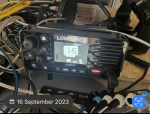
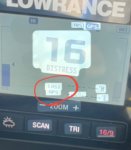
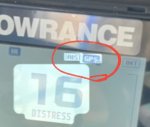
Not familiar with your particular VHF, but it doesn't have a GPS fix, that may have a bearing.

If you are not getting any AIS targets (doubtful as it's in your house) there won't be anything to display anyway.
 
Not familiar with your particular VHF, but it doesn't have a GPS fix, that may have a bearing.

If you are not getting any AIS targets (doubtful as it's in your house) there won't be anything to display anyway.
Thanks Paul , I’ve had the set up outside with both having GPS coordinates , and I’m pretty sure going by other posts there’s an ā€œtargetsā€ menu you need to select in order for AIS to work that should available once both are connected but I’m not getting that menu šŸ˜ž
 
From memory (my boat is 245 miles away) in the system settings screen there should be a "Sources of data", or similar, option.

Should be able to select the Lowrange (Lowrance?) unit from there. Without it knowing that there's AIS data available, it might not make other AIS-related options visible,

There should also be a diagnostic screen where you can see the data being sent on the network. If the Lowrance unit is sending data, you'll see the AIS "sentences" on there.

Have you set up the Lowrance to transmit on the network? There may be a specific option to make it do that.

Hope this helps.
 
If you're inland and there's no AIS stations within range, you'll not see anything.

Perhaps when you take the setup to the boat you'll be in range of AIS transmitters and the other vessels will appear on screen.

Regarding what can be seen in NMEA diagnostics, it's normal on a lot of kit to be able to see NMEA0183 sentences showing what the MFD is receiving..... but on the newer NMEA 2000 kit, diagnostics can often be limited to seeing bus status and maybe number of packets transmitted/ received, but not the actual PGNs..
 
Last edited:
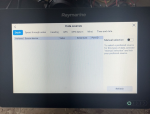
Thanks jlavery, I’m just charging the battery at the moment I’m going to take a trip down to the local harbour and check everything out , under the sources there’s nothing about Ais I’ve attached a picture also there’s nothing in the options of lowrange got to do with Ais or outputs
 

Attachments

  • View recent photos 9.png
    View recent photos 9.png
    1.5 MB · Views: 8
  • View recent photos 10.png
    View recent photos 10.png
    1.4 MB · Views: 9
  • View recent photos 9.png
    View recent photos 9.png
    1.5 MB · Views: 9
If you're inland and there's no AIS stations within range, you'll not see anything.

Perhaps when you take the setup to the boat you'll be in range of AIS transmitters and the other vessels will appear on screen.

Regarding what can be seen in NMEA diagnostics, it's normal on a lot of kit to be able to see NMEA0183 sentences showing what the MFD is receiving..... but in the newer NMEA 2000 kits, diagnostics can often be limited to seeing bus status and maybe number of packets transmitted/ received, but not the actual PGNs..


Thanks Martin, sorry about the duplicate I posted in the wrong place at first and I can’t figure out how to delete it , I’m going to the local port later this after noon to see if the vhf is picking up targets, would it be Possable it’s not working because I’ve not entered the mmsi number, it’s a new boat to me and I don’t have the ships radio licence ? But the ais on the screen says it’s working fine so I don’t think it’s a problem
 
I don’t recall having to do anything to activate AIS targets on my Axiom 9. Other thoughts:

1. Where’s your house?. Is it within 6-12 nm of an AIS transmitting boat? That’s the max AIS range you might expect for an aerial which isn’t up a mast.

2. Is your AIS appearing on the list of networked devices on your Axiom?

3. Is the menu bar on your Axiom showing that it’s ready to receive AIS?
 
Last edited:
The VHF can show AIS targets on its own front panel display, so it's pointless trying to debug the NMEA network unless you've got targets showing on the VHF's display that cannot be found on the chartplottter.

From the VHF's manual:

hMDFYBn.png
 
The original pictures appeared to show no GPS fix on the VHF.

Screenshot_20230219-174142_Samsung Internet.jpg

So, until the VHF gets a position fix, even though it could receive AIS position information from other vessels (and even pass those messages onto NMEA2000), it won't be able to plot their position relative to itself on its own screen.

As KompetentKrew and PaulRainbow mention though, you should at least get the other vessels showing as a list on the VHF screen (although the VHF will not be able to calculate distance to targets either).
 
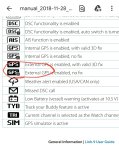
Maybe I'm jumping to conclusions on an old manual but the GPS fix part isn't clear depending on which page of the manual you read...

The original post showed light GPS (with a small 'x') on a dark background..

Screenshot_20230219-180015_Samsung Internet.jpg

The legend page in the manual implies this light text on dark background is showing the VHF set to external GPS but has no fix...

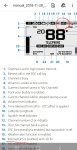
Screenshot_20230219-180314_Drive.jpg

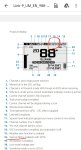
Yet on the very next page of the same manual, a description of a typical display suggests it is set for internal GPS for the white text on a dark background.

Screenshot_20230219-180232_Drive.jpg

I guess only the original poster will know if the VHF GPS source is set correctly.
 
Thanks guys I think I got it sorted eventually, I went down to the coast and set it all up in the car and the ā€œ targets menuā€ appeared allowing me to switch on the AIS layer I guess it needed to pick up a target first to communicate with the axiom.. thanks Martin over the last few days I had it set up out side with gps fix when I was trying to get a target menu , the pictures i posted was from this morning on the kitchen table just for reference, really.. thanks again for the time you took to help me šŸ˜€
 
All good fun ... and a worthwhile learning exercise in finding out what works and how...

Thank you for letting us know and good luck with the install.

(I still wonder if the manual I checked out implied the internal or an external GPS was in use with the light font on dark background. Something for another day).
 
All good fun ... and a worthwhile learning exercise in finding out what works and how...

Thank you for letting us know and good luck with the install.

(I still wonder if the manual I checked out implied the internal or an external GPS was in use with the light font on dark background. Something for another day).

not sure Martin but , I can select either in the settings it’s set to use it’s own antenna
 
Top