Arduino Nmea Mega Thread

This is frustrating, hooked up the 2200e to an RS485 converter, fed it with 3.3V and.. nothing.
Changed the module, changed the dev board twice. Nothing.
Consulted the 2200e docs, checked the wiring again. Nothing.

Re-read the docs, taking notice of the small print. Realised that I was powering the 2 devices from seperate power sources, wired the Arduino ground to the 2200e earth and bam! Data!
Happy bunny.

7AC4679E-CE53-4EF2-A558-C7C0D72FD6AD_zps5rmg22cx.jpg
[/URL][/IMG]
 
I finished up last night with the addition of a second RS485 module to capture the 38400 baud feed for AIS and added the esp8200-01 module which is now feeding data to its own access point. Tonight should see this done.

I've upgraded iSailor to receive GPS and AIS data, unfortunately I have no AIS data to test with (from the VHF) at the moment so may test with a repeating static array of data from the post above to test.

I have been closely looking at the Node MCU dev board which I think could be combined with the RS485 modules and slotted into a little box to make a wifi NMEA repeater standalone solution for less than £20, even less if we used an esp8200-01 (about £1) and only one input port.
 
Rather happy now.
I have the WiFi compnent board acting as an Access Point (which the iPad/iPhone etc devices can connect to) and had 3 devices connected.
GPS data is streaming from the VHF along with (in theory) AIS data which is being forwarded as a UDP feed by the Arduinio.

I'm also taking the GPS data stream and using it within the Arduinio sketch to display on the LCD, however I need to wait for some stacking headers to arrive so I can extend the LCD shield.


Fantastic :cool:
I've just ordered the nodemcu board, and a free Kindle book if you haven't seen it already... http://www.amazon.co.uk/gp/product/...odemcu 8266&qid=1452327886&ref_=sr_1_2&sr=8-2

Flicking through the spec, it says the nodemcu can be a Web server, so does that mean you could have a Web page displaying all this lovely data available to all over wifi?

Keep posting updates, some of us know the true joy of boat geekyness :)
 
I have the NodeMCU board sat here, its going to be phase 2 of this project :)

It's firmware can be flashed with a variety of things, including a version of the Arduino C++ libraries, LUA on top of Node or (I think) good old AT.
It's main power is that it can be used as a standalone board - so yes you can take data on its input pins and have a web server running on it. (Thats also true of the esp8266-01 that I'm using too).

http://randomnerdtutorials.com/esp8266-web-server/

The main diff between the very very cheap 01 (£2 quid) and the Node board (£7 quid) with the 12e on is the pins - its made the 8266 into a small footprint board that has amazing potential. I'm looking to see if I can make a neat little dual camera - on board intruder / monitoring gadget on it with a gsm device (much like the ones in another thread).
 
A bit disappointed with my 4.3" LCD screen, its very green - suggesting that its faulty.
On the other hand though, the data is now flowing perfectly and I'm able to see it all on the iPads. More usefully the iPad with no GPS now has a data stream supplying it with gps data from the VHF - which would have saved me some money on the bad elf dongle (hindsight is a wonderful thing).

Next stage is to tidy it all up and encase it. I have had some voltage sensors and a backup GPS board arrive today to play with. Also expecting a Co2 and Smoke Detector module as well.

Should be field testing in 2 weeks time.
 
I have the NodeMCU board sat here, its going to be phase 2 of this project :)

Cool little gadget. I've got it netted up now talking to a mobile phone hot spot and sending out temperature from a ds18b20 sensor to the web...

https://thingspeak.com/channels/78434

Slowing coming together..

This might work well as a boat monitor, tweet if the voltage gets too low or something, or let you turn on the fridge etc. 90mA and 12 quid :cool:
 
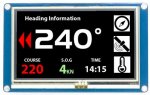
I started work on the UI last night for the screen, currently I have 3 icons on the right which display pertinent information (well its pertinent to me) in big readable type.

Most importantly for me was to have a heading - I don't have a traditional bulkhead compass (which has been a source of annoyance since purchase) so I thought I'd go with the idea of making my own "fluxgate" cheapo copy.

So I'll use the 9 axis sensor in the bow (away from electrics) and couple that with the GPS data that it being piped through the box. I'll compare the headings and if forward progress is being made - will default to the GPS, if stationary or the rate of progress is such that the data duplicates for a period - I will check the heading on the sensor and display that instead - obviously the GPS can not give a heading if you are not moving...

With a small button on screen I could simulate the NASA compass device and place big arrows left and right of the numeric indicator to suggest which way to steer to correct a course deviation (very useful for the kids) on a given (one time button press) course input.

All good fun and now that I'm in the programming stage its become much much more interesting.
 
I'll compare the headings and if forward progress is being made - will default to the GPS

That's an unusual concept. My first reaction was to flat-out say it was wrong, you want heading and not track if you're simulating a bulkhead compass. But in fact maybe a "compass" that displays track is useful - as long as it's very clear that that's what it is. Some aspects of navigation might need a bit of a rethink, and I can't immediately think how to replicate the idea of a course-to-steer across a changing tide (classic cross-Channel example) except by working out a predicted track for each hour and then repeatedly changing the number you tell your helmsman.

Pete
 
I don't for a moment consider myself expert at anything, especially the nuances of navigation!
My (and I'm ok being wrong because that's how you learn) was that at a standstill or becalmed it would be nice to simulate a compass (for reference), then when underway the GPS would be able to provide an accurate track figure.

I'm probably getting confused by the proper references. The aim (in my head) was to have a heading - compass driven, with the track being shown as the arrows - thank you for clearing that up for me - I'd got the right idea but backwards. As far as tidal tracks are concerned - there was no intent to go that complicated - other than knowing what average course to steer, pointing the boat in that direction and pressing 'go' (a bit like an tiller pilot really).

This is the prototype GUI construct that I drew.

43-PROTO.jpg
 
That raises an interesting discussion I just had with a colleague.

Should the arrows point in the direction to push the tiller or the direction of the compass course adjustment (for a wheel its the same as the adjustment obviously), could be a tweak there in setup to define which method is on a boat.

Personally for teaching and children helming - it would probably be better to have the arrows pointing in the direction to push the stick.
 
As far as tidal tracks are concerned - there was no intent to go that complicated - other than knowing what average course to steer, pointing the boat in that direction and pressing 'go'

Right, but if you've worked out what direction the boat should be pointing, and then instead make it track in that direction while pointing somewhere else, you won't end up where you intended. In a strong tide, track and heading can easily be 30° apart.

Pete
 
Right, but if you've worked out what direction the boat should be pointing, and then instead make it track in that direction while pointing somewhere else, you won't end up where you intended. In a strong tide, track and heading can easily be 30° apart.

Pete

My head hurts.

offtrack.gif


I thought that you calculated your tide flows and made a fix on the compass bearing you needed to steer to make that good over the course of the passage time that you planned.
Hence my (naive) conclusion that I'd do the same electronically (like a tiller pilot).

Point the boat at the course required with correction and end up at the right place.

OH! I see what you might mean, no, the only correction was that "You are steering in the wrong direction - steer this way to get back on course" - not for any clever cross track error which is beyond my desire to implement. Which kind of doesn't need the GPS at all.

Edit:
Thanks Pete - that's a very good point to make. I don't 'need' the GPS for that bit at all. I can usefully use the data for other things.
 
Last edited:
I thought that you calculated your tide flows and made a fix on the compass bearing you needed to steer to make that good over the course of the passage time that you planned.
Hence my (naive) conclusion that I'd do the same electronically (like a tiller pilot).

Sure, and that's fine if you always use the compass sensor. But in post 29 you were talking about using the compass only when stationary, and switching to GPS data for "heading" when moving. GPS can only tell you your track, it can't tell you which way the boat is pointing (unless you have two sensors spaced apart and some clever maths).

Pete
 
Also, I'd managed to mangle perfectly usable industry terms into my unicorn infested imagination and come up with my own special meaning of the phrases.
 
Done some more work on the UI. The NMEA data is perfectly happy streaming out so thats a done deal and I wanted to have a go at the compass/heading/speed concept.

Realised that I need a combined magnemoter/accelerometer (more trial and error) but pressed on anyway to see if I could proof of concept it. Needs tidying and a fair bit more code but its promising.

I have mounted a temperature sensor on the breadboard ready to code into the environmental window, and the GPS data will go into the relevant place shortly.
 
Nu
Done some more work on the UI. The NMEA data is perfectly happy streaming out so thats a done deal and I wanted to have a go at the compass/heading/speed concept.

Realised that I need a combined magnemoter/accelerometer (more trial and error) but pressed on anyway to see if I could proof of concept it. Needs tidying and a fair bit more code but its promising.

I have mounted a temperature sensor on the breadboard ready to code into the environmental window, and the GPS data will go into the relevant place shortly.
Looks great - well done!

I *need* one of those screens :cool:
 
Top