Android NMEA Serial WIFI

Hi Martin I am in Scotland so a bit far. Got navmon working. It looks OK. The cables seem to be quite expensive. Digital yacht $64.

 
Anything non-prolific does tend to cost more.. but should give you less grief.
If you really want to check out an even more user friendly FTDI cable then look for COM port retention. Plug into any USB port on the netbook and it will keep the same COM port designation.
Microsoft Virtual WiFi Miniport should be possible direct from windows. A few 'netsh' commands might be needed at the DOS prompt or added to a .bat file though.
 
The trouble with using some kind of "serial to Wifi converter" is that the only standard protocol it can implement is Telnet and I rather doubt that the various NMEA applications for tablets, smartphones or PCs will be expecting that.

Good point but I was covering my ar$e with talking about one that "fits the bill". There was a recent thread on cruisersforum where a similar question was asked and someone raised the same point, assuming the devices in question were like traditional terminal servers. Apparently there's a number of devices which do have the option of simple tcp or udp encapsulation (ie not wrapped in telnet which as you say, nothing will want to talk), with devices from moxa being popular for this purpose. Here's the thread:
http://www.cruisersforum.com/forums/f13/nmea-into-router-101914.html
They're talking about serial to ethernet there (being fed into a wifi access point), but moxa seem to do a straight wifi version.

I have no experience with these things at all: Obviously I'm going to dogfood with kplex and a raspberry pi :-) I'll polish up the howto for nmea-to-wifi with that as soon as I finish butchering my boat's cabinetwork.

Serial to ethernet adapters which do the right thing probably aren't cheap and it sounds like it would be a bit of a mine field for the OP so yes PC probably an easier solution here.
 
There is an App called AirDisplay (and others) which take whatever is on your PC and uses an ad-hoc WiFi connection between your PC and your phone (i or Android). So, if you can get it to your PC, you can get it to your phone via WiFi. There are 2 modes, one is a direct mirror (ie copy) of your PC monitor the other treats the phone as a second monitor so that it can display a window of whatever you wish and the PC can continue to be used for other programs. Costs about Us$10. I can display my Seatalk output on my iPhone. I'm now thinking of a YAPP to do away with the PC - that's a bit harder. Andrew
 
it more simple that what you think, i've just donne it, interface from nmea to wifi and Iregatta hooked. thatway even with pc you can take the nmea from wifi... and all android apps that let you specify the ip address and port for reciving data... i'm looking for an android app that display nmea data so i can make the mast repeaters using an waterproof tablet. and it costs 55 euro... for more info aurelrica@yahoo.com
 
Last edited:
Still trying to solve this problem. Just to recap I have a Raymarine Seatalk to NMEA adapter which also has RS232 connections. I have several yachting apps on my tablet and phone. Whats the best way to get the data to my devices. Preferably wirelessly and without using the very expensive Digital Yacht device. Can I just use a cheap serial to bluetooth adapter. Otherwise can I just plug it in via a serial to usb adapter.
 
Can I just use a cheap serial to bluetooth adapter. Otherwise can I just plug it in via a serial to usb adapter.

That will depend on the apps concerned. I'm guessing that more than a few won't be expecting to receive data over a serial connection, only network, so check the docs/user forums.

Out of cheapo options , forum user curtis documented using a cheap serial to wifi device bought off ebay last year:
http://www.ybw.com/forums/showthread.php?376686-IPAD-AIS


My preferred solution would be a low-cost single-board computer with a wireless dongle and the rs232 output of your converter device plugged in, either to a serial port on the computer or via a serial to usb converter. I used to say "raspberry pi" here but I remain underwhelmed by the reliability of the (closed source afaik) usb-related firmware for that so am currently looking around for something else. A number of people (including forumite RobbieW) have multiplexer software running on open source routers. I do recognise that this kind of thing might be more geekery than you want to get in to.

Obviously if you'll have a windows laptop running at the same time MartinJ made some suggestions on page 2.
 
The difference between the "pc" and "nmea 0183" outputs (both will be "serial") will (I think) be that the former will be single ended rs232, the latter differential (rs422). The application layer data should be the same (as playtime says). In your proposed scenario you don't actually care about anything below that application layer because you're going to convert it to IP over wireless anyway. A serial to wireless converter is definitely worth a look if you can find a reasonably priced one that fits the bill although one imagines that with a dedicated "nmea-0183 to wireless" adapter the manufacturer should understand exactly what you're trying to achieve if you need support. You can always come back here for help of course :-)

Not only is the cost of some of these nmea-to-wifi adapters just absurd (even considering the extra cost of opto isolated circuitry) (£400 for the digital yacht one?) the network programming on some of them is just absurdly toytown. "TCP server" which supports one client device? WTF?
I bought eventually the vYacht wifi adapter, it does the biz, got a muxer in it I believe. Just over a hundred quid, direct from the Swedish version of Angus YAPP
A
 
+1 for the FTDI serial-to-USB cable solution.

I'm using two of those. The first is connected to one of Angus' YAPP GPS boxes. The second is connected to a Standard Horizon AIS receiver.

Could you explain a bit more about the FTDI cable. Which one did you use.
 
Could you explain a bit more about the FTDI cable. Which one did you use.

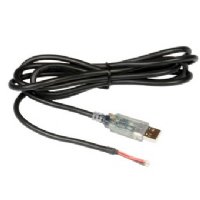
Yes, this is the type I bought from All Gadgets :

30847-usb-rs232-cable_2322_general.jpg


They say:
This cable allows you to connect bare wire NMEA devices to a PC USB port. (Most USB converters come with a serial 9-pin connector which means using another serial cable to make connections.) The driver software creates 'virtual' serial ports for use by navigation and other software. Can be connected to GPS units, chartplotters, autopilots etc. Also useful for connecting to Raymarine NMEA/SeaTalk interface box E85001. Supports transfer rates of 300baud to 1Mbaud (NMEA is 4800 or 38400). Drivers available for Windows, Linux and Mac. Cable is 1.8m long

As an old IT person, deeply scarred by a lifetime on the bleeding edge of new technology, I was pleasantly gobsmacked that it all worked first time as advertised. Just make sure you have the latest drivers on your notebook/laptop before leaving home/wifi connection.

http://www.allgadgets.co.uk/marine/pc/USB-RS232-cable-bare-wires-PC-to-NMEA-AIS-27p417.htm
 
Top