AIS Engine 2

That shouldn't be a problem. My old GPSMAP550 and my current ECHOMAP 700 both have 2 NMEA 0183 ports. I have the radio connected to one port at 4800baud and the AIS 3 engine connected to the other at 38400 baud (high speed on the Garmin).

I would add that you can do a lot more... Yes, separate port for AIS at 38400 baud, but on my "other "port (originally Garmin 551, now 751) I have DSC, Tacktick NMEA transmitter, and Yeoman Plotter. They all play nicely
 
Hi all

Must be me- I'm missing something here!!

Can't get the system to work.

I have NASA AIS Engine 2 - Now upgraded with AIS Chip
Lowrance Elite 5 HDI- with AIS in the menu system so it's in there!

AIS engine is connected to antenna and power red LED on all the time, Green Flickers now and again- so getting AIS signal.

NMEA Connections (this is the bit I am unsure about).

On the AIS- I have a Black Wire, a Red Wire and a silver wire with no plastic on. Instructions say to ignore Red and connect Black to relevant input on the plotter and silver to 'Ground or Ref'.

On the plotter I have Yellow TX+, Blue TX- and Silver (Shield/Ground) wire with no plastic on as well.

I have connected Black wire from AIS to Yellow TX+ wire on Plotter. What then do I connect the Silver wire from the AIS to?? The NMEA- Blue wire or the Silver wire with no plastic on?

I have tried various combinations but not a lot seems to work!!

I am slightly confused!
 
On the plotter I have Yellow TX+, Blue TX- and Silver (Shield/Ground) wire with no plastic on as well.

I have connected Black wire from AIS to Yellow TX+ wire on Plotter. What then do I connect the Silver wire from the AIS to?? The NMEA- Blue wire or the Silver wire with no plastic on?

I have tried various combinations but not a lot seems to work!!

The AIS engine is transmitting data to the plotter, so it needs to be connected to the plotter's receiving (RX) wires. I don't have an installation diagram for the Elite 5 HDI, but Lowrance tend to use orange and green for NMEA receive. Usually, there will be 2 ports; orange and silver will feed data in to one port, green and silver will feed data in to the second port. The port needs to be configured in the plotter's menu to receive data at 38400 baud.
 
So- more confused now!

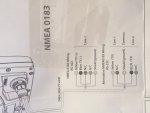
On the diagram...

NMEA 0183 RS-422;

Yellow TX+
Blue TX-
N/C
N/C
Shield (Ground)
The 2 N/C wires are green and orange but the instructions do not refer to colour
All on COM1

Alternative NMEA 0183 RS-232

Yellow TX
N/C
On COM1

Shield (Ground) COMMON

Blue TX
N/C
On COM2

Help!
 
I can't quickly locate a wiring diagram, can you post an image of whatever you have? Do you have an orange or green wire as well? I can't understand why Lowrance wouldn't put this stuff on their website!
 
N/C means "not connected". I can't understand why your plotter wouldn't have the capability to receive data (although Lowrance equipment is a bit odd). What exactly is the model/type of your plotter?
 
N/C means "not connected". I can't understand why your plotter wouldn't have the capability to receive data (although Lowrance equipment is a bit odd). What exactly is the model/type of your plotter?

I may be stating the obvious, but on the Garmin plotter's you have turn on AIS before it will display. Is there something similar on Lowrance?
 
Yes- I have no idea what the input wire is! Tried them all but nothing seems to work...

Intrigued by this I have googled manuals for the Lowrance Elite-5 plotter/fishfinder range and every single variant (5m HD, 5x HDI etc) says in the 'communications' field of the 'specifications' panel at the back, page 30, that the comms are a single NMEA0183 output. There is no mention of an NMEA input, which is what you're looking for. Manual at: www.lowrance.com/Root/Lowrance-Documents/US/ELITE-5M_HD_OM_EN_988-10520-001_w.pdf

It seems pretty clear to me that your plotter has no NMEA0183 input at all, which is why the input wires for the generic Lowrance data cable you have (this for example is shared with the 4 and 7 series plotters, which *do* have an NMEA input) are shown as NC for 'not connected' in your wiring diagram.

I would be pretty certain you cannot connect external NMEA devices as inputs to the plotter you have.

Why you have AIS menus in the software is a mystery; my guess is Lowrance share the firmware with other units which do accept NMEA inputs. There is some guidance on the Lowrance website for using the Elite 5 and Elite 7 plotters with updated firmware (3.0) which supports AIS. Addendum at: www.lowrance.com/Root/Lowrance-Documents/US/ELITE-5-7_RTM3_ADD_988-10642-001_w.pdf

The manual for the Elite-7m shows it with both NMEA0183 input and outpus ports, so my guess is either:

The version 3 firmware was shipped with both the 5 and the 7 once it was developed, despite the fact the 5 could not receive NMEA data so the AIS menus are useless;
or, input capability was added to the 5 later in the production run than the date your unit was shipped. If you have upgraded your firmware yourself to v 3, this might be the case.

Changes like this are not unusual in the Navico (Lowrance) ranges, but either way it is not going to help much to ge tto the root of it; As I say I would be reasonably sure you can't connect an external input to your plotter.
 
Last edited:
Hmmmmm! That is very interesting! I have sparked up an email conversation with Lowrance support- so I will know shortly....
 
Lowrance is one of the worst companies for publishing information on its website, so asking them directly is a good idea. As I posted earlier, I can't understand why your plotter wouldn't have the capability to receive data, but it certainly seems from the spec bitbaltic quoted that this may be the case.
 
Lowrance is one of the worst companies for publishing information on its website, so asking them directly is a good idea. As I posted earlier, I can't understand why your plotter wouldn't have the capability to receive data, but it certainly seems from the spec bitbaltic quoted that this may be the case.

Navico generally (Simrad, Lowrance, B&G) are very bad at fully documenting specification changes that have a bearing on issues like this. For instance, I bought one of the last Simrad NSS7 plotters available, a couple of months ago (still haven't fitted it though). This is because my boat is all-simrad and I wanted a matched plotter before everything moved over to MFDs without 0183 inputs, which it now essentially has done. In the manual for the NSS, the NMEA2000 port is very clearly a Simnet socket; the text of the manual describes the use of a simnet socket; the diagram captions, however, talk about a micro-c cable, and the plotter itself has a micro-c socket which looks nothing like the simnet in the technical drawings. I am pretty sure the first NSS plotters will have shipped with a simnet socket which was later changed to a micro-c as Navico (in common with all other manufacturers) realised their attempt at a propreitary network was not going to corner the market and fell back to the micro-c standard. The manual was then haphazardly updated to reflect this. But the result is very confusing for the user and clearly there is similar confusion in the documentation of the Lowrance range. In fact those Lowrance manuals look like they were bashed together by a work experience kid with powerpoint.

For the OP, I hope my guess is wrong and the plotter can be connected up somehow.

Cheers
 
The stumbling block seems to be identifying the correct wire colours, and I don't think your link explained anything about that.

Let me copy it for everyone:

Connecting Up

I connected the AIS engine to a Garmin GPSMAP 4008, which provides a number of NMEA ports for data in and out. Other chartplotters will have similar configurations. You will need to connect the AIS data cable screen wire to the negative of your boat wiring loom. The black wire is connected to the + wire of one of the NMEA Data In Ports of the chart plotter. The - wire of the NMEA Data In Port is also connected to the negative of your boat wiring loom. That is all you have to do - solder and heat-shrink tube is the recommended method.The AIS engine has two LEDs, one for power and one for data. If red is on and green is flickering, you know that bit is working fine.

Configuring

Again, easy when you know how. All you need to do on the Garmin unit is totell it that the NMEA port you chose for the AIS signal is High Speed, then everything else is automatic. This vital snippet of information is well hidden in the Garmin manual so it had me struggling for a long time.

If the above does not work then have a look at the Lowrance menu settings.
 
Let me copy it for everyone:

.... The black wire is connected to the + wire of one of the NMEA Data In Ports of the chart plotter.

Salar- you're not getting it. We know what the wiring connections from the NASA box are (and the OP always did). The issue is which of the wires coming from the Lowrance to connect the black tx + wire to. You're correct that it should be the NMEA rx +, but as your blog is about connecting to a Garmin, that does not answer the OP's question about the wire colour coding of his Lowrance, as pvb has already told you. Moreover it now seems likely there is no nmea data in (rx +) port on the Lowrance for the OP to connect the NASA's black wire to in any case, so you repeating your advice to make a connection to it is irrelevant. Suggest you read the whole thread or, if you have done this, stop repeating your blog advice as it is not relevant to the OP's problem and you perhaps don't realise why.
 
Top