AIS demo

pappaecho

Well-Known Member
Joined
13 Oct 2004
Messages
1,841
Location
S. Hampshire
Visit site
For those who want to see the advantages of AIS, there is a live site which was sent to me today which covers the Solent area. If you click on moving vessels you get full details of their movement heading, destination etc, if they have bothered to fill the details in.
try www.ais-live.co.uk
 
Doesnt show you the entirety of what can be achieved with AIS. If you have www.shipplotter.com software, then you get much wider coverage from the shore sites. You also get - what for me was one of the best selling points, prediction of movement and closest point of approach, plus audible warning of any vessel with a cpa within a specified distance within a specified time. IMHO the most important info you could have.
 
Doesnt show you the entirety of what can be achieved with AIS. If you have www.shipplotter.com software, then you get much wider coverage from the shore sites.

------------------------------------------------------

Like this?

Reduced_AISPlot.jpg


or this?

LoadsofAIS_2.jpg
 
Shipplotter will actually plot a curve prediction line if the ship is turning.... not got a screen grab though - sorry!
 
I think Shipplotter needs you to have an AIS receiver thingy on your PC/Laptop before it will show 'local' data? Does shipplotter have a link to others that have already plugged in receivers?
 
Personally I prefer to remove as much confusion as possible from the screen, so I do navigation on one screen and view the AIS on another, and I view the AIS on a calibrated satellite image of the area. That way I dont lose details. Horses for courses, but www.shipplotter.com allows you to do that. I then view the nav page as priority. If there is a need for an alert, shipplotter overwrites the nav page with the alert message - which includes if GPS info is stale!

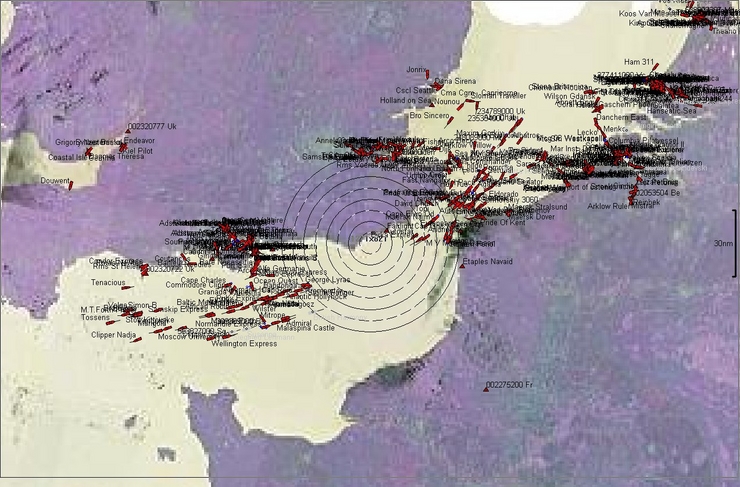
The following is an example from some time ago from the server which really shows the seperation lanes

AISintheChannel.jpg
 
[ QUOTE ]
Personally I prefer to remove as much confusion as possible from the screen, so I do navigation on one screen and view the AIS on another, and I view the AIS on a calibrated satellite image of the area. That way I dont lose details. Horses for courses, but www.shipplotter.com allows you to do that. I then view the nav page as priority. If there is a need for an alert, shipplotter overwrites the nav page with the alert message - which includes if GPS info is stale!


[/ QUOTE ]

In open water I use ShipPlotter in "radar" display mode and have chart plotting and/or radar on a separate instrument. One can then compare the AIS plot directly with the radar plot without distractions, as you say. However, having a chart under the AIS plot is useful in coastal waters as it helps predict where the trafiic is likely to be heading.
 
Top