
dje67
Well-Known Member
One for the IT techies on here….
I use Navionics on my 13” non-cellular iPad. Onboard, my wi-if router allows the iPad to get GPS and AIS NMEA data from my Em-trak B954. This work perfectly.
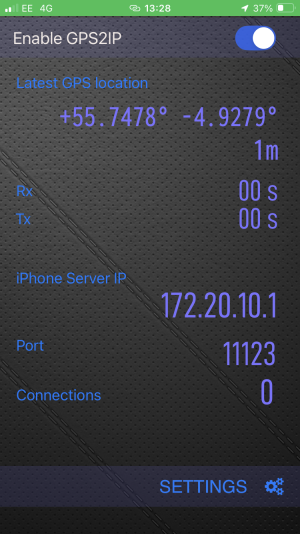
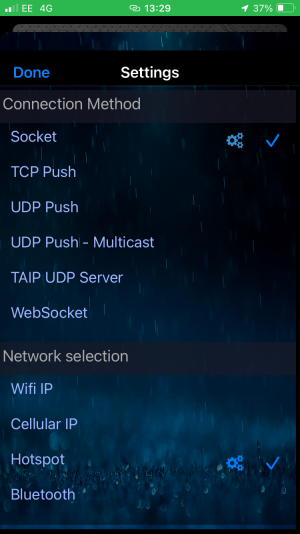
However, I’d also like to have a fallback setup if, for some reason, my router or B954 failed (preventing the iPad from getting GPS data). The GPS2IP app looks like it should do this, allowing my iPhone GPS position to be shared with the iPad using the phone hotspot. I cannot get this to work. I’ve setup the app for hotspot and socket 11123. Enabling GPS2IP tells me the hotspot IP and socket address of the server. I then put those settings into Navionics paired devices (iPhone server IP 172.20.10.1, port 11123), but it doesn’t connect; no GPS data is received and my position on Navionics is unavailable.
I’ve also tried ‘pushing’ TCP and UDP from the iPhone to the iPad using the network address the iPad tells me it has on the hotspot (192.0.0.2), but that also doesn’t work. I’ve tried using Bluetooth to connect the iPad and iPhone, but that also doesn’t work.
As an aside, if both the iPhone and iPad are connected to the boat router, GPS2IP does send data; just not if they are paired via the phone hotspot.
My phone is iPhone SE, IOS 18.5. iPad is iPad Pro 12.9, IOS 16.7.11.
Any suggestions?
I use Navionics on my 13” non-cellular iPad. Onboard, my wi-if router allows the iPad to get GPS and AIS NMEA data from my Em-trak B954. This work perfectly.
However, I’d also like to have a fallback setup if, for some reason, my router or B954 failed (preventing the iPad from getting GPS data). The GPS2IP app looks like it should do this, allowing my iPhone GPS position to be shared with the iPad using the phone hotspot. I cannot get this to work. I’ve setup the app for hotspot and socket 11123. Enabling GPS2IP tells me the hotspot IP and socket address of the server. I then put those settings into Navionics paired devices (iPhone server IP 172.20.10.1, port 11123), but it doesn’t connect; no GPS data is received and my position on Navionics is unavailable.
I’ve also tried ‘pushing’ TCP and UDP from the iPhone to the iPad using the network address the iPad tells me it has on the hotspot (192.0.0.2), but that also doesn’t work. I’ve tried using Bluetooth to connect the iPad and iPhone, but that also doesn’t work.
As an aside, if both the iPhone and iPad are connected to the boat router, GPS2IP does send data; just not if they are paired via the phone hotspot.
My phone is iPhone SE, IOS 18.5. iPad is iPad Pro 12.9, IOS 16.7.11.
Any suggestions?