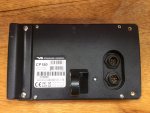
Standard Horizon CP180 Flush Mounting: need pictures

Joined
20 Jun 2007
Messages
16,234
Location
Live in Kent, boat in Canary Islands
www.bavariayacht.info
I have now decided that I'm going to build a slope fronted box to flush mount my CP180 and [Matsutec HP-33A AIS Transponder]...

I've got two templates for mounting my CP180; one with two small holes, one with one large hole. I've made a composite below:

CP180-Template-Composite_zpsed822131.png~original


I can't decide how to cut this as I don't remember what the back of the CP180 looks like.

Has anybody got any pictures of the CP180 back, or can take a couple? If the latter, square on, fully zoomed in from a distance if possible.

[UPDATE] Picture sorted, thanks for the replies. New question about fitting screws.
 
Last edited:
Cp180_zpscc786db1.jpg


When I mounted mine I just cut the rectangle as shown and everything just slipped snuggly inside it.

I presume the red cut-outs as seen on your post are for where you may just want to cut out for the connections and to accommodate the hinged stand mounting only.
 
Last edited:
There are two variants of the CP180, the CP180 and the CP180i.

The "I" version has an integrated GPS aerial.

Therefore the cutout has to show both versions???

Edit: Actually reading what KevO says, I think he is correct, its where you want to use the mount through the panel.
 
Last edited:
There are two variants of the CP180, the CP180 and the CP180i. The "I" version has an integrated GPS aerial. Therefore the cutout has to show both versions?

The template on the SH web site shows only the larger cut-out. The template in my original manual shows only the two-hole cut out. I have combined them to make the composite in my OP.

As you can see, the red holes are outside the bounds of the large hole, I want to see a photograph so I can figure out why.
 
Last edited:
The template on the SH web site shows only the larger cut-out. The template in my original manual shows only the two-hole cut out. I have combined them to make the composite in my OP.

As you can see, the red holes are outside the bounds of the large hole, I want to see a photograph so I can figure out why.

No idea. But if you are planning to flush mount it as standard then just cut to the large rectangle (with the rounded corners) marked 'cutting line' on your diagram and it will fit perfectly.
 
No idea. But if you are planning to flush mount it as standard then just cut to the large rectangle (with the rounded corners) marked 'cutting line' on your diagram and it will fit perfectly.
+1 I Have installed a few and the red lines correspond to further protrusions on the rear for data and power connections, the only reason I can imagine for their use would be a double skin panel to get the cables neatly routed and access for the connections.
 
I've got two templates for mounting my CP180; one with two small holes, one with one large hole. I've made a composite below:

CP180-Template-Composite_zpsed822131.png~original


I can't decide how to cut this as I don't remember what the back of the CP180 looks like.


Has anybody got any pictures of the CP180 back, or can take a couple? If the latter, square on, fully zoomed in from a distance if possible.

Mine is a 175 so I cannot help in terms of the configuration but if it helps, I cut off the protruding bracket to reduce the depth of the unit meaning that I could house the entire unit within a shaped teak block and not cut into the grp bulkhead
 
CP180i Pics

Hi Nigel, I am going through a similar issue! I have a SH CP180i and have been wondering how and where to mount the unit in the cockpit of my Elizabethan 30. I looked at the SH cutting template pdf and could not understand how it would work for me! I can only imagine that there has been a change in design of the back because the integral GPS stub would not fit in the cutout as described.

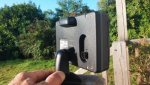
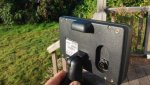
I have attached some pics of the back of the unit.

2014-08-09 07.14.47.1.jpg2014-08-09 07.14.38.1.jpg2014-08-09 07.14.47.1.jpg2014-08-09 07.14.38.1.jpg
 
I have attached some pics of the back of the unit...
That's very helpful, thank you. Unfortunately they don't show one thing that I need to know: does the bracket protrusion project below the level of the lower mounting screws, as implied by the 2-hole cutout? That's why I really need a square-on picture, preferably from a distance to reduce perspective distortion.
 
I think this is the bit from the manual that confused me! Page 13.


The CP180 and CP300 are available in either internal or external GPS antenna variants. The
internal GPS versions CP180i and CP300i are designed for bracket mount only and supplied
only with the mounting bracket. The external GPS versions CP180 and CP300 are designed
for bracket or flush mount and are supplied with both bracket and flush mounting kits.


Both external and internal GPS models may be flush mounted, but the user should ascertain
that they can obtain a satisfactory GPS fix when using the internal GPS version.
 
Another pic.

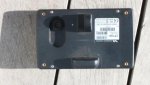
This is the back, square on, the bottom of the mounting bracket is, possibly, a little more than 1mm above a line connecting the centre of the two lower mounting points.
 

Attachments

  • 2014-08-09 08.40.34.1.jpg
    2014-08-09 08.40.34.1.jpg
    33.8 KB · Views: 3
This is the back, square on, the bottom of the mounting bracket is, possibly, a little more than 1mm above a line connecting the centre of the two lower mounting points.
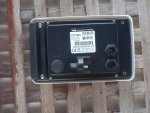
Interesting, there appear to be two different backs! I've got the type with the recessed sockets.

Here is my current drawing for the template (using Steve's photo):

CP180-Composite_zps0f401fc4.png~original


My main concern was that the large cut-out (red) was very close to the mounting holes, this is only 3mm MDF! So this is my new template, cut line in dark green:

CP180-New-Template_zps4b38b21a.png~original


Thanks for all the help, now sorted.
 
Last edited:
Surely the most accurate method would be to cut out the hole from a piece of stiff cardboard and adjust it until you reach a snug fit, then use that card as a template for the actual surgery on the boat.
 
Top