
Raymarine NMEA - tracing back cables?

Tim Good

Well-Known Member
Joined
26 Feb 2010
Messages
2,888
Location
Bristol
Visit site
I have an old Raymarine system on the boat but my plotter (Raymarine E80) had an unused NMEA cable into the back of it. I now want to use this for my AIS (green + white). The redundant NMEA cable runs down the penedstal and works its way through the boat through sealed inaccessible conduits. The cable is the standard only 5 pin NMEA cable below.
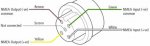
IMG_8943.JPG

My problem is I can't find where this unused NMEA cable comes back to. All my other instruments use the Seatalk cable. I suspect they may have made a join somewhere and now the cable that comes into the cabin is no longer yellow, brown, white, green and screen.

My question: is there any way to test an unloaded wire with a multimeter to figure out which cables are which if the cable thay enters the boat is no long corrispondong to the cable going into the plotter.
 
Unplug the nmea connector from the plotter, short all the pins together somehow (Don't plug it back in like that BTW) and then test for continuity with a multi meter (If you have a boat you must have one of these) at the other end where you think the cables are.
 
Ah, I see. I'm not sure now whether the OP wants to trace a cable which he only has one end of .... or wants to unplug that one end and use a multimeter to test lots of other ends of other cables until he finds each end of the same cable. :confused:

Yes that basically :)

Unplug the nmea connector from the plotter, short all the pins together somehow (Don't plug it back in like that BTW) and then test for continuity with a multi meter (If you have a boat you must have one of these) at the other end where you think the cables are.

Can you explain how to short them together and also what you mean by continuity in terms of using my multimeter please?
 
Yes use wire if female (holes that receive pins) or if they are bare pins (male) you could just stuff some kitchen foil in the connector or something, you are just trying to connect the wires together to create circuit so that you can test continuity (ability to hold electrical current) between two of the wires, then you can test the circuit from the other end. If you don't short the wires at one end you would need a very long set of multi meter cables and arms. :)

Continuity is usually an option on even basic multi-meters with a symbol ->+ , it will usually sound a beep when it is able to create an open circuit (you can also use the Ohms options to test for resistance).
 
I can't see that joining a 4-wire NMEA cable to a 3-wire Seatalk cable would achieve anything useful. I think it's more likely the plotter output is connected to the NMEA input, not Seatalk, of one of your other instruments. Check the manuals! For example our Autohelm system has an NMEA input connected to the ST7000 AP controller.

Maybe you could disconnect the plotter cable and check what is no longer working? The spare plotter input connection lines will probably be nearby.
 
Last edited:
Yes that basically :)

Can you explain how to short them together and also what you mean by continuity in terms of using my multimeter please?

Just a thought ..... but if you have a DSC VHF radio then that is where the other end of the NMEA cable goes to as most (all?) DSCs will not accept Seatalk.

If you unplug the NMEA cable from the back of the plotter and the VHF starts bleeping after 10 minutes and the GPS position vanishes from the screen then you have the proof.

This means that the NMEA port is set to 4,800 and an AIS unit will need 38,400 but there are a lot of threads about ways to get around this.

Richard
 
Just a thought ..... but if you have a DSC VHF radio then that is where the other end of the NMEA cable goes to as most (all?) DSCs will not accept Seatalk.

If you unplug the NMEA cable from the back of the plotter and the VHF starts bleeping after 10 minutes and the GPS position vanishes from the screen then you have the proof.

This means that the NMEA port is set to 4,800 and an AIS unit will need 38,400 but there are a lot of threads about ways to get around this.

Richard

Thanks for that and a good suggestion!!! However my DSC VHF was never wired in via NMEA when I got the boat. It now takes a NMEA feed from my AIS which has integrated GPS.
 
That's very unusual, I suspect. Didn't it keep bleeping at you like mine does?

Nope just said "no GPS". I suspect the previous owner fitted a new DSC and then could find the NMEA cable either. Anyway I'll try the continuity test on the cables I have found and see how it goes. Haven't used a continuity function on my meter yet so it'll be a good place to try it out :)
 
Nope just said "no GPS". I suspect the previous owner fitted a new DSC and then could find the NMEA cable either. Anyway I'll try the continuity test on the cables I have found and see how it goes. Haven't used a continuity function on my meter yet so it'll be a good place to try it out :)

I hope you find the other end. Those Raymarine cables are like gold dust these days so whatever you do don't accidentally chop the end off. :)

Funnily enough, I was brought up on basic analogue multimeters and always tested for continuity using the Ohms scale. Then a couple of years ago someone on here mentioned in passing that digital multimeters often have a built-in continuity bleeper so I pressed that little button with a speaker symbol on the meter which I bought about 5 years earlier ..... and it started bleeping. Perhaps I should have read the manual? :o

Richard
 
I can't see that joining a 4-wire NMEA cable to a 3-wire Seatalk cable would achieve anything useful. I think it's more likely the plotter output is connected to the NMEA input, not Seatalk, of one of your other instruments. Check the manuals! For example our Autohelm system has an NMEA input connected to the ST7000 AP controller.

Maybe you could disconnect the plotter cable and check what is no longer working? The spare plotter input connection lines will probably be nearby.
I don't think OP was saying NMEA was connected to SeaTalk but that it had likely been extended using a cable with random wire colours that wouldn't correspond with manual.
 
I recall those NMEA cables weren't very long and the join may well be in helm pod or in pedestal if it has access plate. You might then be able to identify emerging wire colours. Biggest crime would be a join somewhere inaccessible.

Alternative is to just make a new join in there and run a cable through. PM me if you end up needing some data cable.
 
I don't think OP was saying NMEA was connected to SeaTalk but that it had likely been extended using a cable with random wire colours that wouldn't correspond with manual.
Agreed, but it is still likely the cable is connected to an NMEA socket on an instrument if they are original fit.
 
Result!

Ok using the methodology suggested and joining the wires together and testing resistance I basically discovered the NMEA wire ended half way back. Anyway, using the same method I was able to trace an unused cable, for a now defunct MOB Sea Marshell system, and wire that up to the AIS. I now have AIS displayed in the cockpit for NMEA.

Something new learned and job sorted. Thanks everyone!
 
Top