
Raymarine i60 new install, no wind speed displayed

wizzer

Well-Known Member
Joined
27 May 2004
Messages
267
Location
Ever sunny Cornwall
Visit site
I have just installed a Raymarine i60 Wind display unit, connected to a new short arm, masthead transducer.
The connections are;
Transducer to i60 Wind by supplied cable to male spade terminals 3-7 on rear of i60
i60 to SeaTalk ng bus, using SeaTalk ng cable - using the white SeaTalk socket on the rear of the unit.
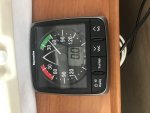
Having installed as above, the i60 display reads “0” knots whilst the needle does show the wind direction (see attached pic)
I understand that I have to calibrate the instrument, as per the Raymarine i60 manual, but I understand that the calibration is for the wind direction only (not speed)
I am wondering if the blue coloured SeaTalk socket should have a SeaTalk ng backbone terminator fitted and if this maybe the cause of the “0” wind speed display?
Comments appreciated
Apologies for the rotated pic, the system here does it and I can’t stop it
 

Attachments

  • BC5AE592-30AC-48E2-9BCD-93E1271E076A.jpg
    BC5AE592-30AC-48E2-9BCD-93E1271E076A.jpg
    483 KB · Views: 1
I have just installed a Raymarine i60 Wind display unit, connected to a new short arm, masthead transducer.
The connections are;
Transducer to i60 Wind by supplied cable to male spade terminals 3-7 on rear of i60
i60 to SeaTalk ng bus, using SeaTalk ng cable - using the white SeaTalk socket on the rear of the unit.
Having installed as above, the i60 display reads “0” knots whilst the needle does show the wind direction (see attached pic)
I understand that I have to calibrate the instrument, as per the Raymarine i60 manual, but I understand that the calibration is for the wind direction only (not speed)
I am wondering if the blue coloured SeaTalk socket should have a SeaTalk ng backbone terminator fitted and if this maybe the cause of the “0” wind speed display?
Comments appreciated
Apologies for the rotated pic, the system here does it and I can’t stop it

the seatalk ng blue backbone cable seems to need a terminator resistor at each end and a 12v supply from somewhere
 
I understand that I have to calibrate the instrument, as per the Raymarine i60 manual, but I understand that the calibration is for the wind direction only (not speed)
I am wondering if the blue coloured SeaTalk socket should have a SeaTalk ng backbone terminator fitted and if this maybe the cause of the “0” wind speed display?

The calibration process probably also allows you to select the units for windspeed, although I'd expect it to default to kts. You should try the calibration process before anything else.

You shouldn't need a terminator on the instrument, but it wouldn't hurt to try adding one.

You don't need to worry about the 12v supply as your instrument obviously has power connected.
 
I also understand that it’s possible to test the operation of the masthead transducer, by connecting a voltmeter as follows;

Yellow to shield should read between 0V and 5V DC (the exact voltage depends on the instrument: 3.2V is typical for ITC5, more like 5V on ST60.)
This is the wind speed signal. The voltage will toggle between 0V and the maximum (3-5V), twice per rotation of the anemometer cups. At low wind-speeds you'll see each individual pulse, but at higher wind-speeds your multimeter will average the voltage, in which case the the faster the wind is blowing, the higher the voltage will read.
 
I’ll try it tomorrow
The i60 wind display unit is a used one (eBay), whereas the masthead transducer is new, so, if the voltmeter test indicates that the xducer is working, which it should be, then perhaps the display unit could be faulty
 
I’ve had this before on the the same unit model, a factory reset cleared the fault. You can also test the unit using a regulated power supply if the wind transducer tests ok and you wish to delve further.

The blue end of line terminators are necessary for a “proper” install however the network will work without them.
 
Thanks for your input Matt
I’ll try the factory reset tomorrow and install the blue line end plug
If that doesn’t sort it, I’ll do the voltage check, then it must be down to the display unit
Cheers
Wiz
 
If you need the display testing then you’re welcome to pop it in the post. Also think, although it might have been an st60+ now I come to think of it, I repaired one about a year ago where one of the terminals on the back had become damaged on the board and was making intermittent contact. New pin and some solder fixed it.
 
I'm wondering whether the instrument is confused by using both cables into the back. My i60 has data and power through the ng system but the data from the masthead has to go into an ITC-5 box of tricks to convert it from analogue to digital.
 
I'm wondering whether the instrument is confused by using both cables into the back. My i60 has data and power through the ng system but the data from the masthead has to go into an ITC-5 box of tricks to convert it from analogue to digital.

The i60 wind has direct input terminals for the wind transducer cable. I thought you only needed the iTC-5 box if you were connecting to an i70 instrument head?
 
Voltmeter tests just now;
Red to shield 7.93v steady
Blue to shield 2.2 to4.6v
Green to shield 2.8 to 4.1v
Yellow to shield 0.13 to 0.2v (very light wind)
Display shows wind direction fine
Still reading 0.0 kts
Interesting that pressing the “display” button shows; “F0’, followed by “max 1.8 kts”, therefore it would appear that the i60 is getting wind speed data, but not showing the current wind speed, back to you Matt!
 
The "F 0" message shows the factory reset page; use the VMG or Tack buttons to change it to F 1, then press Display again to exit and set to factory default settings.

Just a thought; you said the i60 is secondhand. Could it be set up as a "repeater" rather than as a "data master"? The display with the transducer connected must be set up as a master.
 
According to the i60 manual, the first press of the “display” button shows the wind speed in the Beaufort scale, hence “F0” for now, as there is little or no wind in Falmouth today
The instrument is set as “Master” too
 
Top