Orca (Nav app) experience?

John_Silver

Well-Known Member
Joined
19 Mar 2004
Messages
1,261
Location
St Mary's Island
allatseawithstargazer.blogspot.com
Prompted by the revelation (in Navionics App Issue thread) that Navionics app capability has been degraded. Specifically that it can no longer be relied upon as a plotter ‘backup,’ because it may, randomly (it seems) demand an online login, to operate it:

Is anyone using the Orca app? Does it fill the gap left by Navionics? IE: phone & tablet based, intuitive to use, offshore (= offline) capable, plotter substitute with regular cartography updates and the ability to share routes / waypoints across devices via a ‘cloud.’
 
Last edited:
You can download Orca for free and have a bit of a play around with it. It will work provided you have a intwrnet connection. Presentation is very different to Navionics as it uses mapbox base mapping. There are some areas that have an annoying banded shading indicating that the area is not surveyed, usually in harbours or marinas. I have been looking a CMap app. Presentation wise, the charts look similar to Navionics but the app does work slightly differently. Cmap seem to have gone a different way to Navionics. It is a subscription based service. You pay your subs (<£50) and you have access to all of their mapping for a year. Download the area you want and it all seems to be included in your subscription. At the end of the subscription, you have to renew or you lose access to your downloaded maps on your device. It does save having to buy different map areas as Navionics charge for each. Worth considering if you are transiting lots of different areas. Again you can download the app and take a look at it via a live Internet connection to see what you think 🤔.
 
Thanks @robmcg. Liking the sound of all areas access. I tend to be in the move all summer. East Coast UK down to N Spain & back. Sometimes via Ireland. Which requires 2 big & expensive Navionics cards in the plotter. Plus 2 areas on the Navionics app subscription.

Does C Map app share routes and waypoints with their plotter cards, like Navionics?
 
Is anyone using the Orca app?
I’ve played with it. It has a lot going for it, but IMHO has 2 significant issues (see below) which is why I’ve not jumped to it.
Does it fill the gap left by Navionics?
It depends how real you think the Navionics issue is. All the apps will have a get out of jail warning at that start about navigation and so any of them could suddenly and unexpectedly “switch off”.
IE: phone & tablet based, intuitive to use,
Yes it seems fairly intuitive. Different chart style may take a day or two to get used to and like all these apps there is so much info it can be a bit odd finding your way through various screens/menus/views.
offshore (= offline) capable,
Not tested in anger and definitely no guarantee that an app will not spontaneously flip out.
plotter substitute with regular cartography updates and the ability to share routes / waypoints across devices via a ‘cloud.’
I’ve not tested those features but expect it would work.

Now the downsides:

1. Without an orca core it will not connect to your boat instruments including ais. It will display web obtained Ais if it has a connection, but if you have no signal or the shore based stations have no coverage you get no Ais (and without warning). It’s technically trivial to connect to your boats instrument wifi so this is commercial greed!

2. The autorouting feature is nice and theoretically far more powerful that Navionics: it takes into account tidal streams, wind direction, weather and polar diagrams. This is exciting for getting meaningful ETA’s - except it doesn’t work in the real world. It presents itself as though if you were leaving Crinan heading for Tobermory it would account for the tidal stream and show you the best way to go. It even offers you the option to put in a target arrival time and back calculate your departure time. Except it is unaware of major tidal gates like the Dorus Mor and Cuan Sound. It does know some tides but not these big critical ones! Frankly, in my opinion this makes it unsafe. Obviously all apps come with warnings and anyone should do their own sanity check - but by telling you it is calculating tide and wind and then not actually doing it right it is bad. Wouldn’t be so bad if it was a setting you could turn off, but it doesn’t seem so (except by manually plotting your own course - which is possible but much slower). It will actively take you a route to avoid a current it does know about by leading you into a stronger one that’s not in its database! Of course if you are crossing oceans that won’t matter, and if you are sailing in areas without critical tidal concerns it won’t matter. I wouldn’t even mind if it flagged routes that go through areas of hard calculations as being dodgy but it doesn’t. I could live with it if it was cheap, but it’s not. I could live with it if it was only me that used the plotter, but it’s not.
 
I switched to orca and I like it. Feels like flying a plane haha. Good night vision, too. But if I could choose between old navionics and orca, I'd go for navionics. The depth charts are just so much better there and I liked that you can just click on things to identify what they are.

But navionics is now region locked, unreliable due to their constant connectivity desire, lack of web access any more, and the fact that it loses gps connection all the time (I had to restart my phone every 2 hours or so to get rid of that bug, and recently found out that orca doesn't have issues when navionics does on the same device).

All in all, I see a great future in Orca if they optimise the underwater charting.
 
Thanks @robmcg. Liking the sound of all areas access. I tend to be in the move all summer. East Coast UK down to N Spain & back. Sometimes via Ireland. Which requires 2 big & expensive Navionics cards in the plotter. Plus 2 areas on the Navionics app subscription.

Does C Map app share routes and waypoints with their plotter cards, like Navionics?
Waypoints all use standard gpx files and they are easy to copy across between C Map, Navionics (Boating app), B&G and Raymarine.

Only the symbols seem to change so you might get a generic dot if you import a Raymarine magenta anchor to C Map for example.
 
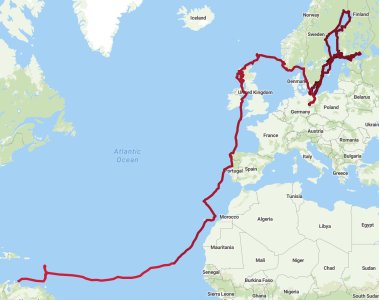
We've used Orca since 2023. Very nice charts, with less "fake accuracy" than for instance in Navionics Sonar Charts. Of course this means a bit less detail in anchorages, but that is usually covered by cruising guides (Harbour Guides for Baltic, Antares for Scotland, etc).

So far we've navigated this route with Orca with no major issues:
IMG_1718.jpeg

We have the first-generation Orca Core, so Orca gets boat AIS, wind etc, and we get to utilize its true wind calculations in our other sailing instruments.

As ylop noted, autorouting is not perfect, especially with tidal gates. We basically always auto-route, but then manually check the route before starting to make sure there are no issues. I think that's prudent regardless of what routing software we use. We also sometimes need to adjust the route for things Orca can't really know about, like to avoid an active shooting range or recently the areas off Venezuela where there have been reported incidents of piracy.

We tested a lot of different navigation apps before going with Orca. Navionics was our previous go-to, but the enshittification process drove us off.

Some things I like about Orca:
  • Clarity of the charts, especially in trickier places like the rocky Baltic
  • The way lights are shown, making night navigation super easy
  • AIS CPA rendering
  • Getting whole world charts (well, the places where they have charts, but that list keeps expanding) in one subscription
  • How Orca integrates with the rest of our system, our instruments and autopilot see the active route etc
We run Orca primarily on a waterproof Android tablet permanently placed in a charging cradle in the cockpit. But route planning usually happens on our personal tablets or phones.
 
We basically always auto-route, but then manually check the route before starting to make sure there are no issues. I think that's prudent regardless of what routing software we use.
Would be nice if you could mark no-go zones yourself. It’s a while since I used it - but is editing an autorouted course easy?
We run Orca primarily on a waterproof Android tablet permanently placed in a charging cradle in the cockpit. But route planning usually happens on our personal tablets or phones.
Does the transfer from personal tablet to navigation tablet work nicely without an internet connection (eg via the orca core)?
 
Would be nice if you could mark no-go zones yourself. It’s a while since I used it - but is editing an autorouted course easy?
Sure, constraints like in LuckGrib ("leave this point to port" etc) would be nice.

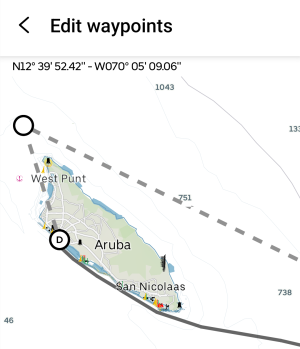
But yeah, editing a route is no big deal, just press "edit waypoints" and drag a portion of the route around. As an example, I just made an autoroute to Aruba. Let's say we wanted to pass the island from the north, I can just drag a point there:
Screenshot_20250516_085758_Orca.png
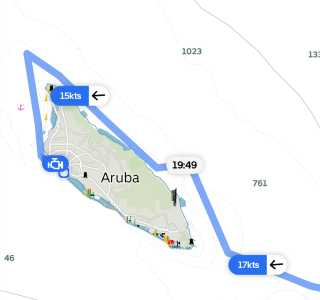
And Orca will recalculate the route:
1000024043.png
Note the little bit of motoring in the end where there isn't enough space to tack inside the reef.
Orca is sometimes a bit over eager with the polar-based optimisations. In cruising mode I don't think I'd do those gybes.
Does the transfer from personal tablet to navigation tablet work nicely without an internet connection (eg via the orca core)?
As long as both devices are connected to Orca Core (via Bluetooth, Orca's WiFi hot-spot, or boat network doesn't matter), it is pretty much seamless. You activate a route, or modify the active route (or accept Orca's update to the route because of new weather data or whatever), and it'll show up on all devices.

The primary benefit of having Internet is that then Orca gets new weather data and can suggest route changes. But most of our sailing we're offline.
 
Last edited:
We've used Orca since 2023. Very nice charts, with less "fake accuracy" than for instance in Navionics Sonar Charts. Of course this means a bit less detail in anchorages, but that is usually covered by cruising guides (Harbour Guides for Baltic, Antares for Scotland, etc).

So far we've navigated this route with Orca with no major issues:
View attachment 193501

We have the first-generation Orca Core, so Orca gets boat AIS, wind etc, and we get to utilize its true wind calculations in our other sailing instruments.

As ylop noted, autorouting is not perfect, especially with tidal gates. We basically always auto-route, but then manually check the route before starting to make sure there are no issues. I think that's prudent regardless of what routing software we use. We also sometimes need to adjust the route for things Orca can't really know about, like to avoid an active shooting range or recently the areas off Venezuela where there have been reported incidents of piracy.

We tested a lot of different navigation apps before going with Orca. Navionics was our previous go-to, but the enshittification process drove us off.

Some things I like about Orca:
  • Clarity of the charts, especially in trickier places like the rocky Baltic
  • The way lights are shown, making night navigation super easy
  • AIS CPA rendering
  • Getting whole world charts (well, the places where they have charts, but that list keeps expanding) in one subscription
  • How Orca integrates with the rest of our system, our instruments and autopilot see the active route etc
We run Orca primarily on a waterproof Android tablet permanently placed in a charging cradle in the cockpit. But route planning usually happens on our personal tablets or phones.
For a Solent/SW UK/Brittany sailor, that is mega impressive!
 
As long as both devices are connected to Orca Core (via Bluetooth, Orca's WiFi hot-spot, or boat network doesn't matter), it is pretty much seamless. You activate a route, or modify the active route (or accept Orca's update to the route because of new weather data or whatever), and it'll show up on all devices.
Ah that is a definite benefit over Navionics! If I'm in an anchorage sitting at breakfast planning the route on my own phone it a bit irritating if I then go to access it on the tablet only to discover I now only have "G" so have to manually redo it. Not the biggest pain in the world, and not enough to splash hundreds on an Orca Core, but its at least an extra tick!
 
Prompted by the revelation (in Navionics App Issue thread) that Navionics app capability has been degraded. Specifically that it can no longer be relied upon as a plotter ‘backup,’ because it may, randomly (it seems) demand an online login, to operate it:

Is anyone using the Orca app? Does it fill the gap left by Navionics? IE: phone & tablet based, intuitive to use, offshore (= offline) capable, plotter substitute with regular cartography updates and the ability to share routes / waypoints across devices via a ‘cloud.’
i love the Orca 3-D chart view, its beats all the competition and the price is reasonable.
 
I've just stumbled on this thread, which is super helpful as someone new to big boat sailing, and one question I have that perhaps other newbies may wonder is:

When you guys mention not necessarily trusting Orca's autorouting due to its lack of awareness/accuracy around tidal gates, where exactly would you do your manual checks on a long passage? Do you mean checks on the charts/tidal atlases or is there an online reference and/or app that assists with doing those types of checks?

Just curious!
 
I've just stumbled on this thread, which is super helpful as someone new to big boat sailing, and one question I have that perhaps other newbies may wonder is:

When you guys mention not necessarily trusting Orca's autorouting due to its lack of awareness/accuracy around tidal gates, where exactly would you do your manual checks on a long passage? Do you mean checks on the charts/tidal atlases or is there an online reference and/or app that assists with doing those types of checks?

Just curious!
For the examples I mentioned the easiest place is to have the pilot books for the local area. The information in these for coastal sailing is invaluable, not just for the tidal stuff. A lot of their purpose was pilotage, and very precise GPS and plotters might seem like it replaces that (but reassuring to know that if there’s local or global system failure you can revert to “old school”). But there’s extra information: navigational and practical.
 
For the examples I mentioned the easiest place is to have the pilot books for the local area. The information in these for coastal sailing is invaluable, not just for the tidal stuff. A lot of their purpose was pilotage, and very precise GPS and plotters might seem like it replaces that (but reassuring to know that if there’s local or global system failure you can revert to “old school”). But there’s extra information: navigational and practical.
Makes sense! I'm doing my first Isle of Wight crossing next month and have my cruising companion ready to go -- like you say, invaluable!
 
For the examples I mentioned the easiest place is to have the pilot books for the local area. The information in these for coastal sailing is invaluable, not just for the tidal stuff. A lot of their purpose was pilotage, and very precise GPS and plotters might seem like it replaces that (but reassuring to know that if there’s local or global system failure you can revert to “old school”). But there’s extra information: navigational and practical.
Yup, there can be a lot of stuff that's relevant but not on the chart. Recent example was the exclusion zone around the Kick-em-Jenny underwater volcano. Normally it is 1.5km, but it may be bigger if the volcano is feeling more bubbly. Something you need to look up.

Quite often you can also simplify the pilotage quite a bit by making the route a bit longer, but not going through a tricky spot. Autorouting tends to prefer "efficient", not "easy". But that of course also depends on your sailing style, mood, and what time constraints you might be under (getting to an anchorage before sun sets or pub closes, etc).
This is slightly less of an issue with Orca, which knows how sailboats move. Navionics always makes a motorboat route, and that might mean routing in a way that's difficult or impossible to sail,

I also like to know what's on the route before sailing it. Have a look a the hazards and the navigational aids. That's easy to do by once scrolling through the route on a higher zoom level. Then you also see if something is amiss.
 
Last edited:
I use the free Orca app and love it becaise it shows light characteristics without needing to click through to object info.

Can't really comment beyond that because I'm on the free version and I still have Navionics but next time I dip my hands in my pocket for a mobile nav app it's not going to be Navionics.
 
I really like Orca too, though I’m hardly a power user. I put the Core in last year and having many boat systems tied together is neat. My navigational area has been decidedly unchallenging, west Med. And I can’t find polars for my boat so I’m having to use a supposedly similar one. Favourite silly feature: steering with my watch.
 
Auto routing is usually just a guide. Between Scotland and Portugal we have used Navionics auto routing but rarely follow that course. It's a great guide as to how long your passage is but rarely reflects the realities on the ground. No app will be perfect but in evaluating Orca and Cmap Vs Navionics, perhaps Navionics stranglehold on tablet navigation might be slipping 🤔.
 
Top