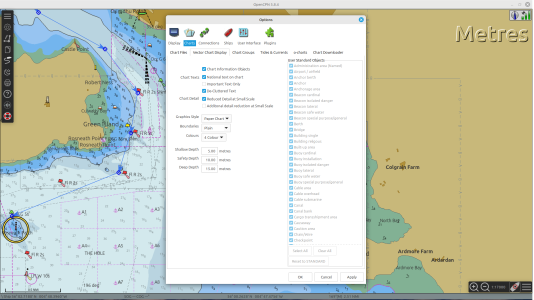
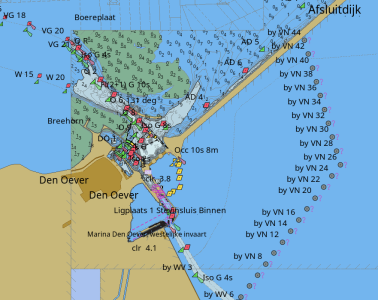
Open CPN, sections with green water and blue

SvenH

Well-Known Member
Joined
28 Mar 2011
Messages
389
Location
The Netherlands
Visit site
With the charts I have on opencpn, some of the sections have green water and some have blue.
I've searched high and low in open cpn itself and the interweb but cannot find a reason why this might be the case.

Do any of you know what is going on? I'd like all water to be blue.
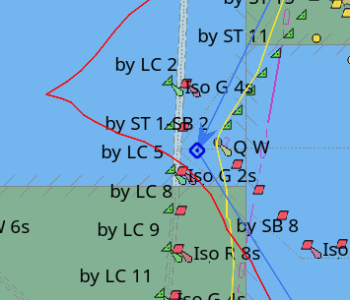
water2colors-opencpn.png
 
Thanks for the replies guys.
These green bits definitely do not dry out, they are part of the IJsselmeer in the Netherlands.

Sorry bout the missing info: I use ubuntu linux, I think the charts are vector.
 
Last edited:
I can only suggest you have a look at your Vector Charts Display settings. On my system, an Android tablet running oenc charts, my shallow depth (dark blue) is 0 to 5m, Safety depth (light blue) 5 to 10m and grey 10 to 15m is 'deep'. Green always dries out and that is an unalterable feature of the charts. What is strange about your display is the green areas are perfectly square edged, which suggests to me there is something wrong with your map tiles rather than OpenCPN. You could also try asking for help on the OpenCPN forum.

1755507017272.png
 
About the depth thing:
I just found the option to hide map sections, by right click on the tabs bottom left and "hide map"
This made hidden depth data appear, apparently one map was covered by another.But this does not do anything but make the green sections go missing alltogether.
 
I've been fiddling with my system and am unable to replicate your problem.
It's as though adjacent tiles, which make up your vector charts, are at different zoom levels.
The fault would seem to lie with your charts and not OpenCPN. I suggest you contact whoever supplies your chart package and soo what they say.
 
OK.

My take on the issue:

As mentioned, green means drying area (with according negative depths).
This is clearly visible on your second screenshot.

In your first screenshot the area is square and shows no detail.

The issue is probably that in your fist image, you are zoomed out, the green square area is a section of chart that is in a different scale, and you have to zoom in to see the details. That's a feature, not a bug.

Because much of that area is drying depths, the whole section of the different scale is coloured green.
When you zoom in you should see more detail and well defined contours.
 
It's as though adjacent tiles, which make up your vector charts, are at different zoom levels.
This is precisely it. If SvenH obtained the charts via o-charts.org then the package is likely a copy of that country's official ENCs. If obtained from elsewhere, the charts could be anything (including a random subset of charts for the region).

ENCs, like paper charts, have intended scales, and whilst you can zoom them to arbitrary levels, the information contained in them will be based on the compilation scale. Thus over-zooming will result in artificially-smooth coastlines, sometimes not quite in the correct place. Soundings may be similarly limited.

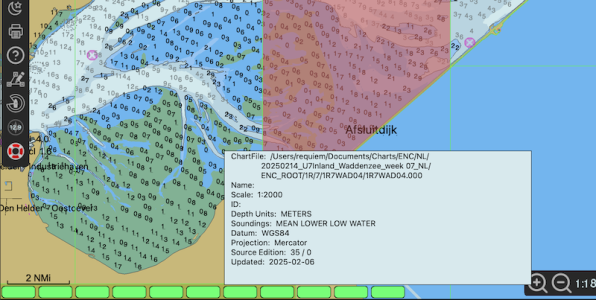
If there are coloured lozenges at the bottom you can mouse over them to view details. Here I've loaded a copy of the Netherland's Inland ENCs for the area in question. You can see the green areas are not a fluke!

You can also see the soundings datum is MLLW not LAT, and the scale is 1:2000, for the chart I've moused over.
1756881733901.png
 
Thanks requim, that is really helpful!
You have a bit (around Den Helder) that is green on mine but better on yours.
In looking at the lozenges, your map is 2025, mine are 2023 or 2024. updating via opencpn does not seem to work.

I think updating (after migrating to new pc) must have gone wrong somehow.
I think I have too may folders where the maps are stored.

OOH! Looks promissing!
I changed to a new folder, with the last publiation, look very good!
 
The waddenzee looks just like your screenshot now.
But the green bits of the IJsselmeer in mine are still just like the screenshot in my first post.

This is with charts from the downloader in opencpn.
 
Top