Opacmare remotes

starfire

Well-Known Member
Joined
7 May 2005
Messages
1,226
Location
Not In the Med
Visit site
Yet another plea for help.


A friend here has an opacmare box passerelle, he bought another erone remote, but has no manual to give him the programming details.

Nice sealed control box, lots of stickers about voiding warrenty, but I suspect an erone receiver inside.

Opacmare & their agents are being less than helpful, Quote from the UK mob "we don't keep manuals"


Anyone have a copy to hand ?


Cheers,
 
Yet another plea for help.


A friend here has an opacmare box passerelle, he bought another erone remote, but has no manual to give him the programming details.

Nice sealed control box, lots of stickers about voiding warrenty, but I suspect an erone receiver inside.

Opacmare & their agents are being less than helpful, Quote from the UK mob "we don't keep manuals"


Anyone have a copy to hand ?


Cheers,

I don't have a manual to hand, but to pair the remote you have to press a button on the passarelle control box (on mine that's next to the fluid reservoir), then press any button on the remote within x seconds.
 
Thanks Nick,

There is a big button marked, program.

But having been used to other makes where getting the sequence wrong gets you into all sorts of fun, I was reluctant to push it :-)

I'll give it a go.

Thanks.
 
Oops!

Just what I feared.

Pressed the button marked program on the box, not only has the new remote not paired, it's lost the pairing with the original remote.

So this is now urgent.

On the phone to Opacmare in Italy as I type, no response to an email so far.


Thanks,
 
I would think that OpacMare doesn't build any remotes/receivers, but uses third party components.
And among them, the most popular are those built by "Quick", which I also have onboard.
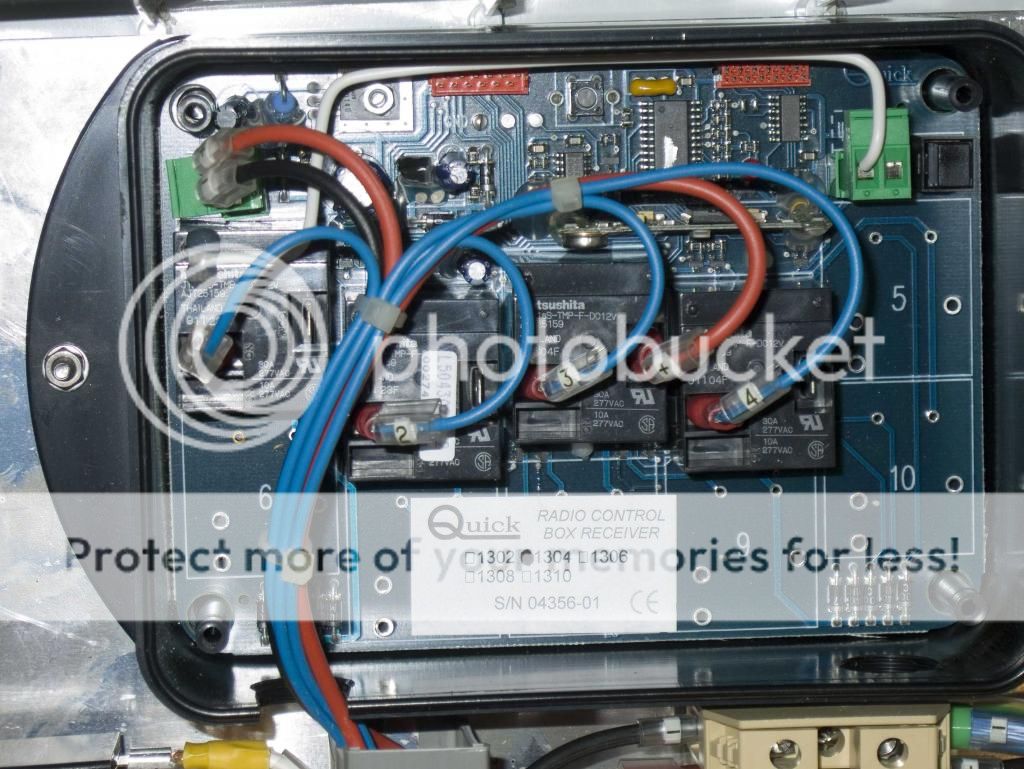
If you've got a receiver box somewhere which looks like the following, I can tell you how to program remotes on it, and I can also send you the PDF manual.
I'm just a bit puzzled by the "program" button, I've never seen one so obviously marked and easily accessible... :confused:
Quick_zps2311e973.jpg
 
Have you tried pairing the original remote again? I vaguely remember that when I paired a new remote, I also had to do the original one again.

You can just see the panel on mine behind the reservoir, top right of the picture. Is yours like this one?

opacmare_zpsb5665dd1.jpg


There is someone on my boat later today, and I can ask them to look at the manual to make sure there isn't a specific button on the remote you have to press, but i've programmed a few and I don't remember having to do so.
 
Hi MapisM & Nick,

Thanks for taking the time to help.

It's sorted!, phone call to Opacmare in Italy & a pdf copy arrived in email of the prog procedure.

Yes same as yours, & as you say, Opacmare don't do rx & tx, in this case they use Erone kit.

I have used quick stuff before & like it.


Turns out the owner had amongst other things, pushed the program button for 15secs +, that deletes all remotes !

Push the program button, push a button on the remote, wait for a beep, job done.

The replacement remote refuses to program, slightly different model I think.

Busy with another boat this afternoon, I get a panic phone call, the garage door & the passerelle are going up & down on their own. Asked him to pop the breaker while I got there.

It has the Opacmare "rot" on the fixed control panel, "have you washed the boat ?" I asked. Yes!, opened up the panel, tipped the water out, dried it out & all ok.

Same with the carling switches for the garage door.

Next task, get a price for a fixed control panel, I bet they don't do just the decal !

Again, Many Thanks
 
Last edited:
Turns out the owner had amongst other things, pushed the program button for 15secs +, that deletes all remotes !

was about to say that pressing the button for more than 10 secs or so erases all remotes! Typical procedure for RFID, rolling or fix code remotes afaik

lucky you, wasn't that lucky finding a reasonably priced remote myself for my oldish QUICK receiver...

cheers

V.
 
Top