Navtex on Mobile Phone

double_ender

Well-Known Member
Joined
5 Dec 2007
Messages
189
Location
West coast - Scotland
Visit site
Being left high and dry for days at a time for weather info with the coastguard strike, I've looked at ways of getting Navtex.

There is an internet site which is a great help, frisnit.com

Also with an email capable mobile you can get navtex messages from them as follows

To the following email address Navtex@frisnit.com send an email with just the following in the subject line, G E Navtex-dx

send nothing else, and an email will be returned with available navtex message, in this case weather specified by the E in the code. G is cullercoats, other stations are O for Portpatrick, Q Malin Head

Their website gives information about other stations etc

It seems to work well and I think should be useful in getting the 3-5 day weather outlook which doesn't seem to be otherwise freely available

Be glad of your comments

Malcolm
 
I like the idea of getting Navtex emailed to my mobile - must confess to knowing little about Navtex stations etc. What code letters would I need to include to get weather forecast, weather warnings and nav warnings for the "Wight" area? From looking at the web site mentioned in this post, I am guessing that might be "A", "B" and "E" - is that right and what station code should I use? Thanks.
 
I might be being a bit dense - have tried emailing the following message (in subject line) to navtex@frisnit.com.....

E E Navtex-dx

I get back an email with the following message....

Unrecognised request. The email subject should be of the form 'STATION(S) MESSAGE(S) SOURCE' For example VW XY Frisnit 518kHz

probably missing something obvious, but what am I doing wrong?

Thanks.
 
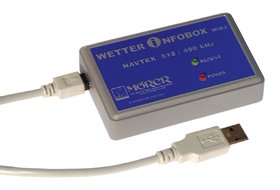
I just got myself one of these and so far seems great value for the money:

wib2m.jpg


[ QUOTE ]

* Digital receiver for 490kHz and 518kHz
* Simultaneous reception on both frequencies
* Internal ferrite rod antenna, no antenna installation necessary
* The equipment is used like a USB-stick (only WIB2)
* Dimensions only 90x57x23 mm
* Internal batteries for approx. 3 days cont. operation without PC
* The batteries will be charged via PC
* Non volatile data memory for 762000 characters
* Automatical message administration
* A charger for 12/24V or 230V is optionally available

NAVTEX from the costal radio stations

A connection between WIB2 and PC will be established via USB. The WIB2 will be recognized as USB memory device. (data memory)

The NAVTEX messages are stored on this data medium in HTML code.

The data will be shown an th PC monitor via a webbrowser.

No software installtion is necessary.
[ QUOTE ]


Right, you'll need a laptop but I have one onboard
anyway and rather prefer the 15" TFT to my mobile!

Also gives you an overview on shedules, navtex areas etc. Free of charge and works offshore too (even get Splitradio!)
 
Page 78 of Reeds gives you the station and message categories

Station E is Nilton ( middle of the south coast)

Met warnings are B and forecasts are E

What I am not clear about is the importance of the final string which specifies a receiver

I am guessing that these are amateur receivers which are voluntarily sending the messages they receive to the Frisnit servers. If I am right then I would regard this as a useful back up but not necessarily something to rely on.

For instance, recently I was on a friends boat, no Navtex, up the yealm so radio reception flaky and no Marina to ask - would be useful when discussing plans for the next day or so but not to rely on 100%

I have just tried it using your subject line and it works so it may just have been a glitch

Have fun
 
[ QUOTE ]
Be glad of your comments

[/ QUOTE ]

Only works when you are in mobile 'phone range seems an obvious comment. Can't understand why you don't have your own Navtex receiver, it works at longer range than VHF CG broadcasts and as long as it is powered up, shouldn't miss any forecasts, nav warnings etc. They are not expensive.
 
Top