

Rascal Joe
Well-Known Member
Ahead of a major relaunch of the River Thames Guide app (the free guide to all leisure activity on the Thames and Wey) before the 2026 season begins, I have released new and updated live condition widgets for all Apple devices.
You now have a choice of small and medium widgets to show the current Board conditions for any three consecutive stretches.
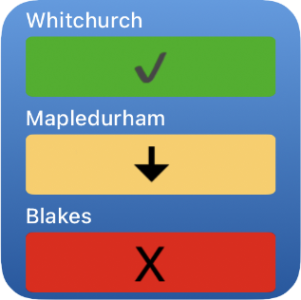

The installation process has been simplified to just two steps prior to configuring the widget just as you would for any Apple-compliant one; it is no longer necessary to modify the code in any stretch script (unless you want three non-contiguous stretches) - a link from the Widget page provides a list of stretch scripts for you to add to your device (they will sync across all devices logged in to the same Apple ID).
Once the script or scripts are downloaded, just move each one to the folder in the instructions and you are good to go.
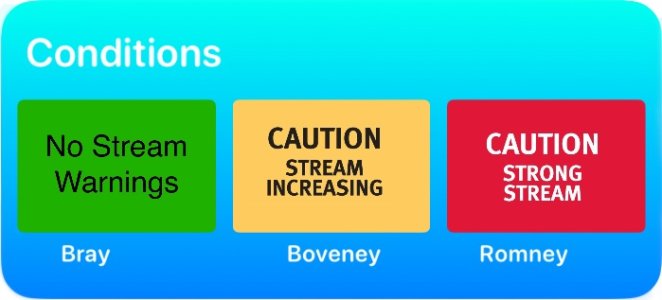
More examples of the available widgets (non-tidal and tidal) together with the simplified instructions for installing one or more widgets can be found here.
You will also see a link for a lock screen widget - this one is a bit more complicated as you will need to edit the code in the downloaded file (LockScreen.js) to point to the three stretches you would like to see on your lock screen - instructions are in the popup and in the file itself.
It is vital that you install the free Scriptable app and open it once before downloading the stretch scripts; the instruction page includes a link to the App Store for Scriptable (which is free to download and free to use).
You now have a choice of small and medium widgets to show the current Board conditions for any three consecutive stretches.
The installation process has been simplified to just two steps prior to configuring the widget just as you would for any Apple-compliant one; it is no longer necessary to modify the code in any stretch script (unless you want three non-contiguous stretches) - a link from the Widget page provides a list of stretch scripts for you to add to your device (they will sync across all devices logged in to the same Apple ID).
Once the script or scripts are downloaded, just move each one to the folder in the instructions and you are good to go.
More examples of the available widgets (non-tidal and tidal) together with the simplified instructions for installing one or more widgets can be found here.
You will also see a link for a lock screen widget - this one is a bit more complicated as you will need to edit the code in the downloaded file (LockScreen.js) to point to the three stretches you would like to see on your lock screen - instructions are in the popup and in the file itself.
It is vital that you install the free Scriptable app and open it once before downloading the stretch scripts; the instruction page includes a link to the App Store for Scriptable (which is free to download and free to use).
