Integrating a Raymarine autopilot and C120W display to fix a specific problem?

jmnapier

Well-Known Member
Joined
29 Jun 2007
Messages
196
Visit site
IMG_0218.pngIMG_0219.png
Hi Learned Folks
On my present boat I have a Raymarine C120W plotter/radar standalone. I then have an autopilot, Raymarine 400G, ST60+, fluxgate etc also standalone. Both work well.
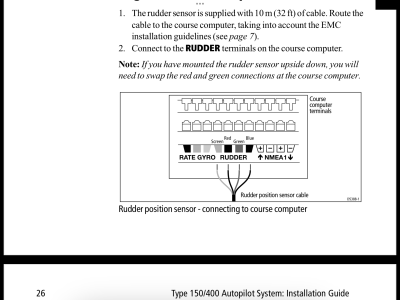
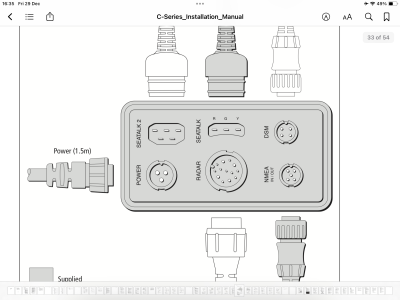
When the boat is stationary the map display on the plotter dances around rotationally with the map rotating about the boat’s position. This is annoying! On my last boat this didn’t happen despite having virtually the same setup. The only difference was that the two systems were connected to each other on the previous boat so that we could set the autopilot to follow a route on the plotter. This is not a function I ever used or will ever BUT would this connection stop the ‘dancing’? If so, where do I connect? Is it the NMEA plug on the back of the plotter? (left picture) in to the NMEA 1 connectors on the course computer?(right picture). In which case which wires to where please?
I have the manuals but am not completely clear and I can’t remember the detail of the previous boat.
Many thanks
Jonathan
 
Last edited:
Why not set the plotter chart display to North Up? This should then stay put.
Presumably you currently have the chart set to Heading Up, which does therefore tend to rotate as the boats heading fluctuates (or at least if the compass thinks it is)
 
View attachment 169766View attachment 169767
Hi Learned Folks
On my present boat I have a Raymarine C120W plotter/radar standalone. I then have an autopilot, Raymarine 400G, ST60+, fluxgate etc also standalone. Both work well.
When the boat is stationary the map display on the plotter dances around rotationally with the map rotating about the boat’s position. This is annoying! On my last boat this didn’t happen despite having virtually the same setup. The only difference was that the two systems were connected to each other on the previous boat so that we could set the autopilot to follow a route on the plotter. This is not a function I ever used or will ever BUT would this connection stop the ‘dancing’? If so, where do I connect? Is it the NMEA plug on the back of the plotter? (left picture) in to the NMEA 1 connectors on the course computer?(right picture). In which case which wires to where please?
I have the manuals but am not completely clear and I can’t remember the detail of the previous boat.
Many thanks
Jonathan
The reason the display moves around is that the plotter cannot get an accurate heading without the boat moving, as the heading is derived from GPS. If connected to the autopilot the plotter can use the heading from the fluxgate compass. You can use NMEA, if you have the cable to fit the plotter, or you can connect them together via Seatalk, which would be best. Use the 3 pin "Seatalk" port on the plotter.
 
Why not set the plotter chart display to North Up? This should then stay put.
Presumably you currently have the chart set to Heading Up, which does therefore tend to rotate as the boats heading fluctuates (or at least if the compass thinks it is)
Thanks for the suggestion and I think it would work but I prefer course up
 
The reason the display moves around is that the plotter cannot get an accurate heading without the boat moving, as the heading is derived from GPS. If connected to the autopilot the plotter can use the heading from the fluxgate compass. You can use NMEA, if you have the cable to fit the plotter, or you can connect them together via Seatalk, which would be best. Use the 3 pin "Seatalk" port on the plotter.
That’s great Paul, nicely explained. Will take up your suggestion and use the seatalk socket. I’m in Foulkes marina and the barge has a selection of cables so I’ll go for a rummage. In terms of the internal wires are all seatalk cables the same?
 
That’s great Paul, nicely explained. Will take up your suggestion and use the seatalk socket. I’m in Foulkes marina and the barge has a selection of cables so I’ll go for a rummage. In terms of the internal wires are all seatalk cables the same?
The Seatalk cable has three wires, red (+12v), yellow (data) and a bare shield (-12v). If you have a Seatalk device with a spare port you can connect the plotter to that. If not, you can splice into another cable, just cut the cable and join the 3 reds together, 3 yellows together and 3 shield wires together.
 
Sorry, one last question Paul. If I have a 3 pin Seatalk tail with 6 inches of cable can I just add any decent quality 3 core cable to make up the approx 5m I need as it’s in to individual pin connectors at the course computer?
 
Top