nigelmercier
RIP
- Joined
- 20 Jun 2007
- Messages
- 16,234
- Location
- Live in Kent, boat in Canary Islands
How to view your PC screen (with optional control) on an iPad, Android tablet etc. I use this on my boat so I can see the Chart Plotter software in the cockpit.
First of all, if you don't have a Wi-Fi network, it still may be possible using a Hosted Network, but you need to check if your PC network card supports it, see: http://www.ybw.com/forums/showthrea...rs-from-one-wifi-signal&p=4088870#post4088870
Then you need to run a VNC server on your PC, I use UltraVNC which is excellent:
http://www.uvnc.com/docs/uvnc-server.html
Finally, you need a VNC client on your iPad or iPhone (or indeed on an Android tablet, or any other networked device). I use Jump Desktop, but if you look on the iTunes store for "VNC Client" you will find loads. Note: Jump Desktop is currently over £10, but I paid half this.
https://itunes.apple.com/gb/app/jump-desktop-remote-desktop/id364876095?mt=8
Set up the server and the client as per the instructions, then connect to the same network, either a private router or a Hosted Network. Make sure the server is running, then run the client.
When you have connected to your PC, you can actually control it from the device as well as view the screen. However, I have mine set up so all controls are disabled, and set to only mirror my chart software.
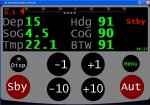
Example of iPad screen mirroring my chart plotter running on my PC. This is on my home PC, so no data (image reduced by 50%):

This was done via VNC Lite, which works well.
First of all, if you don't have a Wi-Fi network, it still may be possible using a Hosted Network, but you need to check if your PC network card supports it, see: http://www.ybw.com/forums/showthrea...rs-from-one-wifi-signal&p=4088870#post4088870
Then you need to run a VNC server on your PC, I use UltraVNC which is excellent:
http://www.uvnc.com/docs/uvnc-server.html
Finally, you need a VNC client on your iPad or iPhone (or indeed on an Android tablet, or any other networked device). I use Jump Desktop, but if you look on the iTunes store for "VNC Client" you will find loads. Note: Jump Desktop is currently over £10, but I paid half this.
https://itunes.apple.com/gb/app/jump-desktop-remote-desktop/id364876095?mt=8
Set up the server and the client as per the instructions, then connect to the same network, either a private router or a Hosted Network. Make sure the server is running, then run the client.
When you have connected to your PC, you can actually control it from the device as well as view the screen. However, I have mine set up so all controls are disabled, and set to only mirror my chart software.
Example of iPad screen mirroring my chart plotter running on my PC. This is on my home PC, so no data (image reduced by 50%):
This was done via VNC Lite, which works well.
Last edited: