

wonkywinch
Well-Known Member
I use my Garmin GPSMAP 78S on my travels and found a way to download a wide selection of maps to the device. To avoid risk of corrupting the device, I always load maps to an SD/micro SD card and use that.
Format the SD card using FAT32 then create a directory on that card named "garmin".
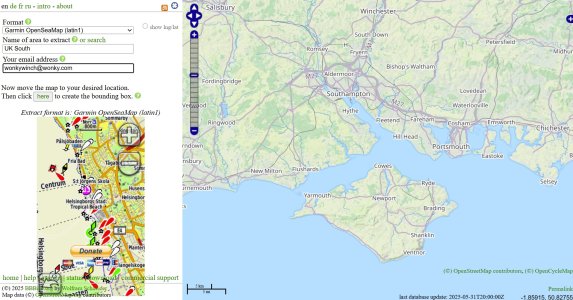
Using the BBBike extracts OpenStreetMap (OSM, Garmin, Shapefile etc.) website, select the map you wish to download, then drag and zoom the map to the required area then click the button to choose/modify the bounding area (edges of your desired map).
Enter your own name for the map and your email. The site will then generate a garmin compatible map and send you a link when it's complete. You can also watch progress here - BBBike extracts ready to download and then download it from that location when it's done (usually less than 10 mins).
Once the downloaded zip file is on your computer, unzip it and save the file to the /garmin sub folder on your SD card. The file must then be renamed to gmapsupp.img for your Garmin device to recognise it. I store a selection of files on my desktop with the names SOLENTgmapsupp.img, IONIANgmapsupp.img etc for easy access then copy the one I need to the SD card and rename it only on the SD card buy deleting the capital letters I used to identify the area.
The function is so useful, I have made a few donations to the owner of the domain but it's purely on a voluntary basis.
Format the SD card using FAT32 then create a directory on that card named "garmin".
Using the BBBike extracts OpenStreetMap (OSM, Garmin, Shapefile etc.) website, select the map you wish to download, then drag and zoom the map to the required area then click the button to choose/modify the bounding area (edges of your desired map).
Enter your own name for the map and your email. The site will then generate a garmin compatible map and send you a link when it's complete. You can also watch progress here - BBBike extracts ready to download and then download it from that location when it's done (usually less than 10 mins).
Once the downloaded zip file is on your computer, unzip it and save the file to the /garmin sub folder on your SD card. The file must then be renamed to gmapsupp.img for your Garmin device to recognise it. I store a selection of files on my desktop with the names SOLENTgmapsupp.img, IONIANgmapsupp.img etc for easy access then copy the one I need to the SD card and rename it only on the SD card buy deleting the capital letters I used to identify the area.
The function is so useful, I have made a few donations to the owner of the domain but it's purely on a voluntary basis.

