Help with Raymarine interface

On the Slea

New Member
Joined
26 Aug 2023
Messages
5
Location
Sleaford, Lincs
Visit site
After constantly going in and out the companionway steps cleaning on Saturday, I mis-judged and fell straight into the galley from the cockpit.
On the way down I managed to pull the RS232 cable out of my Raymarine interface that was connected to my laptop using RNS.
Although Raymarine show the colours of the cables connected to interface they don't show to which pin on the rs232 plug each colour relates to.
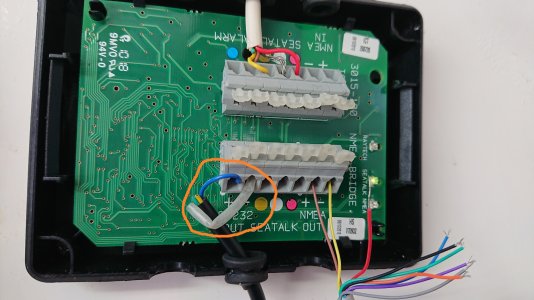
Would anyone be able to tell me which spring clip goes to what RS232 9 pin plug. Apparently there are four connections. RS232 + & - and NMEA + & -

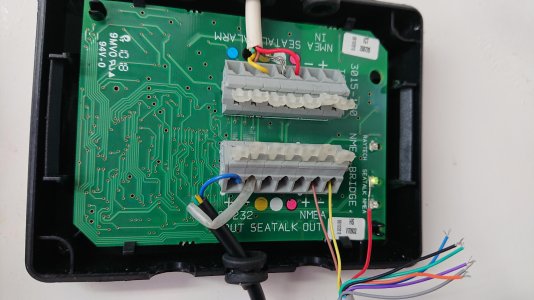
Also something else seems to be populating my RS232 clips on the board,interface.jpg not sure any other instruments should be connected to that except the computer lead.
Need to remember I'm 61 and not 21 anymore
 
The coloured connections are for old Seatalk, which has 3 wires, 0V (unshielded), 12V (red) and data (yellow). You can see this arrangement at the top where the white cable is Seatalk in, & you have the connections for Seatalk out at the bottom with red, yellow & white/grey labels.

To connect to a laptop all you need are RS232 out which is at the bottom left. Where does the black cable go, & where does the other cable bottom right with 9 strands go? What is RNS?

On the RS232 DB9 connector pin 2 is data receive & pin 5 if ground. No other connections needed if the data go one way.

It looks like the RS232- cable at bottom left has broken.

NMEA0183 like RS232 also needs only data & ground, or data+ & data- (depends on how old it is, but it's always 2 connection) so I suspect that the 7 unused lines in the bottom right 9 core cable were never connected to anything. The exposed wires should be cut back if that's the case.
 
Hi Agnus

The colours may be irreverent as it's just a Belkin RS232 cable so might use different colours per pin.
The RNS is RayTech Navigator and their instructions show connection to RS232 OUT (yellow and blue) and connection to NMEA IN (Green and Black)
The Yellow and Brown you see connected to the NMEA in, I put there while using a debug program to see data flow coming in but also shows the wire colour is different (Not Green and Black)

At present I don't know what is connected to the RS232 Out as it goes behind the panel.

Although Raymarine show connections to the panel they don't show which of these connections go to which on a 9 pin RS232 plug.

Hope that makes sense
 
Hi Marco
Yes, that seems to make sense now looking at page 18 of NMEA BRIDGE Operation and Installation manual.
Using a RS232 9 pin plug.
pin 2 Yellow
Pin 3 Green
and pin 5 shared black to both the RS232 negative and the NMEA input negative.

I'll hook that up this weekend to try.
At the same time try and find what is already populating the RS232 clips as I've traced all my instruments and GPS DSC VHF radio and none of them have been wired there. The only thing I didn't check was my ST2000 autohelm wiring. didn't think about that until I got home although it is working fine.
Many thanks for your help
Steve
 

Attachments

  • ray inter.jpg
    ray inter.jpg
    638 KB · Views: 3
Top