stu9000
Well-Known Member
Help! Im.worried ive screwed up my ais. My raymarine a75 plotter is not displaying ais data. I am showing up on Vesselfinder website. My antenna is on the push pit.
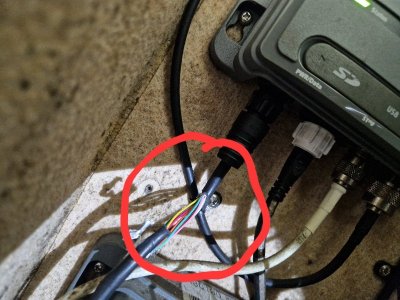
I wanted to attach a yakka WiFi bridge so I can see ais vessels on my tablet. I stripped the black plastic casing off the ais wire going into the grey box. No wires were nicked in the process. I then stopped, thinking I should just check all was working as it should on the a75 plotter. But I cannot see any ais ships. The ais layer is on.
The fact that my vessel is showing up on the vesselfinder website suggests I am transmitting.
The green led is on, on the grey box.
Maybe I just don't have any vessels nearby. But it's a bit odd.
I am sailing to Shotley tomorrow so that will be a chance to check.
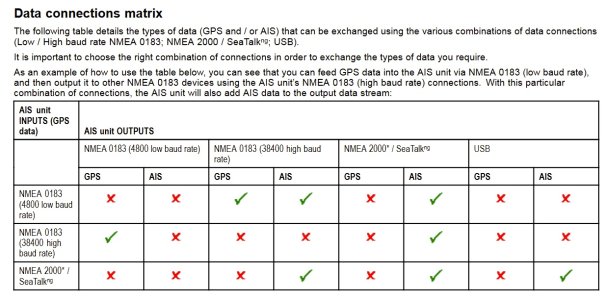
Any suggestions on what i can do to check if I am receiving ais data and why it isn't displaying on the plotter?
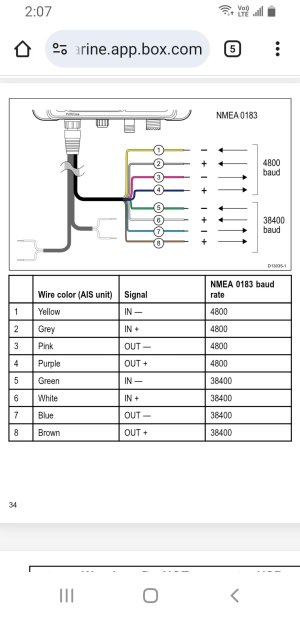
I was going to splice off the brown wire to get ais data to the yacka WiFi bridge but I'm stopping until I know whether I've messed something g up.
I wanted to attach a yakka WiFi bridge so I can see ais vessels on my tablet. I stripped the black plastic casing off the ais wire going into the grey box. No wires were nicked in the process. I then stopped, thinking I should just check all was working as it should on the a75 plotter. But I cannot see any ais ships. The ais layer is on.
The fact that my vessel is showing up on the vesselfinder website suggests I am transmitting.
The green led is on, on the grey box.
Maybe I just don't have any vessels nearby. But it's a bit odd.
I am sailing to Shotley tomorrow so that will be a chance to check.
Any suggestions on what i can do to check if I am receiving ais data and why it isn't displaying on the plotter?
I was going to splice off the brown wire to get ais data to the yacka WiFi bridge but I'm stopping until I know whether I've messed something g up.