FURUNO AND RAYMARINE NETWORK

John100156

Well-Known Member
Joined
31 Oct 2007
Messages
2,671
Location
SANT CARLES DE LA RAPITA
Visit site
Hi

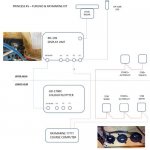
I have a Furuno navigation set-up on my 2002 Princess 45. It seems it has not been properly set-up, at the moment I have my C-Map chart card installed to the upper helm display and whilst the radar displays on both units, the chart does not show on the lower helm display once selected, I tried moving the C-Map to LH but no joy. I suspect this may be a setting that has not bee set correctly to tell the LH display where the card is.

Anyway, it seems that the chart plotter has no interface sending/receiving data to the autopilot, the latter being an old Seatalk 3 conductor network.

I note there is a NMEA-IN on the back of the autopilot and wondered if I could configure one of the data ports on the upper helm unit to send/receive data so I can send from the UH Display to the Autopilot?

Anyone configured this set-up before - any info useful...!

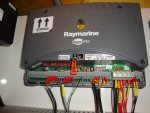
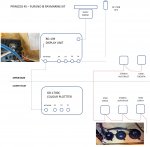
Image as follows - red is sea talk cabling:
c.jpg
 
John
Did you find the course computer/autopilot itself?
You will need a port (other than the old Seatalk 1) that the ST60/ST6000 instruments/autopilot use.
I think you will find a course computer (the actual Autopilot)
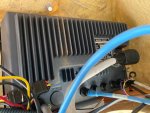
This is what mine looks like:-
DSC01451.resized.JPG

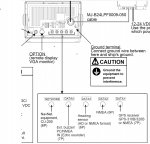
if you look closely, you will see that mine has two NMEA 0183 ports (an in and an out) and the Seatalk 1 Bus.
You won't be able to connect the Furuno to the Raymarine Seatalk 1 without a special interface (they do exist).
But if your course computer/autopilot has some NMEA 0183 ports, you should be able to connect a NMEA 0183 output from one of the Furunos to the course computer's NMEA 0183 interface.
I'm surprised that it isn't already connected like that anyway.

To reacp
Seatalk 1 is a multi drop bus in which the ST60 and ST6000 instruments connect into - usually "daisy chained" together.
NMEA 0183 is a one to one serial link - very similar to the old RS232 that we use in computers.
The simple way of thinking about NMEA 0183 is to consider each connection as either a "talker" or a listener".
You can have more than one "listener" connected to a single "talker" but not the other way round.

So, you would be looking for the NMEA 0183 output channel on one of the Furunos (a talker) to connect to the input of the Autopilot (a listener).

Finally, you may need to configure the Furuno to send AutoPilot information to its NMEA 0183 port that you have connected to the Autopilot.
 
Hi Mike - Yes me too, I was surprised but quickly established that when setting a course on the plotter when playing out in the bay....!

Autopilot worked well though, keeping a steady course so that's good, hence looking for physical connections from Furuno kit (first time user).

The Furuno kit seems very robust, I quite like it, albeit I am more use to Raymarine. I will probably end-up with new Raymarine kit, but might consider keeping the Furuno radar, just moving its larger display down below. After all, I have only used radar twice in 10 years but do believe its a must to retain it, bit like a liferaft really I suppose. I suppose if it was all integrated into a whole new system it would be best, but I still need to keep control of expenditure and hate to throw away perfectly good kit.

I believe from reading the manuals you can port from a data port, NMEA sentences. I think you are also right about the interface, there was a nice interface unit on my old F43 which could interface: Seatalk, RS232 and NMEA in and out! The out going to the CC as I recall. I like the listener/talker analogy, makes sense.

On advice received from others, which I was thankful to receive in any case, I have now taken down ceilings in SB cabin but no course computer found! Looked under bunks, looked under SB saloon seating (which was the location on my F43) and helm, had a quick look in the engine bay, but did not expect to find it there. Next trip its down in the mid-ship bilges where the AC units and black tank is located, otherwise physical tracing of wiring - once found I can establish the whole system network

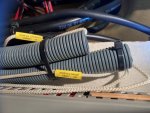
What I do really like about the Princess is all the spare conduits and draw stings installed, see below, cost pennies during construction but may really help when upgrading:
conduits1.jpgconduits1.jpg
 
That will be it.
Follow those cables and you will find the course computer/autopilot.
As usual, it seems that the NMEA cable is very light weight cabling - almost telephone wires.

On our Sealine, the course computer was located in the lazerette behind the generator - fairly close to the rudder control.
But on our Princess, it is located in the place I call the electronics bay - behind the lower helm - I get to it through the main cabin's shower cubicle.
How much access do you have behind the lower helm.
Alli and Mark's P58 is the same - lots of electronics in an area behind the main helm.
If you didn't know, you wouldn't have thought all that stuff was there.

BTW
I visited the factory about 3 months after our boat was delivered to word out wiring paths for the docking cameras.
During the visit, I was chatting to the guys who build the boats and they explained that ours was one that had asked for extra conduits.
I guess that the contractor who fitted our G Series had asked for more conduits to be installed during build.
So, JW has more conduits than usual.
Shame - I've filled them all up!!!
 
Looked behind the lower helm panel, very good access, a lot of cabling/equipment installed including the RS8400 VHF module, no CC, worth looking in the lazaret locker again behind Genny, may trace back from there, next visit, and I will revert back - thanks.
 
Would you believe it, I just downloaded and updated the latest OE-SENC charts to OpenCPN yesterday, before my annual subscription runs out in Jan, tested the GPS Dongle too, I must say OCPN seems excellent now, had a few issues in older versions when zooming and panning but seems very stable. May be worth taking a look, but as you say, need to find that course computer....! Great backup system even if not connected to AP.
 
Would you believe it, I just downloaded and updated the latest OE-SENC charts to OpenCPN yesterday, before my annual subscription runs out in Jan, tested the GPS Dongle too, I must say OCPN seems excellent now, had a few issues in older versions when zooming and panning but seems very stable. May be worth taking a look, but as you say, need to find that course computer....! Great backup system even if not connected to AP.
Have you seen the dual window in OpenCPN.
They introduced it a couple of years ago.

I don't use OE-SENC charts so I would like to play with your sometime.
As you know, I usually create my own - as you say, it is a great backup to the main ships system.
 
Yes, dual windows great - the charts are quite good, I'll show you them when next out together.

Looking a bit more promising to get out to SC end of Dec., with letter from work for a visit to Valencia and can just squeeze-in a Covid test in time to arrive at and travel from Bilbao onboard Galicia.....
 
Yes, dual windows great - the charts are quite good, I'll show you them when next out together.

Looking a bit more promising to get out to SC end of Dec., with letter from work for a visit to Valencia and can just squeeze-in a Covid test in time to arrive at and travel from Bilbao onboard Galicia.....
Great - Please don't forget to take the camera!!!
 
Top