
Free App helps journey planning

Rascal Joe

Well-Known Member
Joined
16 Jun 2013
Messages
265
Location
Ascot
www.jeffmaynard.com
The 'River Thames Guide' can be downloaded free from the App store and works on an iPhone, iPad (inc iPad mini) and iPod. It is quite large as apps go (so takes a while to download) but this is because the maps are built-in to the app so no Internet connection is required for using the interactive map or most of the other features (live river conditions and weather require an Internet connection).

I find the most useful feature to be the journey planner: select a start point and a destination and the app displays the total distance, sailing time (at 8Kph) and the number of locks to transit. Once underway the app will display your location on its map (GPS enabled devices) and you can easily add (to the default locks overlay) overlays of food/lodging, moorings, marinas and more (tapping any one brings up more detail such as facilities, opening hours, phone number, charges etc). Other options include bridge headways, safety advice, boats fro sale, lock features and more.

the App can be downloaded free of charge here: https://itunes.apple.com/gb/app/river-thames-guide/id617269104?mt=8

Screenshots:
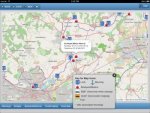
iPad Screen shot 1.jpgiPad Screen shot 2.jpg
 
Downloading it now for my Ipad. Present estimate 2 hours to d/l. Oh the joys of living in the sticks and only having a 3mb connection.
 
Just curious really. These days I rarely venture more than a few miles from home and I'm pretty conversant with the River to Southend and beyond. Just sounds like a fun app to have.
 
I have just downloaded this. It is a useful concept, but the navigation between features is a bit cumbersome (in and out of the menus all the time), and overall it is rather slow.

I would like to keep it loaded long enough to try it in earnest, but I'm not sure I can spare the memory for its HUGE 1.1GB installed size. Compare the size if you will, with the entire raster UKHO chart portfolio for MemoryMap at 880MB, and the NavFree UK and Ireland Satnav at 543MB.

I was wondering if it was going to be full of photos or something to explain the size, but no. Incidentally, as i-devices need a bit of spare room while installing things, you may find (as i did) that you need to free up several GB before the installation will complete.

Cheers,
A.
 
Thanks for drawing my (our) attention to this App. Unfortunately I had difficulty in installing the application on my Ipad. To be fair however I didn't put a great deal of effort into it and merely deleted it. I shall sit back and await other folks comment.
 
The largest component by far is the collection of map tiles. These are built in to the App so that it can be used without needing an Internet connection (my own non-tidal Thames experience is patchy coverage); GPS enabled devices can pinpoint themselves on the in built map without any Internet (just using GPS signals).
Many of the available map sets are only usable on-line so were ruled out; others show remarkably little detail for the river so were also ruled out. The set used is both detailed and free (an important issue when developing a free of charge App).
The size of the map tiles means a large download (even after Apple compress the app package for delivery) but is is the only way to get a version that works anywhere (a key design objective).
Simplest download option is to set it downloading in iTunes and then wander off for a coffee (or stronger) - once in iTunes it can be installed relatively quickly on as many devices as are registered to that copy (of iTunes).
An updated version with more details of river locations, more accurate geolocation, easier interface and a display of Nautical Twilight (the earlier of this and 2100 hours being the correct time to lower your boat's Ensign) is awaiting review by Apple.
More features to follow...
 
Howard,
I found i had to free up nearly 4 GBytes, (!!) before the install would complete on my iphone 4. (That's downloading directly to the phone from the Appstore, I guess that if you go via Itunes on a Mac/PC you probably wouldn't need the free space for processing the compressed application file.)

Rascal Joe,
I must say that I view the huge size of this app as a bit of a showstopper. If suitable lighter weight map tiles can't be found (and I do see your point about detail, vs the many slimmer road-centric implementations of OSM which exist), then I'd strongly suggest separating the cartography from the app, and going to a chunk-based download model a la MemoryMap, Tucabo, etc where users don't need the entire map-base on their devices if they only actually need a subset for the trip in hand.

Cheers,

A.
 
A.
thanks for the feedback.
Definitely quickest is to download to iTunes then transfer to one or more devices.
Splitting the maps up so that users could just download the river area of interest is theoretically possible but is quite a lot of work so not near the top of any list (but, as devices get faster, the problems mentioned will go away).
I expect that the development work will concentrate on more and better information (all lock and boatyard facilities have been revisited and checked for the next edition) followed by new functionality (such as 'where is my nearest fuel?'). Any other suggestions appreciated.
 
Thankfully I'm not an Iphone user but I have got Garmin's Mapsource on my laptop - the entire Atlantic mapping for 750mg!

Not sure how they can justify that size!!

CJL
 
CJL
Sorry, but 'justify' is completely meaningless in this context. Map tiles contain information and, the more information, the greater the size of the tiles; the areas around the River Thames are seriously more detailed that the middle of any ocean (including those in the Garmin Blue Charts).
As already mentioned, the choice of maps for River Thames Guide was influenced by river detail and zero cost, and the desire to deliver all mapping functionality without an internet connection.
River Thames Guide is a large download (as mentioned in the App Store description) but it is free and it works anywhere on the River Thames - that seems to me to be an acceptable compromise...
 
The 'River Thames Guide' can be downloaded free from the App store and works on an iPhone, iPad (inc iPad mini) and iPod. It is quite large as apps go (so takes a while to download) but this is because the maps are built-in to the app so no Internet connection is required for using the interactive map or most of the other features (live river conditions and weather require an Internet connection).

I find the most useful feature to be the journey planner: select a start point and a destination and the app displays the total distance, sailing time (at 8Kph) and the number of locks to transit. Once underway the app will display your location on its map (GPS enabled devices) and you can easily add (to the default locks overlay) overlays of food/lodging, moorings, marinas and more (tapping any one brings up more detail such as facilities, opening hours, phone number, charges etc). Other options include bridge headways, safety advice, boats fro sale, lock features and more.

the App can be downloaded free of charge here: https://itunes.apple.com/gb/app/river-thames-guide/id617269104?mt=8

Screenshots:
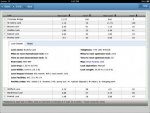
View attachment 32882View attachment 32883

Not sure why but I have tried 5 times to download and install on my mini but it does not like it.

That's running off the office (very secure and fast) wifi.

Will try at home later.
 
Richard
it can take some time (because of the size of the built-in maps) but should be possible on any network. I suspect that in the office you are downloading direct to your mini? Easier to download to iTunes then install by sync'ing.
Any more issues please post details...
 
Top