Digital Charts, GPS, Tablets, Smart Phones, Apps... I have a lot to learn!

stu9000

Well-Known Member
Joined
8 Mar 2008
Messages
949
Location
near kingston upon thames, surrey
Visit site
Ok, so before I launch in I just have to shout "Yippee" at the recent event of my joint ownershop of Sun Bird, a beautiful Bilge keel Jaguar 27.
Thanks to all here who answered questions for YEARS about a whole range of boats and a special thanks to Laurie and Spuddy who have been a real support.

Anyway, so I have bought my charts and have been pouring over them, tracking my route through the Thames Estuary. All good there.

But I have been looking into using Sea Clear charts or the like, linking my laptop to on board Furuno GPS. However this is proving problematic in the short term. I spoke to Tech Support at Furuno who seemed to think that you could not write back to the GPS and that I would have to splice off an existing cable to go to the laptop, which would connect with a serial to usb. I mean,,, really!?

So I am now looking at using the GPS in my first Gen Nexus 7 tablet and Orus Maps software.
GPS connection found me, inland at home, and it has some nice features, but I cant find UK maps.
There is stuff online about OS Maps protecting their copyright (unlike the USA who share this data as it is collected with public funds).
So, anybody know how I can add maps of the Thames Estuary to an Android App?

I did wonder whether I could use the gps on my smart phone tethered to my laptop running Sea Clear or the like?
I suppose i could buy visitmyharbour.com's laptop gps unit, but if I am spending £ I would ideally want it to link up to the boats existing systems.

I will use paper Admiralty Charts as a primary source but it would be quite handy to have a graphical display of my current location.

A longer term goal would be to get my laptop to set waypoints that can then feed into the Furuno gp 32 GPS.

But has anybody used tablets and smart phones in this way?

Cheers all


S
 
I can't answer any of your questions regarding the technology so apologies for adding a comment but I can't see the point of trying to work off OS maps at sea. But maybe I am not understanding your intentions correctly. In the meantime, you may find some value in the up to date information on my web site in the Notices to Mariners and chartlet download sections. Which is all FREE!
 
I may not have been clear. I am not trying to work off OS Charts. But it may be that there is limited access to digital charts in UK waters compared to US waters because of how the Governments view Copyright.

Thanks for the link. I have recently bought the book... your book?

I prefer paper charts, but having a graphical representation of current location I could glance at would be useful.
 
MX Mariner App

Hi

This MX Mariner App illustrates what I am looking for
https://play.google.com/store/apps/details?id=mx.mariner

There are lots of similar apps out there which use free to download NOAA maps.
But the UK seems harder to come by.

The MX Mariner App costs a few quid but you can, apparently, download UK maps through "In app purchases" of around £3.50.

Has anyone got this working?

thanks

S
 
I have VMH (Visit My Harbour) charts on my Nexus, smartphone and laptop. I only use them as a visual reference which is good to see where I am. I always plot on paper charts, never tried it with the VMH charts on the laptop
 
I may not have been clear. I am not trying to work off OS Charts. But it may be that there is limited access to digital charts in UK waters compared to US waters because of how the Governments view Copyright.

Thanks for the link. I have recently bought the book... your book?

I prefer paper charts, but having a graphical representation of current location I could glance at would be useful.

Yes, my book. Grateful Sir. This is not the time to tell you that a second edition will be out in the New Year! Sorry. Much improved though.

I feared I wasn't understanding it. You are right about digital charts in UK waters of course. It's the 'Agency' need to earn revenue status rather than a stance on Copyright I think although of course Copyright licencing is how they raise revenue. I suspect the UKHO would claim that they do a fair bit of free service provision (NtM for example).
 
If you already have an android tablet, you could get the Navionics chart app. All the UK for abt £30. My tablet has gps so I have plotter functionalty to back up all the rest of the gizmos and paper charts
 
Interesting. This is what I hope to do. Checking leeway, tidal drift and that I am not doing something particularly stupid!
I particularly like the idea of using my Nexus 7 as the screen is a bit bigger than the phone, the power drain is tiny and I can have it up in the cockpit.

Navionics looks good for that price.
I think it is worth a go!

Ta
 
Last edited:
Is the Nexus7 working with NAVIONICS? As far as I know the Navionics Software requires an sd Card internal or external. The Memory of the Nexus doesnt show an sd Card. I am using a Samsung Tab3 10", but would rather use an Nexus. What I like on the Samsung is that it receives russian and american gps satelites for the Position fix and that the GPS fix is very fast available. Is it the same with the Nexus?
 
The Navionis APP does not have an SD card, it downloads directly to your tablet. It is exceptional value for money and has a major plus feature I have not seen anywhere else, which uses data supplied by Navionics users to build better chart data. People sailing about are knowingly or unknowingly logging data concerning position and depth on their chart plotters if they are combined units or networked with sonar. With so many boats around it is updating the depths very comprehensively. If you look an Conniston Water, this now has extensive depth soundings on the chart but it was an inland water so it was never charted by UKHO. All this was done by people using Navionics. It can be done automatically if you have Raymarine kit or by updating via the web using a plotter log file. If you want a really detailed view of the bottom you can upgrade your Navionics app to include this extra detail.
 
I use Memory Map (c.£35, IIRC all uk.) It works on the rather power hungry laptop but I route plan there then send it via USB/serial to the Garmin 128 and my Xoom 10'' tablet and shut down the laptop.

This gives me the NASA repeater in the cockpit (SOG, rolling road) and I clamp the tablet to the saloon table and, if I want I can adjust the display without popping below with a cordless bluetooth mouse.

Was some faffing to set up but works well including solo night time passages to new harbours. 700 miles done this year in new waters.

MMap also allows paper chart printing and I have an A3 printer.
 
I cannot speak for your area but for the Aegean the Navionics app on an iPad, at less than £40, has better cartography than the Garmin Bluechart at nearly £200.

Ditto Solent area, by a country mile! Or should that be a nautical mile? Which is in fact longer than a regular land mile so would be more appropriate on several levels.
 
+1 for Navionics. All decent apps with charts have have transformed chartwork and passage planning.

I can do all that is needed on charts but what can be achieved on the ipad or phone takes 5-10 times longer on paper and 2-3 times long even on my big Raymarine Plotter.

If you are used to paper charts and never used a modern charting APP you'll be staggered once you figure it out.
 
Ok So I installed the Navionics on my laptop.
GPS works ok even with wifi off.
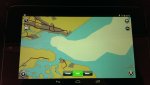
But there is no detail to the map at all.
I must be missing something.
I have checked settings.
Currently I have no depth, obstructions or any buoys at all.

S
 
I have submitted an e mail to their help desk but to illustrate...

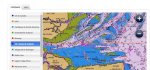
This is what their website shows I should be getting:

View attachment 46621

This is what I am actually getting:

View attachment 46622

Go to Menu, select Map Options, and you can adjust the level of detail displyed. If in doubt select Restore Default Settings. I assume you have actually downloaded the section of the map you need?
 
Hi Salar
thanks for the suggestion. I don't seem to have a "map options" button.
When I go to menu i get a list inc "magazines and Guides, Weather and Tides etc."
There is also a Download Map button.
When clicked it offers a resizable box with a green bar at the bottom titled "download map".
When I click that it "requests" then downloads, but no change in detail appears even when zoomed in.
I can't find a "Restore Default Settings" option either.

Cheers tho.

S
 
I have a Samsung Galaxy Tab2 10.1 and use Navionics App for Uk and Holland - cost £38 from memory almost 2 years ago and it's excellent. You did download the tablet version? The phone version is different and cheaper. Used on trips to Holland, Belgium, West coast of Scotland and all the East Coast. It has gps so not using mobile network.
Persevere and you'll be pleased, sorry I cant help more.
 
Top