Connecting Standard Horizon CP180 to a laptop

SteveSarabande

Well-Known Member
Joined
3 Apr 2012
Messages
1,304
Location
Solent
Visit site
I see from the manual it's possible to feed the NMEA output to a serial port, but my netbook only has USB. Is there a way to wire it up to USB without buying a serial/usb convertor?

Anyone had any success in using this connection to send routes/waypoints form OpenCPN to the CP180?
 
I have two of these plotters, although one only works as a slave now but have never come across a situation where I need to do this link. No wish to stifle enthusiastic experimentation but I would be interested in knowing what your intentions are. Pre-plotting routes maybe?Always found that, once I get to the boat I need to modify them anyway.
 
I have two of these plotters, although one only works as a slave now but have never come across a situation where I need to do this link. No wish to stifle enthusiastic experimentation but I would be interested in knowing what your intentions are. Pre-plotting routes maybe?Always found that, once I get to the boat I need to modify them anyway.
Pre-Plotting routes in comfort at home, then sending them to the CP180 when I get to the boat. Far easier on a laptop than the small screen of the cp180.

I see maplins do usb convertors for £19.99 so maybe that is an easier way to go
 
Last edited:
I have two of these plotters, although one only works as a slave now but have never come across a situation where I need to do this link. No wish to stifle enthusiastic experimentation but I would be interested in knowing what your intentions are. Pre-plotting routes maybe?Always found that, once I get to the boat I need to modify them anyway.

Wouldn't you do this to upload/download waypoints?

I have a chartplotter on my lappie, bigger screen than the GPS..I'd use the GPS to feed the position to the lappie.

To the OP,
You do need a USB/serial converter, but be picky about which one you get.
Some have an awkward box you connect the serial/usb cables into and it might even have a power supply.
More practical ones are integrated into a single cable with serial one end, usb the other. Electronics are hidden in one of the plugs.
If I find a link I'll post it here.
 
Pre-Plotting routes in comfort at home, then sending them to the CP180 when I get to the boat. Far easier on a laptop than the small screen of the cp180.

I see maplins do usb convertors for £19.99 so maybe that is an easier way to go

Much cheaper and 2 in stock at Cardiff :)

Important to note, these work with Windows 8 as well. Many older models don't because support was dropped by prolific who make the chip inside.
 
As others have said - you will need the USB <-> Serial adapter cable.

If you can find one that is not based on the Prolific chipset then it should be more reliable in terms of connectivity... but you'll probably pay more for it! (about £20)

Even better are ones that will always appear on the same COM port wherever and whenever you plug it in. (for about £25)

Any cheap cable (under £5 on eBay) will probably work though.

(If you are not aware of the COM port meaning... it is how the USB connection will appear in your Control Panel -> Device Manager -> Ports (COM & LPT) menu in Windows. You will have to set up your application to the relevant COM port that you find comes up when you connect the cable).
 
As others have said - you will need the USB <-> Serial adapter cable.

If you can find one that is not based on the Prolific chipset then it should be more reliable in terms of connectivity... but you'll probably pay more for it! (about £20)

Even better are ones that will always appear on the same COM port wherever and whenever you plug it in. (for about £25)

Any cheap cable (under £5 on eBay) will probably work though.

(If you are not aware of the COM port meaning... it is how the USB connection will appear in your Control Panel -> Device Manager -> Ports (COM & LPT) menu in Windows. You will have to set up your application to the relevant COM port that you find comes up when you connect the cable).
I've never had a problem with the prolific ones and reliability. The only issue I have had was my 10 year old one is not supported any more. The new (also prolific) ones work perfectly well, and I use them most days at work. I'll be honest I didn't know anyone else was still making chips for these!
 
Hi-

You will need some dedication and possibly a soldering iron (three wires)

My serial/usb converter was 99p off Ebay, works fine (if a little noisy RF wise) the link below looks like mine, not positive.

http://www.ebay.co.uk/itm/USB-2-0-t...ting_Parallel_Serial_PS_2&hash=item19d5ef333e

It worked straight off as a receiver, allowing the laptop to receive a position from the Garmin 128.

Took more head scratching to send routes/ wpts from Memory Map to the Garmin but works now.

http://www.ybw.com/forums/showthread.php?t=335604

I can now save power by turning off the laptop and still have a route at Nav station and cock[pit repeater without needing to punch in 100's of digits.

Good luck
 
If you go the route of getting the full USB <-> Serial cable then for the serial part to bare wires, I am sure that someone here could give you an old Cisco console cable!
 
Note to Stevev2

If you want to also be able to see AIS on your OpenCPN you will probably find it is transmitted on a separate NMEA bus at 38400 baud and will need a second USB to Serial input.

If this is the case then to save on laptop USB ports look for a twin Serial to USB cable and configure OpenCPN to share the input.
 
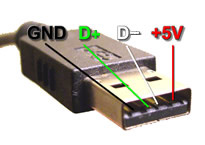
Make up a usb connector

USB-pinout.jpg
see here
 
I see from the manual it's possible to feed the NMEA output to a serial port, but my netbook only has USB. Is there a way to wire it up to USB without buying a serial/usb convertor?

You want an RS422 (not RS232) to USB adaptor, they're available from eBay for a tenner in the UK or a fiver from HK/China (if you can stand a long wait).
Anyone had any success in using this connection to send routes/waypoints form OpenCPN to the CP180?

Nope, never used a CP180 but I've bought an RS422 adaptor to use with my e7 though I haven't wired it up yet.

Boo2
 
You want an RS422 (not RS232) to USB adaptor, they're available from eBay for a tenner in the UK or a fiver from HK/China (if you can stand a long wait).


Nope, never used a CP180 but I've bought an RS422 adaptor to use with my e7 though I haven't wired it up yet.

Boo2

It doesn't matter for this application which you go for. Most will be labelled RS232 because it's recognisable so just go with whatever is available and cheap.

*Unless you actually sail a large ship, then it might matter
 
Top