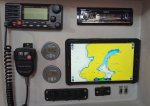
Cheap android tablet

DoubleEnder

Well-Known Member
Joined
27 Apr 2002
Messages
1,554
Location
N Hemisphere
Visit site
My old SH cockpit plotter died.

I’ve in fact really been using iPad/Navionics, together with paper charts, much more than the small plotter. So I’m going to promote the iPad (which has a good waterproof case) to cockpit duty with a semi permanent installation. I know it isn’t great in sunlight but can live with that.

As backup I thought I’d get a low cost android tablet eg https://www.amazon.co.uk/dp/B07C8FX9CS/ref=psdc_429892031_t1_B00M0FLG9M
Anyone got a favourite cheap Android tablet? It will live below deck so doesn’t need to be hardened I think
 
I know you mention Android but as a tip for others - don't get a s/h MS Surface tablet as I did; it needs a special power lead with 230volts or an inverter, so is useless on a 12v socket...:rolleyes:
 
I took the view that it would probably get smashed and that buying an expensive one could be regretted. I also weighed up 8" vs 10" and decided that if it fitted a jacket pocket it would be more likely to survive. I was right, but it was just the screen (£8 and half an hour).

Acer Iconia B1-850. It doesn't have the latest Android, but runs everything I've asked it to (inc Navionics). No compass in them, same as most of the cheapies, but that doesn't matter to me. Screen is as bad as all the others in sunlight, ziplock freezer bag works fine, except with wet fingers when a bit of patience is required. £58.

https://www.ebay.co.uk/itm/ACER-Ico...=STRK:MEBIDX:IT&_trksid=p2057872.m2749.l46252
 
If you are running Navionics on an iPad, be aware, that if you want to run it on Android you will need a second purchase through the Google App Store. AFAIK, the same subscription will not work across different OS platforms.

I use a Lenovo Tab 8 and have been pretty happy with it, though it’s a bit slower than an ipad
 
Last edited:
Look at the Ulefone Armor range, they are water proof, rugged, big battery and some of them have QI charging which means you don't need to open the waterproof cover to charge them. I have one and velcro it to a QI charging pad outside as a replacement for expensive instruments (data over wi-fi). Screen is not full tablet size but it's the biggest you can get with waterproof and QI. I've had it a few months and the waterproofing and build quality seems good.
doogee and blackview have similar products but I have not tried them. Amazon sell all of them.
 
We havegot a wifi only ALBA and an unlocked Padgene, this latter recently to replace SWMBO's Samsung that didn't bounce. Both stream and can b control main set plotter, with navionics, plus radar etc by wifi from the flybridge mounted Raymarine main set. very pleased with the padgene so far, may even get a sim for it, battery lasts ages and screen good in sunlight although it is set up on a bracker below decks at the downstairs helm

https://www.amazon.co.uk/gp/product/B07WRBWHLY/ref=ppx_yo_dt_b_asin_title_o02_s00?ie=UTF8&psc=1
 
Last edited:
You can't share the Navionics subscription from iOS store to Play store... maybe a refurbished iPad is better for you? However I have a Galaxy tab A but I run Aqua Map as software and I pay it only in one store.
 
The neocore E1 looks to fit the bill, my only reservation is that having a glass screen might make it a bit more vulnerable to knocks that you might get on a boat.
I would certainly consider one for home use.

I have a Neocore at the chart table. The first one failed after a few months. It took a while but they did replace it under warranty (with a refurbished, not new) one. The second one has been fine for a couple of years and performs well with openCPN. If you are worried about knocks I'd go for a ulefone and put up with the smaller screen. The neocore stays fixed at our chart table, not suitable to take outside.
 
Last edited:
ChartTable.JPG

I did exactly what you suggest with a 10' Samsung Galaxy Tab A (See pic)

I also bought a spare hard case (€12), cut the flap which protects the screen off and screwed the plastic back over the hole where the old plotter lived using countersunk screws. It snaps in and out relatively easily so I can take it home or to the pub but underway it is held firmly in place in the case.

I also have a Spotify account and it is paired with the stereo above it so it can stream music over BT to the stereo - remove it, snap it into another case and you can watch Netflix/Amazon Prime on the saloon table - I intend to fit an LCD TV to the bulkhead at some point and stream to that instead.

It charges from the USB sockets below it in the pic.
 
Is the Navonics app accurate with just the GPS running or do you need a WIFI/3g connection as well?

I would say it is better to set the tablet positioning to GPS Only. If you use WiFi / 3g then the possibility exists that the tablet will use ONLY WiFi to locate you. Obviously WiFi names can change and location of equipment can move - which when entering a harbour could result in a false position. If you use GPS only then you at least know how good your fix is and can act accordingly.
 
I have been using one of these dual boot hybrid mini pc/tablet things for a number of years.
http://vi.raptor.ebaydesc.com/ws/eB...522&category=171485&pm=1&ds=0&t=1572347627595
This gives you the option of using either Navionics or Open CPN. I have tended to default to OPEN CPN for more serious stuff as the AIS screen presentation is far better than the mickey mouse offering that Navionics have introduced. IMHO their current AIS display is pretty meaningless for even basic collision avoidance. Navionics should as a minimum introduce a basic radar display for it to be of any use.

https://www.ebay.co.uk/itm/PiPo-X12...421671?hash=item3d721bade7:g:FAcAAOSwXOBbiAxe

This version even has an RS232 port so you could hard wire wire direct from any AIS transponder/ GPS or NMEA network.
 
Last edited:
Top