
Autohelm Tridata ST50 - dealer calibration lock

Tim Good

Well-Known Member
Joined
26 Feb 2010
Messages
2,888
Location
Bristol
Visit site
I have a set of ST50 autohelm units. The master unit is a Tridata and takes the depth and log data cables.

I can't calibrate either so I emailed Raymarine and they said "It seems that calibration is locked off and you need to get into the deep level of dealer calibration and turn the CAL lock off".

They haven't been able to tell me how to unlock it and get back to normal user status. Non of my manuals give "dealer calibration" instructions.

Attached is an image of the three screens I get when I enter calibration by pressing Depth & Speed together for 2 seconds.
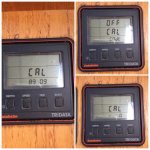
IMG_9127.jpg
 
Try holding Depth & Speed down for at least 12 seconds - on the ST60 this gets you into the Dealer menu. The ST50 may well work in the same way. Have a look at ST60 manuals for info.
 
Holding it for 10 seconds brings a screen that just says "Cal" but it won't go anywhere from there. Any button or combination of buttons from there just reverts back to the normal screen.
 
Not sure if this helps but found it with google

http://www.devill.net/Documentation/Autohelm/ST50_plus_Tridata_Repeater.pdf

page 35 seems to be what to look at AND SUGGESTS press speed and depth for 14 seconds to get CAL up then press trip and reset together momentarily then cycle through menus pressing depth

Extended Calibration Notes
All of the extended calibration screens are adjusted usingtJ-reTRlP and/or RESET keys.
Calibration
Calibration allows you to protect your selected settings against accidental change. When lock is enabled the initial and intermediate calibration settings cannot be mod&d.
Cl = Calibration unlocked, i.e. normal access CO = Calibration locked, i.e. no access
Once locked, calibration can be unlocked by entering extended calibration and selecting calibration unlocked.
 
Not sure if this helps but found it with google

http://www.devill.net/Documentation/Autohelm/ST50_plus_Tridata_Repeater.pdf

page 35 seems to be what to look at AND SUGGESTS press speed and depth for 14 seconds to get CAL up then press trip and reset together momentarily then cycle through menus pressing depth

Extended Calibration Notes
All of the extended calibration screens are adjusted usingtJ-reTRlP and/or RESET keys.
Calibration
Calibration allows you to protect your selected settings against accidental change. When lock is enabled the initial and intermediate calibration settings cannot be mod&d.
Cl = Calibration unlocked, i.e. normal access CO = Calibration locked, i.e. no access
Once locked, calibration can be unlocked by entering extended calibration and selecting calibration unlocked.

Amazing !!!! You did it!!!! And did more that Raymarine could do! Well done!
 
Sounds like the same routine I suggested...

Not quite - you didn't mention pressing Trip and Reset briefly after the long press of Depth and Speed.

Not sure why it's been such a puzzle for everyone though, particularly Raymarine - it's clearly laid out on page 34 of the manual.

Pete
 
Not quite - you didn't mention pressing Trip and Reset briefly after the long press of Depth and Speed.

No, I couldn't be bothered to type it all out, which is why I referred the OP to the manuals. If he'd have bothered to look, he'd have found the info.
 
More generally the Raymarine manuals, like many others, are very difficult to follow first because they include guff you are never going to want to know - setting it up for demonstration use at a boatshow for example - and second because they jump about between more than one product. Now that most manuals are on line it would not take the brains of an archbishop to produce a seperate file for each product.
 
No, I couldn't be bothered to type it all out, which is why I referred the OP to the manuals. If he'd have bothered to look, he'd have found the info.

That's BS Pvb. Nothing in any of the ST50 manuals have that in it. Clearly the Raymarine guy didn't find it so easy to fix either as he's been trying to find a solution for a week now.
 
That's BS Pvb. Nothing in any of the ST50 manuals have that in it.

Wasn't the post you thanked a link to the ST50 manual? How can you then say the info isn't there?

There seems to be a reluctance for many posters to even look at manuals; it's easier for them to post a question here and wait for someone else to bother to look at the manual and tell them what to do. We see that all the time with NMEA wiring queries.
 
There seems to be a reluctance for many posters to even look at manuals; it's easier for them to post a question here and wait for someone else to bother to look at the manual and tell them what to do. We see that all the time with NMEA wiring queries.

Well there is a degree of that for sure... but that testament to how good the knowledge is on here and how quick people respond. You for one, often respond helping others incredibly quickly and have helped me on a number of occaisionas. Anyhow I swear down, there is no mention of that solution in my Tridata manual.
 
Top