
Any Lowrance plotter experts about?

Steve_N

Well-Known Member
Joined
31 May 2004
Messages
1,104
Location
Fife
Visit site
My recent purchase has an old Lowrance Elite-5 sonar/plotter installed.
Although I'm not really intending to use the plotter function I would nevertheless like to understand what charts I should expect to find on it.
I fired it up (inland in storage) and having acquired position all I could seem to display was a base map kind of chart.
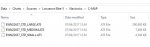
The SD card in it is labelled 'UK and Ireland' and the files in the C-MAP directory are as in the attached screenshot.
Can anyone identify what these files represent i.e should detailed charts be present, please?
Thanks.Capture.JPG
 
Last edited:
My B&G Vulcan has a "chart source" menu option which has to be enabled when you put in a new SDcard. B&G are the same group as Lowrance and Simrad, but I can't find a similar option in the PDF manual for the Elite-5.

I would think those clearly are the map files, considering the .AT5 file extension (I googled it) and their size. 300MB would allow a reasonable level of detail to be stored, considering the plotter was released at least 10 years ago.

Best guess is that the memory card is corrupted or the plotter can't read it. Inspect electrical contacts for corrosion.


(Not sure why Navionics is mentioned in the title? Mods plz edit.)
 
Actually I think your last comment re Navionics may have hit the nail on the head. When I go into the 'Chart data' menu there is the option to select either 'Lowrance' or 'Navionics' and Navionics was already selected hence why I assumed they were Navionics charts (this is all new to me, I'm a VisitMyHarbour chart user). I'll retry with Lowrance selected and perhaps that will be the answer.
 
Navionics and C-Map are competitors, both suppliers of charts. C-Map is owned by Lowrance, so you have probably hit the nail on the head.
 
And if you search the internet for the file name arranged as below, you will find how it was sold and the area covered...

c-map ew-n226

I think it's now sold as ew-m226
 
And if you search the internet for the file name arranged as below, you will find how it was sold and the area covered...

c-map ew-n226

I think it's now sold as ew-m226

Excellent, thanks. I had searched on 'EWN22637' as per the filename without success.
 
Not an expert but I agree with steve N.

I distinctly remember having to go into the menus to select the chart source. When I put my new navionics card in and still got the inbuilt base map I thought I had been ripped off by the seller.
I went away read the instruction book, twice its not an easy menu structure, then found out how.

From memory press the main menu button, then select navigation , then look in the sub menu for the option, its there somewhere.

Good luck. Clive
 
I have the lowrance chart plotter sonar, and its very easy to use and works well. Initially it will start on a standard map, which is quite basic when you zoom in. When you use the plotter, in the settings there is an option to choose the map sourse and you obviusly chose the c-map version on the chip. Once set up every time you start up it will look for the c-ma and use it.
I find it excellent, fully zoomed in my gives individual marina fingers and berths, and after a few minutes literally plots mine in its berth. Mine was new late last season so i have just been playing so far, and not used it for serious navigation, but i am sure it will be a useful tool in the box.
 
Yes I think it'll be a useful bit of kit. I use VHM charts plus Antares charts on a tablet + old phone which works faultlessly, but it will be nice to have a fixed installation too.
Currently working on converting the Antares KMZs to AT5 format which will be really useful, if it works.

The sonar transducer installation is a bit Heath Robinson - about 1.5m behind the keel's trailing edge, glassed to the outside of the hull with the cable going up a cockpit drain. I'll have to see if that can be improved upon.
 
Top